• Skip to primary navigation
  • Skip to main content
  • Skip to primary sidebar

TweakHound

Computer stuff...

  • Home
  • Windows XP
  • Windows Vista
  • Windows 7
  • Windows 8
  • Windows 10
  • Windows 11
  • Linux
  • Tweak Guides
  • Site Info
    • About
    • About Me
    • TweakHound’s World
    • Contact
    • My Computers
    • Old Articles
    • Privacy Policy
    • Old Index
    • Advanced Search

SanDisk Clip Sport “Review”

speaker

September 27, 2016, 15:48(EDT) By Eric (a.k.a. TweakHound)

I only use a standalone MP3 player for working out. I’ve had an iPod Nano for some time. Nothing particularly wrong with except it is Apple and if you know me, well…
One minor annoyance is I have to keep the Nano in my pocket as the clip just doesn’t seem to do well, especially on thick edges of clothing (sweatpants and shorts). Don’t get me wrong. As much as I hate to admit it this Nano has been good to me. Especially when you factor in I got it for free. I think this was Apples best MP3 player.
I have a 6th generation iPod Nano. It was a freebie replacement for a long dead 1st generation Nano that was recalled.
So I’m midway through a hard back workout, arms shaking, trying to dig the Nano out of my pocket. That’s when I decided to look for something else.
After due consideration I decided on a SanDisk Clip Sport 8GB. I paid $37 for it on sale last week.
As a reference. The 6th gen Nano can still be had with prices ranging from $22 to a whopping $180, all used or refurb.

First issue, right off the bat.
The SanDeisk Sport has expandable storage via a micro SD card. That being the case I figured I would throw some flac files on it since space was no longer a concern. The files stuttered during playback. SanDisk forums says use a slower card (class 4 or less) or different file format. I’m already using a class 2 sd card so that ain’t it. Guess I’m not using flac either. I’m using headphones, in a gym, so not like it is a big deal but still. So with just MP3’s on internal storage I soldier on.

FYI
– My headphones are the Yurbuds Focus 400.
– I use MediaMonkey to manage both.

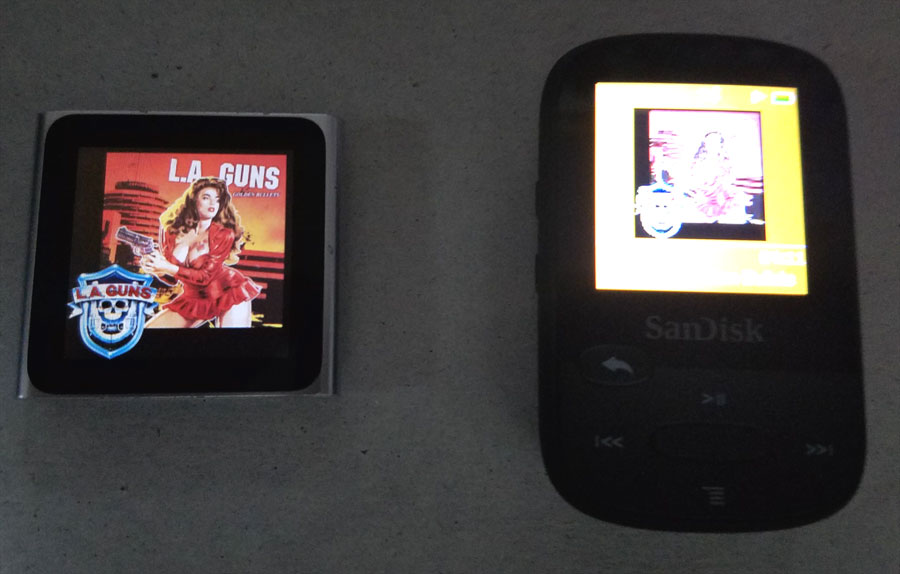
Alright, pictures are below. I’m just gonna do a little list here.
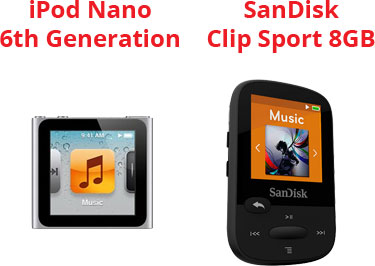
Sound quality – Very slight edge to the Nano.
Screen quality – The Nano has excellent screen quality. The SanDisk has absolutely HORRIBLE screen quality.
Expandable storage – Only the SanDisk has it via micro SD card.
Touch screen – Only the Nano has it.
Feel – Nano is metal and sturdy. SanDisk is plastic and feels cheap.
Other features – The Nano has a fitness app and radio. The SanDisk has a radio.
Audio formats:
SanDisk – MP3, WMA (NO DRM), AAC, Ogg Vorbis, WAV, FLAC, and Audible (DRM only)
Nano – AAC, MP3, Audible, Apple Lossless, AIFF, and WAV.

My Opinion
The clip on the SanDisk is better than the Nano’s but I don’t think much of the SanDisk Clip Sport. If I could find the fracking box it came in and receipt I would return it.
Pic from my phone:
sansport_nano_1
Retail pics because my pics suck:
sansport_nano_2

Tagged With: Computer Hardware, This Site

Reader Interactions

Comments

  1. matt says

    September 29, 2016, 11:04(EDT) at 11:04

    Sorry to hear that you are having trouble with your SanDisk. I bought my daughter a Clip this summer, and it definitely does not seem to have the same build quality of my 5 or 7 year old model which has no problems with the external storage (I do not remember if it is capable of playing FLAC files or not. Everything I listen to is MP3).

    Maybe somebody someday will build a decent player again. Until then, fingers crossed, mine will keep soldiering on.

Primary Sidebar

Popular Articles

Windows 10

Tweaking Windows 10

My Windows 10 Tweaks

Windows 10 Privacy Settings

Win10 Diagnostics Tracking Service Gone?

Windows 10 Advanced Disk Cleanup

Win10 Customize Installation Options

Windows 10 Dark Theme

Win10 Wallpapers, Graphics, etc.

All Windows 10 Articles

Windows 8

Tweaking Windows 8.1

Advice On Installing Windows 8.1

Clean Install Windows 8.1

Cleanup After Windows 8.1 Upgrade

Create Shutdown, Restart, Logoff Tiles For Windows 8

Tweaking Windows 8

Install Windows 8 – Clean Install With Upgrade Media

Install Windows 8 – Upgrade

Windows 8 – Cleaning Up After You’ve Upgraded

Windows 8 Freeware Machine

Windows 8 SSD Settings, Etc.

How To Resize Your Windows 8 Partition

Create Windows 8 Recovery Media

Windows 8 – Elevated Command Prompt

How To Fix The Windows Bootloader

Windows 7

Installing Windows 7

Tweaking Windows 7

Windows 7 Diagnostics Tracking Service

The Windows 7 Freeware Machine

The Windows 7 Pagefile And Running Without One

Bad Tweaks

SSD Tweak Guide (sort of)

The noguiboot (no GUI Boot) Tweak

NtfsMemoryUsage=2 Tweak

More Windows 7 articles here.

Windows Vista

Installing Windows Vista

Tweaking Windows Vista

More Windows Vista articles here.

Windows XP

eXPired - The Last Windows XP Guide You'll Ever Need

The Right Way To Install Windows XP

Super XP Tweaking Guide

The Freeware XP Machine

Bad Tweaks

More XP Articles here and here.

Backup

Backup Article Greatest Hits – Vol. 1

Other

Cataloging Your Music Collection

Finding Good Album Art

Converting Vinyl Records To Digital Music – A Non-Audiophiles Guide

Windows All-In-One Recovery Flash Drive

SSD Tweak Guide (sort of)

Raidmax Blackstorm Case Review

Disk Partitioning

Ditch Those CD's! A Guide To Using USB Flash Drives

Checking Your Disks For Problems

Bad Tweaks

More articles here

Tags

Android Backup Beer Computer Hardware Computer News Cool Tools Freeware How-To's Linux Off Topic openSUSE Playlists Privacy Security Software This Site vacation Veterans Windows 7 Windows 8 Windows 10 Windows 11 Windows Vista Windows XP

TweakHound - Optimize Your Computing Experience! TweakHound - Optimize Your Computing Experience!

Copyright 2002-2025 by Eric Vaughan All material contain here is the property of the materials owner. Windows, Windows XP, Windows Vista, Windows Seven, Windows 8, Windows 10, Windows 11, Microsoft, and all associated logos are trademarks/property of Microsoft. You may not use or copy any material from tweakhound.com without expressed written permission. Hotlinking to any material within this site is forbidden. Privacy Policy