
• Skip to primary navigation
  • Skip to main content
  • Skip to primary sidebar

TweakHound

Computer stuff...

  • Home
  • Windows XP
  • Windows Vista
  • Windows 7
  • Windows 8
  • Windows 10
  • Windows 11
  • Linux
  • Tweak Guides
  • Site Info
    • About
    • About Me
    • TweakHound’s World
    • Contact
    • My Computers
    • Old Articles
    • Privacy Policy
    • Old Index
    • Advanced Search

I Need A New PC Case

th

May 8, 2017, 16:11(EDT) By Eric (a.k.a. TweakHound)

I’ve finally had it with my Rosewill Blackhawk-Ultra case (my Amazon review). Looking for a new one. Suggestions/input wanted.
Kinda have green in mind, don’t know why.
Full or mid-tower. Absolute ceiling of $200 but would prefer cheaper.
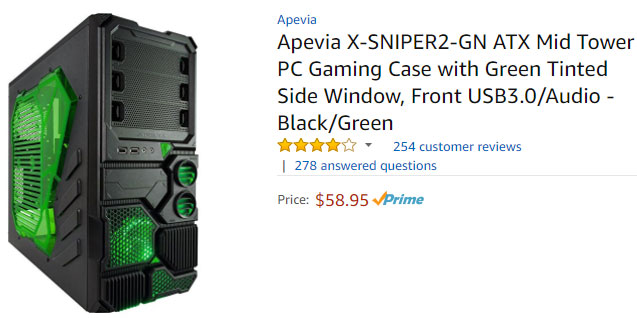
Saw this on Amazon. Not the cats’s meow or anything but it might work:
Apevia X-SNIPER2-GN ATX Mid Tower
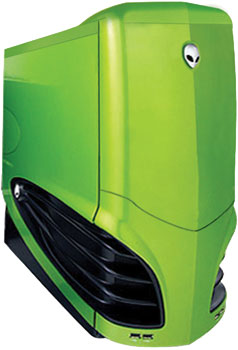
Might even consider going retro. Always liked they look of the old Alienware cases but they are commanding high prices on Craigslist.
Tagged With: Computer Hardware

Reader Interactions

Comments

  1. Kelly says

    May 8, 2017, 16:42(EDT) at 16:42

    I think you might factor in how it’s going to be cooled. Mainly kind of cpu cooler in height. Also consider the length of a video card. and how many actual fans and 5 1/4 inch bays you need.

    • Kelly says

      May 8, 2017, 17:06(EDT) at 17:06

      Just a quick check I’d consider this case. Phanteks makes some really good cases. My next build will be with a Phanteks case. Just swap the fans to green led ones.

      https://www.amazon.com/Phanteks-Enthoo-Chassis-Window-PH-ES614P_BK/dp/B00K6S1B3Q?tag=consumerguidehub-20&th=1

      • Eric (a.k.a. TweakHound) says

        May 8, 2017, 17:15(EDT) at 17:15

        That has possibilities.

        • Kelly says

          May 10, 2017, 15:23(EDT) at 15:23

          Then if you don’t have a liquid cooler Corsair makes some pretty decent liquid all in ones. Which would work perfectly in the case mentioned

          • Eric (a.k.a. TweakHound) says

            May 10, 2017, 16:03(EDT) at 16:03

            Sorry for the confusion. I have Corsair H60 Cooler. Since I’m not overclocking hard and I have the liquid cooler I don’t feel the need for a 1/2 dozen fans. Just a couple will do.

    • Eric (a.k.a. TweakHound) says

      May 8, 2017, 17:16(EDT) at 17:16

      Dont need radical. Only mild overclcking on a liquid cooler.

      • swarfega says

        May 8, 2017, 20:07(EDT) at 20:07

        I have the Phanteks Enthoo Evolv Glass edition case, Its under $200 and its a really premium looking case in your budget range.

        Ift has a radiator tray that slides out making installation really easy. It comes in silver, gun metal or black.

        https://www.amazon.com/Phanteks-Enthoo-Evolv-Computer-Case/dp/B01F0KWL6A/ref=sr_1_1?s=electronics&ie=UTF8&qid=1494288387&sr=1-1&keywords=Phanteks+ENTHOO+EVOLV+ATX+GLASS

        • TinkerToyTech says

          May 9, 2017, 10:00(EDT) at 10:00

          Last couple years I’ve built itx machine into a Corsair 250d complete with the video card and h100i radiator. my little NAS / server went into a Fractal Designs Node804 running unraid with 12 drives, Workstation went into a Fractal Designs Refine R5.

          @TinkerToyTech

        • BYRON D. says

          May 9, 2017, 12:20(EDT) at 12:20

          GET A THERMALTAKE CORE X9…AL THE CASE YOU WILL EVER NEED!!

  2. Chris says

    May 11, 2017, 04:41(EDT) at 04:41

    Obviously cases are subjective, but i think the Thermaltake Core P5 would be a good fit for what you’ve described so far. Also, it being fully modular is a nice bonus

    https://www.amazon.com/Thermaltake-Liquid-Cooling-Computer-CA-1E7-00M8WN-00/dp/B01BMJ1K24/ref=sr_1_4?s=pc&ie=UTF8&qid=1494490584&sr=1-4&refinements=p_n_feature_keywords_two_browse-bin%3A5995618011

Primary Sidebar

Popular Articles

Windows 10

Tweaking Windows 10

My Windows 10 Tweaks

Windows 10 Privacy Settings

Win10 Diagnostics Tracking Service Gone?

Windows 10 Advanced Disk Cleanup

Win10 Customize Installation Options

Windows 10 Dark Theme

Win10 Wallpapers, Graphics, etc.

All Windows 10 Articles

Windows 8

Tweaking Windows 8.1

Advice On Installing Windows 8.1

Clean Install Windows 8.1

Cleanup After Windows 8.1 Upgrade

Create Shutdown, Restart, Logoff Tiles For Windows 8

Tweaking Windows 8

Install Windows 8 – Clean Install With Upgrade Media

Install Windows 8 – Upgrade

Windows 8 – Cleaning Up After You’ve Upgraded

Windows 8 Freeware Machine

Windows 8 SSD Settings, Etc.

How To Resize Your Windows 8 Partition

Create Windows 8 Recovery Media

Windows 8 – Elevated Command Prompt

How To Fix The Windows Bootloader

Windows 7

Installing Windows 7

Tweaking Windows 7

Windows 7 Diagnostics Tracking Service

The Windows 7 Freeware Machine

The Windows 7 Pagefile And Running Without One

Bad Tweaks

SSD Tweak Guide (sort of)

The noguiboot (no GUI Boot) Tweak

NtfsMemoryUsage=2 Tweak

More Windows 7 articles here.

Windows Vista

Installing Windows Vista

Tweaking Windows Vista

More Windows Vista articles here.

Windows XP

eXPired - The Last Windows XP Guide You'll Ever Need

The Right Way To Install Windows XP

Super XP Tweaking Guide

The Freeware XP Machine

Bad Tweaks

More XP Articles here and here.

Backup

Backup Article Greatest Hits – Vol. 1

Other

Cataloging Your Music Collection

Finding Good Album Art

Converting Vinyl Records To Digital Music – A Non-Audiophiles Guide

Windows All-In-One Recovery Flash Drive

SSD Tweak Guide (sort of)

Raidmax Blackstorm Case Review

Disk Partitioning

Ditch Those CD's! A Guide To Using USB Flash Drives

Checking Your Disks For Problems

Bad Tweaks

More articles here

Tags

Android Backup Beer Computer Hardware Computer News Cool Tools Freeware How-To's Linux Off Topic openSUSE Playlists Privacy Security Software This Site vacation Veterans Windows 7 Windows 8 Windows 10 Windows 11 Windows Vista Windows XP

TweakHound - Optimize Your Computing Experience! TweakHound - Optimize Your Computing Experience!

Copyright 2002-2025 by Eric Vaughan All material contain here is the property of the materials owner. Windows, Windows XP, Windows Vista, Windows Seven, Windows 8, Windows 10, Windows 11, Microsoft, and all associated logos are trademarks/property of Microsoft. You may not use or copy any material from tweakhound.com without expressed written permission. Hotlinking to any material within this site is forbidden. Privacy Policy