I’m trying a new add-on called uMatrix. It is from the same guy that brought you uBlock Origin.
“uMatrix: A point-and-click matrix-based firewall, with many privacy-enhancing tools.
*For advanced users.*
uMatrix put you in full control of where your browser is allowed to connect, what type of data it is allowed to download, and what it is allowed to execute. Nobody else decides for you: You choose. You are in full control of your privacy.”
As stated above, this is for advanced users. Like Noscript it can make using the web difficult at first until you train it.
If you are using uMatrix, or you try it please let me know what you think.
In the pic below I have disabled my usual extensions of Noscript and uBlock Origin so I can get a true picture of what is going on.
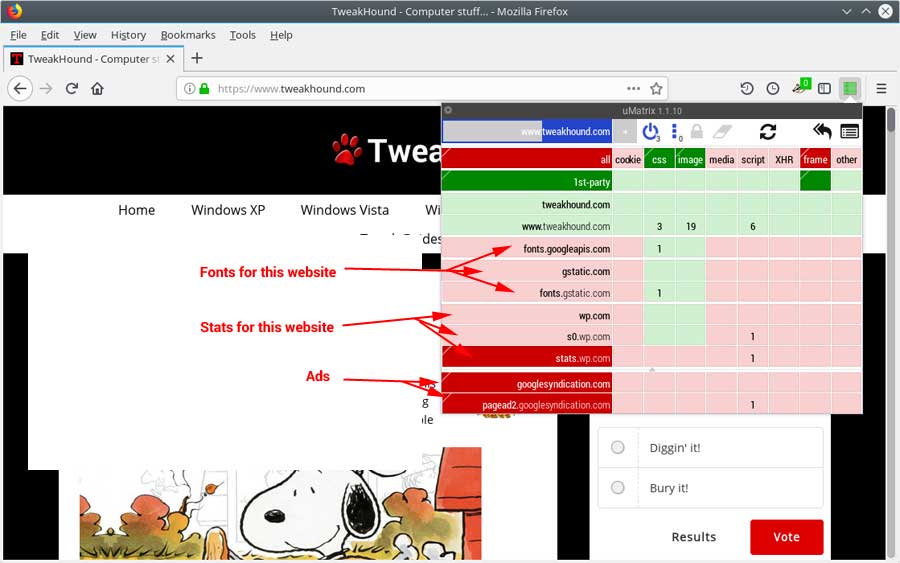
***I’ve said this before and I will say it again.
Do not whitelist 3rd party ad servers on any site, including this one. I know other website operators beg you to whitelist for their site. Ads track you, ads often get caught serving malware. I have Google Ads because I average enough per month to help keep this site going. I hope you are smart enough to never see them. How I finance my site is my problem not yours. You do not need 3rd party connections to have an ad on your site. I reference the Torguard ad in the right sidebar. I created it. Readers see the unintrusive ad and can click on it if they are interested. There is no connection to a 3rd party.

uMatrix Firefox Add-on

Hi,
How does it fit in with uBlock Origin?
Do they work together?
jo
There are folks who run both. IMHO use one or the other. Not both. Too much hassle.
Hi. I downloaded umatrix for Quantum today, hoping that I could get gmail to work better with it than NoScript. My issue, that I haven’t been able to find a solution to yet, is that certain non-default buttons like “reply to all” do not respond to clicks. Also, I cannot access gmail settings, as the gear icon is also non-responsive. I appreciate any insight you may have. rcm
I played a bit with idea of whitelisting some sites and yet blocking tracking via cookies and I ended up using uMatrix+uBlock combo in this way:
1) In uMatrix I disabled all hosts files (so no blocking of ad domains) but in “matrix” mode I made sure that everything but 3rd party cookies is enabled. This way uMatrix works only as a cookie blocker.
2) uBlock works as normal, turning it off for a website doesn’t turn off uMatrix so cookies are still blocked
3) Some websites use several domains to make everything work (mostly logins) so sometimes it’s needed to whitelist 3rd party cookies from specific domain (I think live.microsoft.com is one of the situations where 3rd party cookies are needed).
With this approach there are still some problems – ads can be shown so they can distribute malware, cookies are being downloaded (uMatrix, if I understand correctly, blocks sending cookies to blocked domains so data transfer is one-sided) and because I don’t automatically block scripts on whitelisted websites, canvas fingerprinting should still work, unfortunately.
Now, am I missing something obvious or did I managed to successfully block at least cookie tracking even on whitelisted websites? It’s far from perfect, sure, but in case of some websites I felt I should fairly support them with ad income.
In simple terms, extensions like uMatrix and NoScript “break” the internet when you first install them by blocking almost everything everywhere. You have to unlock a page you use frequently until you find enough functionality. If you’re not an already advanced user and know exactly where to click this can be a very hard and long journey for you. If you care about security and control, you should learn it, but there are easier alternatives out there, although with less possibilities, uBlock in advanced mode for example.
The extension works like it should, but it leaves the rest to you. If you want complete functionality you have to unlock one level at a time until you reach it for every website you use. When you’ve done it one time, it’s done forever, so that’s a big positive, but you do have to do it at least one time, everywhere. You can also set those extensions to unlock a certain level everywhere by default, but if you do this you are somewhat reducing the whole point of installing it from the beginning. uMatrix is about personal control over every single part of a website. I’m sure you can get gmail to work, though, if you use trial and error — step by step. Good luck either way.