• Skip to primary navigation
  • Skip to main content
  • Skip to primary sidebar

TweakHound

Computer stuff...

  • Home
  • Windows XP
  • Windows Vista
  • Windows 7
  • Windows 8
  • Windows 10
  • Windows 11
  • Linux
  • Tweak Guides
  • Site Info
    • About
    • About Me
    • TweakHound’s World
    • Contact
    • My Computers
    • Old Articles
    • Privacy Policy
    • Old Index
    • Advanced Search

Cat6 vs Cat8 cable

thpinpostlogo

September 2, 2019, 14:33(EDT) By Eric (a.k.a. TweakHound)

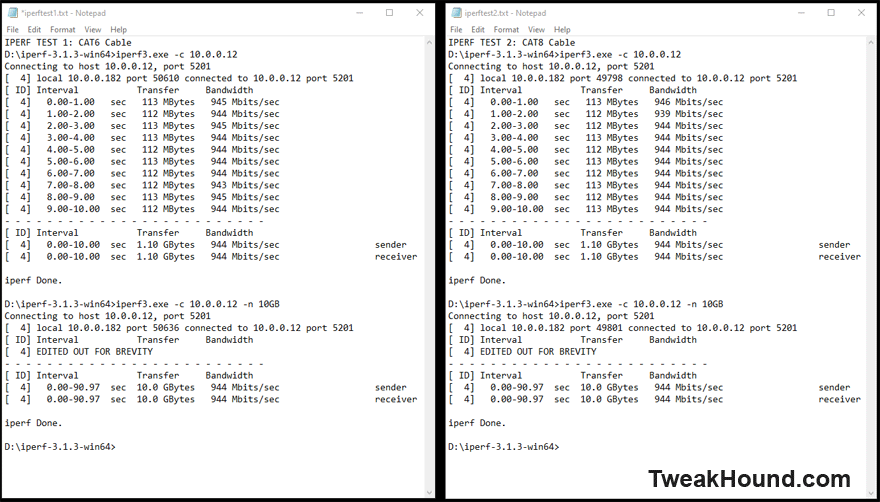
I decided to see if replacing Cat6 ethernet able with Cat8 makes any difference. I had my suspicions, I mean it shouldn’t but anecdotal evidence said “maybe”.
So I ran some quick iPerf tests.

Nope, not a bit of difference.
Tagged With: Computer Hardware, This Site

Reader Interactions

Comments

  1. Steve Vukelich says

    September 2, 2019, 16:35(EDT) at 16:35

    When I had my house built 5 years ago the video company said to install CAT7 instead of CAT6, not because it is faster, but because there is extra shielding which makes higher speed connections more reliable. Since the wires were being buried in the walls it stood to reason to put the better cables in, since replacing them would be cost prohibitive. Additionally, there are lots of electrical wires in the walls and plenty of electrical interference. As future speeds increase that shielding becomes more important.

    • Eric (a.k.a. TweakHound) says

      September 2, 2019, 16:56(EDT) at 16:56

      I don’t disagree.

  2. Allen says

    September 2, 2019, 18:42(EDT) at 18:42

    Wow, that is weird. I would thought that Cat8 would be better. I know it does not make a difference, but I would still stick with Cat8 because it will at least future proof your network for a bit. Again that is up to you. What brand of cable did you go with? I ask because I have cable-masters and its really nice. I do not have fiber internet, I have DSL, but for my network, it made a huge difference. Also could the way your ISP had installed and have there servers set up be a factor also?

    • Eric (a.k.a. TweakHound) says

      September 3, 2019, 07:30(EDT) at 07:30

      ISP has nothing to do with my internal network. Looks like my connection was/is already operating at max as it should be. I understand the “future proof” idea. Indeed many businesses are doing just that.

  3. Allen says

    September 3, 2019, 12:08(EDT) at 12:08

    Ok, my bad on the ISP part. I had a brain fart. Happy that your connection is working at full speed. 🙂

Primary Sidebar

Popular Articles

Windows 10

Tweaking Windows 10

My Windows 10 Tweaks

Windows 10 Privacy Settings

Win10 Diagnostics Tracking Service Gone?

Windows 10 Advanced Disk Cleanup

Win10 Customize Installation Options

Windows 10 Dark Theme

Win10 Wallpapers, Graphics, etc.

All Windows 10 Articles

Windows 8

Tweaking Windows 8.1

Advice On Installing Windows 8.1

Clean Install Windows 8.1

Cleanup After Windows 8.1 Upgrade

Create Shutdown, Restart, Logoff Tiles For Windows 8

Tweaking Windows 8

Install Windows 8 – Clean Install With Upgrade Media

Install Windows 8 – Upgrade

Windows 8 – Cleaning Up After You’ve Upgraded

Windows 8 Freeware Machine

Windows 8 SSD Settings, Etc.

How To Resize Your Windows 8 Partition

Create Windows 8 Recovery Media

Windows 8 – Elevated Command Prompt

How To Fix The Windows Bootloader

Windows 7

Installing Windows 7

Tweaking Windows 7

Windows 7 Diagnostics Tracking Service

The Windows 7 Freeware Machine

The Windows 7 Pagefile And Running Without One

Bad Tweaks

SSD Tweak Guide (sort of)

The noguiboot (no GUI Boot) Tweak

NtfsMemoryUsage=2 Tweak

More Windows 7 articles here.

Windows Vista

Installing Windows Vista

Tweaking Windows Vista

More Windows Vista articles here.

Windows XP

eXPired - The Last Windows XP Guide You'll Ever Need

The Right Way To Install Windows XP

Super XP Tweaking Guide

The Freeware XP Machine

Bad Tweaks

More XP Articles here and here.

Backup

Backup Article Greatest Hits – Vol. 1

Other

Cataloging Your Music Collection

Finding Good Album Art

Converting Vinyl Records To Digital Music – A Non-Audiophiles Guide

Windows All-In-One Recovery Flash Drive

SSD Tweak Guide (sort of)

Raidmax Blackstorm Case Review

Disk Partitioning

Ditch Those CD's! A Guide To Using USB Flash Drives

Checking Your Disks For Problems

Bad Tweaks

More articles here

Tags

Android Backup Beer Computer Hardware Computer News Cool Tools Freeware How-To's Linux Off Topic openSUSE Playlists Privacy Security Software This Site vacation Veterans Windows 7 Windows 8 Windows 10 Windows 11 Windows Vista Windows XP

TweakHound - Optimize Your Computing Experience! TweakHound - Optimize Your Computing Experience!

Copyright 2002-2025 by Eric Vaughan All material contain here is the property of the materials owner. Windows, Windows XP, Windows Vista, Windows Seven, Windows 8, Windows 10, Windows 11, Microsoft, and all associated logos are trademarks/property of Microsoft. You may not use or copy any material from tweakhound.com without expressed written permission. Hotlinking to any material within this site is forbidden. Privacy Policy
