
This morning I read that LastPass will restrict free users to only one type of device starting next month. Since this will leave users scrambling for a replacement, folks are understandably pissed off.
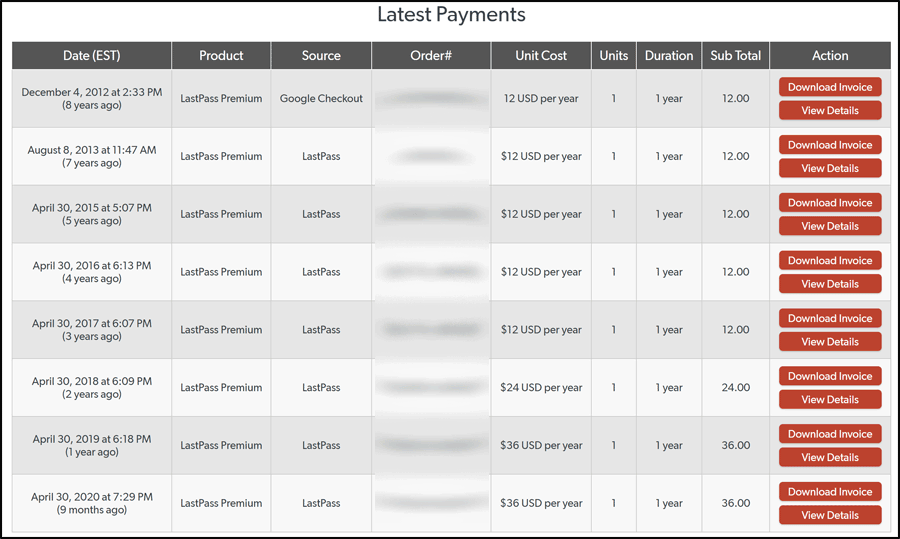
I’ve been paying for LastPass since 2012. My price doubled in April, 2018 from $12 to $24 per year and jumped 50% in 2019 to $36 per year. That makes a price increase of 300% in less than 3 years. So, I’m out and looking for a replacement. I would love some input here. If you use a password manager, what do you use and why? Any other considerations?
My Requirements
– Use across multiple devices
– Windows and Android support (bonus for Linux but not a deal breaker)
– Strong Reputation
– Price is important
Research
I wish I could find a recommendation by an actual cyber security expert but I haven’t yet. If you have, please post it here.
*User Amir came up with a great one. See the video at the bottom of the article. I like the sync on local network feature.
Dude kinda lost me when he whipped out the thermal blanket though. And, he’s a Mac user…
PrivacyTools.io
“PrivacyTools is a socially motivated website that provides information for protecting your data security and privacy. Never trust any company with your privacy, always encrypt.”
“If you are currently using a password manager software like 1Password, LastPass, Roboform, or iCloud Keychain, you should pick an alternative here.”
This site seems to advocate not using servers in the U.S including VPNs.
Bitwarden – Cloud/Self-host
KeePassXC – Local
LessPass – Browser
Wirecutter – The Best Password Managers (Updated February 5, 2021)
Best – 1Password
Free – Bitwarden
Wired – The Best Password Managers to Secure Your Digital Life
Best Overall – 1Password
Best Free Option – Bitwarden
Best DIY Option (Self-Hosted) – KeePassXC
Notes:
– 1password is the same price as Lastpass.
– Many of these programs have an import from another program option.
– Not interested in self-hosting
I’ve used Password Agent (http://www.moonsoftware.com/password_agent) for many years with no problems. Windows only though. Check it if you want.
Need Android
Erid, you said: “I wish I could find a recommendation by an actual cyber security expert but I haven’t yet. If you have, please post it here.”
Here you go:
https://www.youtube.com/watch?v=eu3iP1njMRI
I personally use 1P for Windows and my Andriod phone. Thats all, and I love the developers behind it. Nice UI, and always improving.
You can also buy 1P digital gift cards at https://1password.com/giftcards/ for friends and family and also yourself.
Excellent!
What about Lockwise from Firefox? Free multi platform.
Wiki says, “Firefox Lockwise is a password manager for the Firefox web browser, as well as the mobile operating systems iOS and Android. On desktop, Lockwise is simply part of Firefox, whereas on iOS and Android it is available as a standalone app.”
So no other browser.
Use KeePass. It’s FOSS, built for windows, and it’s code has been audited by third-party security companies and funded by the EU FOSS commission. It just works, supports everything you need (including TOTP out of the box as of the latest update) and is very extensible. It even has a trigger system for running batch files.
I absolutely need an Android app. They say there are “unofficial ports” for Android which IMHO is a security risk.
I use KeePass. It’s free and open source. I run it on Windows, but it also supports Linux. I link it to OneDrive (it also supports other cloud storage platforms), so when I update it on Windows, the cloud-based copy is automatically synced. I haven’t investigated whether I can update a mobile copy and sync back to the cloud. I use iOS for mobile and there are a few apps that work with KeePass (I use KeePassium). There appears to be a few KeePass-compatible apps on the Google Play Store for Android. I know you said you didn’t want to self-host, and I would rather have a pure cloud-based solution, too, but I’m cheap and the KeePass ecosystem works well for me.
I don’t put anything but music and pictures in the cloud. Never any documents or anything private. The link for the 1Password video I just posted has an interesting option.
Your post reminded me of one of my New Year resolutions for when I get time (because when you’re retired and locked in due to COVID, free time is soo fleeting LMAO).
I’ve just started researching Nord Pass, which may be of interest to you as well?
RoboForm for sure…. $24 a year, though I think they have some specials going on right now. RoboForm checks off all of the features you mentioned. Their website lists them all in a clean way.
Also, while they won’t sync, you can install RoboForm free on any device and have unlimited logins. It will periodically tell you that you trial period has ended, but you can just click the X to dismiss and continue using your logins.
I highly recommend it and have been using it for years.
One more comment…. The RoboForm Android app is awesome, especially when you allow the app to autofill in Chrome and other apps.
I love Bitwarden! Highly recommended!!!
I’ve narrowed it down to either Bitwarden or taking my chances with Google Password manager.
There’s also Kee Vault. https://www.kee.pm/ It used to be a plugin that worked with Keepass. Then it turned into a service.
Happy Bitwarden user here for a good few years now
“I don’t put anything but music and pictures in the cloud” Just check Sticky Password Manager. No Cloud-Wi fi Sync options and many more. That’s it.
I have been using LastPass for several years and have never had a problem with it. $36 a year is $3 a month. As often as I use it that seems a small price to pay.
It’s the massive price increases.
Firefox / Lockwise only work on Firefox that’s obvious but since I’m only using Firefox on my Desktop computer and Safari on my IPhone it work flawlessly. The iOS app has only one major downside, you cannot not manually add an entry to the app. It has to be done on desktop counterpart. Not a big deal for me. Free and synchronized on all my PC and mobile devices (iPhone, IPad, android tablet)
I got my email from them yesterday. I used to be a paid customer when it was £6pm but jumped to free when they hiked the price up unreasonably. That and the hacks of previous years started me looking for an alternative. Because of this fresh announcement, I will now go ahead and cease using Lastpass as I suspect droves of people will.
You think in the middle of a pandemic that they would be kinder to us as millions are working from home and need various online tools. They are badly handling this and this is a major misstep on their part.
I am currently leaning towards Bitwarden but will do some further research before switching.