• Skip to primary navigation
  • Skip to main content
  • Skip to primary sidebar

TweakHound

Computer stuff...

  • Home
  • Windows XP
  • Windows Vista
  • Windows 7
  • Windows 8
  • Windows 10
  • Windows 11
  • Linux
  • Tweak Guides
  • Site Info
    • About
    • About Me
    • TweakHound’s World
    • Contact
    • My Computers
    • Old Articles
    • Privacy Policy
    • Old Index
    • Advanced Search

Installing or Upgrading to Windows 11

October 13, 2025, 16:45(EDT) By Eric (a.k.a. TweakHound) 5 Comments

Many folks have repeatedly asked for a Windows 11 Tweak Guide. I’m not promising that will happen but toward that end I’ve been experimenting with installing and/or upgrading Windows 11 on my main PC.
Since it’s release I’ve done an upgrade with almost every version on Win11.
This go round with version 25H2 I did:
– Update via Windows update
– Update online via setup.exe from an extracted ISO.
– Update offline via setup.exe from an extracted ISO.
– Clean install booting from a USB drive via ISO.
My goal in all this was to use a local account. I do not want a Microsoft account on my PC.

Update via Windows update
Went flawlessly but I couldn’t find a way to bypass using a Microsoft account.

Update online via setup.exe from an extracted ISO.
Setup hung at getting updates. A quick Google search revealed the solution: https://www.google.com/search?q=windows+11+setup+update+stuck+at+46

Update offline via setup.exe from an extracted ISO.
With the above attempt repeatedly failing I unplugged the ethernet cable and the skipped the option to install updates.
This worked perfectly and my existing local account was maintained.
This is the option I was to end up keeping.

Clean install booting from a USB drive via ISO.
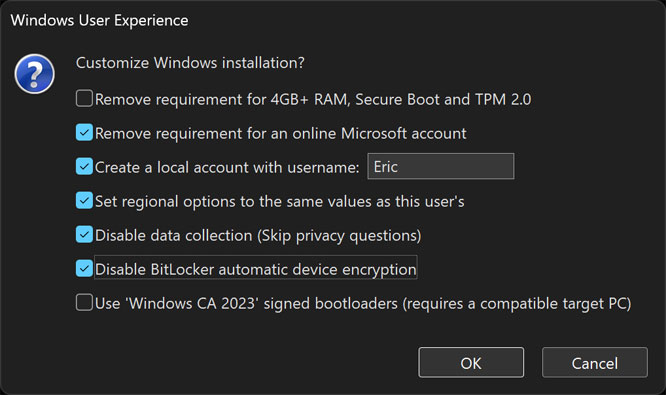
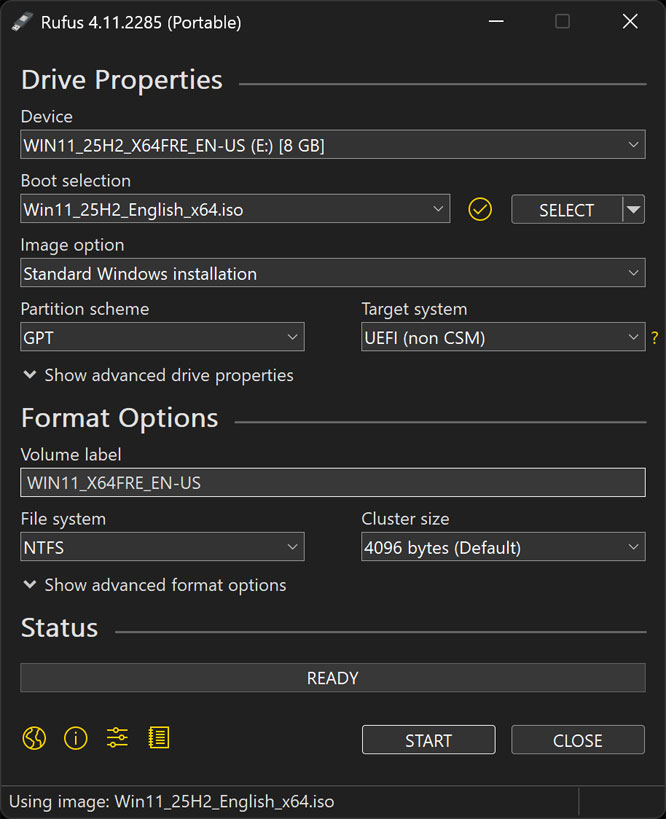
I made a Win11 install USB drive using Rufus. Rufus has the option of creating an install that allows using a local account. SEE BELOW
Next I wiped the OS drive via a Win10 boot disk (diskpart).
From there the install went flawlessly.
Now I was faced with the task of reinstalling everything. Since the upgrade above had worked flawlessly I quickly noped out of that.

So here I continue on, experimenting with tweaks…

The Rufus Win11 Install Thumb Drive
Download Win11
Download Rufus (portable)
Tagged With: This Site, Windows 11

Reader Interactions

Comments

  1. Mark says

    October 14, 2025, 06:43(EDT) at 06:43

    For old PC that don’t meet W11 requirements first option in Rufus must be selected too. That works also for current PC because it just bypass the Windows instruction looking for that hardware during the install.

    Reply
  2. David Maldonado says

    October 14, 2025, 07:17(EDT) at 07:17

    Thank you for experimenting with Windows 11. If you do end up publishing a new guide I look forward to helping support your work. Long time reader 🙂

    Reply
  3. Tim says

    October 14, 2025, 20:50(EDT) at 20:50

    R.I.P. Win10. Hey Eric been working with Win11 for awhile now. Reluctantly created a Microsoft account as it got
    so hard to bypass in the newer versions. Yes Rufus is the ‘go to’ for installing 11 on unsupported hardware. TPM2.0
    is an issue on older PC’s so do agree with Mark about checking that 1st box on Rufus.
    Thanks for getting a start with Win11……

    Reply
  4. Kyle says

    October 15, 2025, 17:39(EDT) at 17:39

    Hope you write that guide!

    Reply
    • Mandar says

      October 31, 2025, 05:08(EDT) at 05:08

      Yes Eric, surely hope you find time to do the guide for Win 11.

      Reply

Comment Policy:
-You do not need an account or login to anything to comment.
-Comments are not posted until moderated and are filtered using Akismet among other things.
-NO POLITICS (unless post is political in nature.)
-Comments are closed after a time to cut down on spam.
-In addition the following comments will be deleted: trolling, posted in the wrong topic, bashing other people, profanity, links to adult or other questionable sites.
-Once you click submit your IP address is recorded (it is NOT posted...unless, perhaps, you violate the rules). FYI - All sites do this, I just tell you about it.
-The comment section is not a way to contact me. See here for that.
-In the end it is my site and not a public forum. I will decide what I do and do not want posted here.

Leave a Reply Cancel reply

Your email address will not be published. Required fields are marked *

This site uses Akismet to reduce spam. Learn how your comment data is processed.

Primary Sidebar

Popular Articles

Windows 10

Tweaking Windows 10

My Windows 10 Tweaks

Windows 10 Privacy Settings

Win10 Diagnostics Tracking Service Gone?

Windows 10 Advanced Disk Cleanup

Win10 Customize Installation Options

Windows 10 Dark Theme

Win10 Wallpapers, Graphics, etc.

All Windows 10 Articles

Windows 8

Tweaking Windows 8.1

Advice On Installing Windows 8.1

Clean Install Windows 8.1

Cleanup After Windows 8.1 Upgrade

Create Shutdown, Restart, Logoff Tiles For Windows 8

Tweaking Windows 8

Install Windows 8 – Clean Install With Upgrade Media

Install Windows 8 – Upgrade

Windows 8 – Cleaning Up After You’ve Upgraded

Windows 8 Freeware Machine

Windows 8 SSD Settings, Etc.

How To Resize Your Windows 8 Partition

Create Windows 8 Recovery Media

Windows 8 – Elevated Command Prompt

How To Fix The Windows Bootloader

Windows 7

Installing Windows 7

Tweaking Windows 7

Windows 7 Diagnostics Tracking Service

The Windows 7 Freeware Machine

The Windows 7 Pagefile And Running Without One

Bad Tweaks

SSD Tweak Guide (sort of)

The noguiboot (no GUI Boot) Tweak

NtfsMemoryUsage=2 Tweak

More Windows 7 articles here.

Windows Vista

Installing Windows Vista

Tweaking Windows Vista

More Windows Vista articles here.

Windows XP

eXPired - The Last Windows XP Guide You'll Ever Need

The Right Way To Install Windows XP

Super XP Tweaking Guide

The Freeware XP Machine

Bad Tweaks

More XP Articles here and here.

Backup

Backup Article Greatest Hits – Vol. 1

Other

Cataloging Your Music Collection

Finding Good Album Art

Converting Vinyl Records To Digital Music – A Non-Audiophiles Guide

Windows All-In-One Recovery Flash Drive

SSD Tweak Guide (sort of)

Raidmax Blackstorm Case Review

Disk Partitioning

Ditch Those CD's! A Guide To Using USB Flash Drives

Checking Your Disks For Problems

Bad Tweaks

More articles here

Tags

Android Backup Beer Computer Hardware Computer News Cool Tools Freeware How-To's Linux Off Topic openSUSE Playlists Privacy Security Software This Site vacation Veterans Windows 7 Windows 8 Windows 10 Windows 11 Windows Vista Windows XP

TweakHound - Optimize Your Computing Experience! TweakHound - Optimize Your Computing Experience!

Copyright 2002-2025 by Eric Vaughan All material contain here is the property of the materials owner. Windows, Windows XP, Windows Vista, Windows Seven, Windows 8, Windows 10, Windows 11, Microsoft, and all associated logos are trademarks/property of Microsoft. You may not use or copy any material from tweakhound.com without expressed written permission. Hotlinking to any material within this site is forbidden. Privacy Policy