
• Skip to primary navigation
  • Skip to main content
  • Skip to primary sidebar

TweakHound

Computer stuff...

  • Home
  • Windows XP
  • Windows Vista
  • Windows 7
  • Windows 8
  • Windows 10
  • Windows 11
  • Linux
  • Tweak Guides
  • Site Info
    • About
    • About Me
    • TweakHound’s World
    • Contact
    • My Computers
    • Old Articles
    • Privacy Policy
    • Old Index
    • Advanced Search

My System Repair Flash Drive

March 8, 2016, 13:46(EST) By Eric (a.k.a. TweakHound)

yumi_logoA reader wanted to know if I had changed what was on my System Repair Flash Drive from previous articles here, and here.
Those were from 2011, 2012. So, yes it has changed.

This is my take it with me system repair toolkit. I use YUMI exclusively to create this.

Please read the entire article before doing anything.
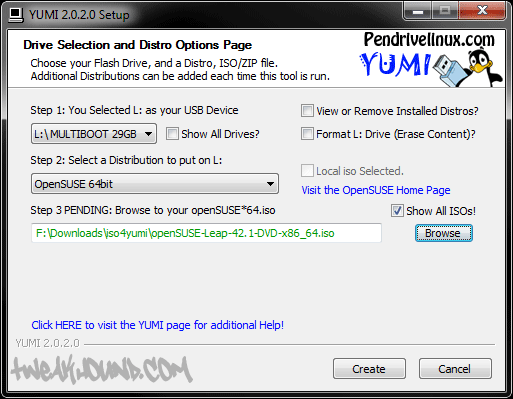
Although YUMI can download all supported ISOs, I suggest you download all the ISOs you want into the same folder before you start.
If you want to an ISO that isn’t listed try Unlisted Bootable ISOs. A Google search for YUMI + the ISO you want to use should help.
Many newer ISO’s will require you to check the Show all ISOs! box.

Download and start YUMI:
yumi2016

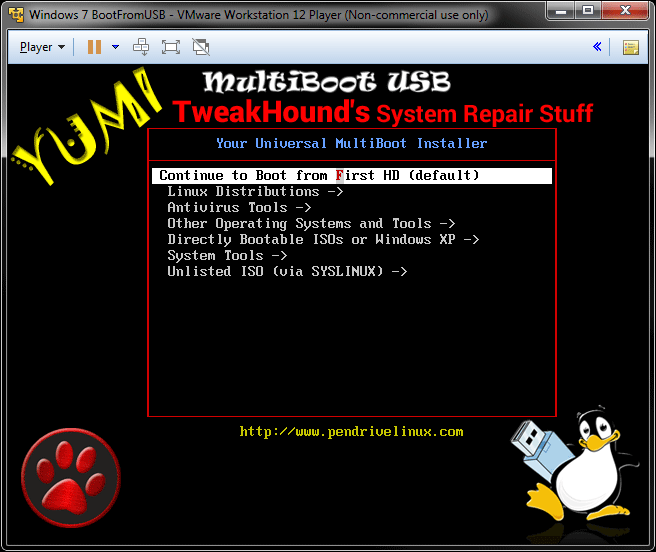
Here is my YUMI flash drive booting in a VM.
And yes, I modded the boot screen (Photoshop) as well as the Menus (Notepad++).
yumi2016_1

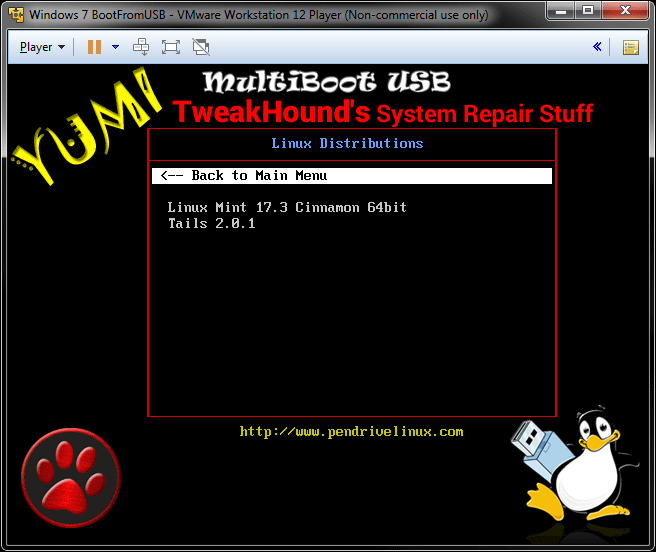
Linux Mint
Tails

yumi2016_2

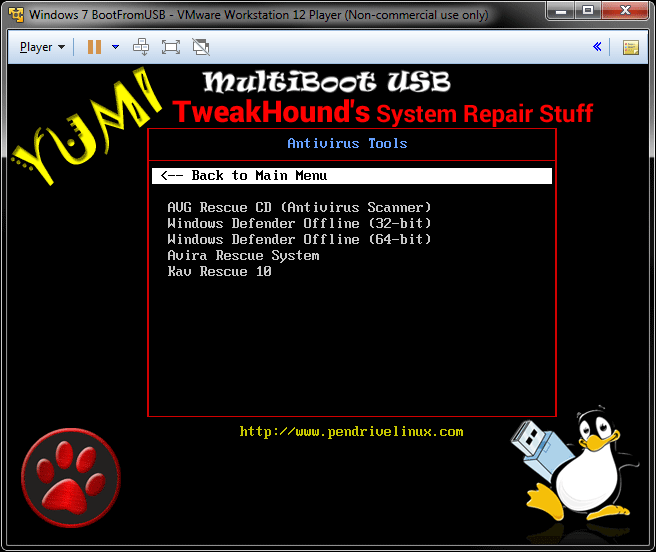
AVG Rescue CD
Windows Defender Offline
Avira Rescue System
http://support.kaspersky.com/us/4162KAV Rescue 10
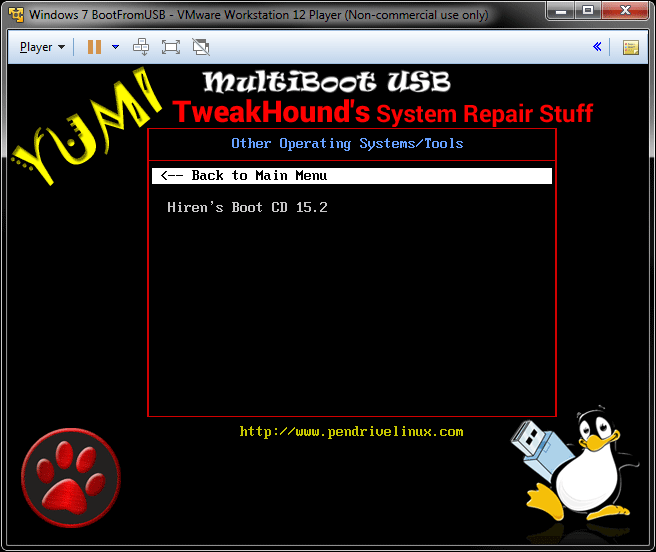
yumi2016_3

Hiren’s Boot CD

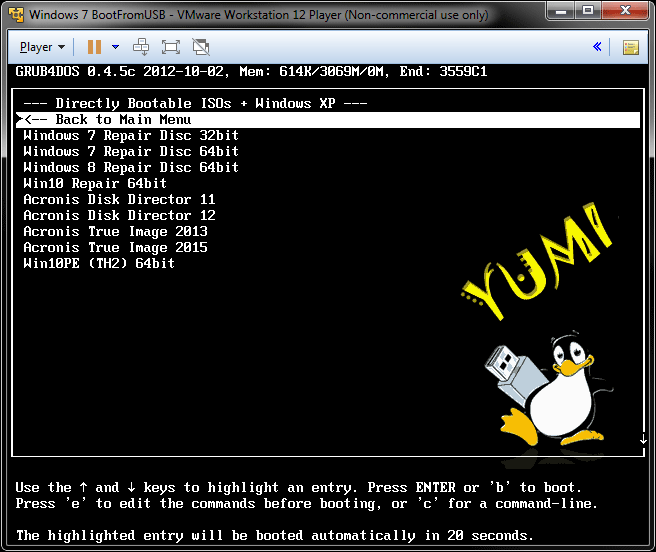
yumi2016_4

Windows Repair Discs – I make my own. Neosmart has them for download.
Acronis Discs – Get the from your Acronis account download page.
Win10PE
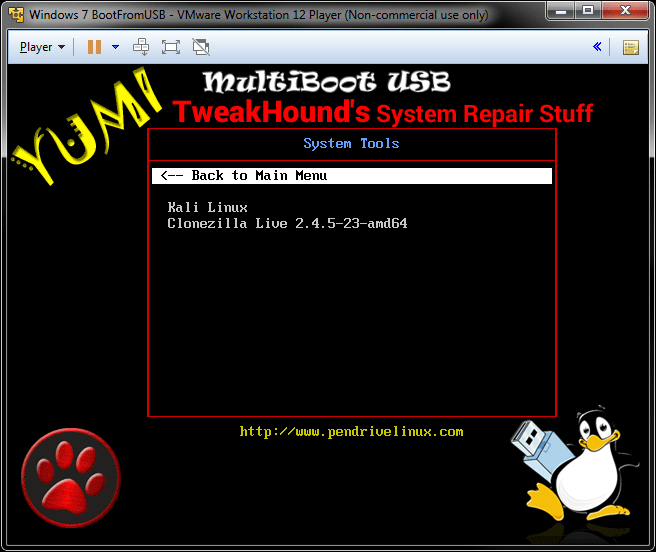
yumi2016_5

Kali Linux
Clonezilla

yumi2016_6

 
Also at the root of the drive I keep a folder called “stuff”. In that folder I have:
Cleaners
Bleachbit portable
CCleaner portable
Wise Disk Cleaner portable
Tools
NirLauncher
Sysinternals Suite

 
-END-

Tagged With: Backup, How-To's, Security, This Site

Reader Interactions

Comments

  1. t2smith says

    March 9, 2016, 22:08(EST) at 22:08

    Thanks for this article. This will make it much easier when I need to fix somebody’s computer. I haven’t been feeling good so maybe I’m having a brain freeze, but I can’t figure out how to get a Windows Repair Disc in iso format without burning it to a disc first. The only options I’ve been able to find require you to write directly to a flash drive or directly to a CD or DVD.

    • Eric (a.k.a. TweakHound) says

      March 10, 2016, 14:20(EST) at 14:20

      I make a CD then use CPBurnerXP or ImgBurn to do CD to ISO.

      • t2smith says

        March 10, 2016, 18:55(EST) at 18:55

        Thanks. I was trying to get around using a CD, but I have plenty so it won’t kill me to use one.

  2. t2smith says

    March 13, 2016, 18:02(EDT) at 18:02

    Any tips getting the Windows Repair Discs to work. If I use Windows 10 installer for Win10PE and Windows 10 Repair Disc, then clicking on the Windows Repair Disc takes me into Win10PE. If I install either using Try Unlisted ISO (GRUB), then they have errors and don’t work.

    • Eric (a.k.a. TweakHound) says

      March 14, 2016, 06:43(EDT) at 06:43

      Here are my menu entries:

      #start Win10_repair_64
      title Win10 Repair 64bit
      chainloader /bootmgr
      #end Win10_repair_64

      #start Win10PE_x64_TH2
      #Modify the following entry if it does not boot
      title Win10PE (TH2) 64bit
      find –set-root –ignore-floppies –ignore-cd /multiboot/ISOS/Win10PE_x64_TH2.ISO
      map –heads=0 –sectors-per-track=0 /multiboot/ISOS/Win10PE_x64_TH2.ISO (hd32)
      map –hook
      chainloader (hd32)
      #end Win10PE_x64_TH2

      I will retrace my steps later this week.

      • t2smith says

        March 16, 2016, 20:43(EDT) at 20:43

        My menu looks the same. I also tried adding a Windows 8 repair disc and that also boots me into Win10PE. If you can think of something I’m missing that’s cool, if not, I will give up on having the Repair Discs on my Yumi drive. I have a Windows 10 installer on another flash drive which gives me the option to go into the repair menu, so I will keep that drive with my Yumi drive on my key ring.

        Another thing I noticed is that Win10PE 64 bit boots up and then goes blank on my PC with 32GB of ram, but all the other machines I tried it on had 16GB or less and it worked fine. I’m backed up with Acronis, so I can live without it working on my machine if I run into any issues.

        Besides the above issues, this repair drive is still great and I’m glad you posted this. I haven’t been able to do everything I wanted to with Yumi, but having a flash drive with Hiren’s Boot CD, Win10PE, Acronis True Image and Disk Director, and all the Antivirus tools you posted is awesome.

Primary Sidebar

Popular Articles

Windows 10

Tweaking Windows 10

My Windows 10 Tweaks

Windows 10 Privacy Settings

Win10 Diagnostics Tracking Service Gone?

Windows 10 Advanced Disk Cleanup

Win10 Customize Installation Options

Windows 10 Dark Theme

Win10 Wallpapers, Graphics, etc.

All Windows 10 Articles

Windows 8

Tweaking Windows 8.1

Advice On Installing Windows 8.1

Clean Install Windows 8.1

Cleanup After Windows 8.1 Upgrade

Create Shutdown, Restart, Logoff Tiles For Windows 8

Tweaking Windows 8

Install Windows 8 – Clean Install With Upgrade Media

Install Windows 8 – Upgrade

Windows 8 – Cleaning Up After You’ve Upgraded

Windows 8 Freeware Machine

Windows 8 SSD Settings, Etc.

How To Resize Your Windows 8 Partition

Create Windows 8 Recovery Media

Windows 8 – Elevated Command Prompt

How To Fix The Windows Bootloader

Windows 7

Installing Windows 7

Tweaking Windows 7

Windows 7 Diagnostics Tracking Service

The Windows 7 Freeware Machine

The Windows 7 Pagefile And Running Without One

Bad Tweaks

SSD Tweak Guide (sort of)

The noguiboot (no GUI Boot) Tweak

NtfsMemoryUsage=2 Tweak

More Windows 7 articles here.

Windows Vista

Installing Windows Vista

Tweaking Windows Vista

More Windows Vista articles here.

Windows XP

eXPired - The Last Windows XP Guide You'll Ever Need

The Right Way To Install Windows XP

Super XP Tweaking Guide

The Freeware XP Machine

Bad Tweaks

More XP Articles here and here.

Backup

Backup Article Greatest Hits – Vol. 1

Other

Cataloging Your Music Collection

Finding Good Album Art

Converting Vinyl Records To Digital Music – A Non-Audiophiles Guide

Windows All-In-One Recovery Flash Drive

SSD Tweak Guide (sort of)

Raidmax Blackstorm Case Review

Disk Partitioning

Ditch Those CD's! A Guide To Using USB Flash Drives

Checking Your Disks For Problems

Bad Tweaks

More articles here

Tags

Android Backup Beer Computer Hardware Computer News Cool Tools Freeware How-To's Linux Off Topic openSUSE Playlists Privacy Security Software This Site vacation Veterans Windows 7 Windows 8 Windows 10 Windows 11 Windows Vista Windows XP

TweakHound - Optimize Your Computing Experience! TweakHound - Optimize Your Computing Experience!

Copyright 2002-2025 by Eric Vaughan All material contain here is the property of the materials owner. Windows, Windows XP, Windows Vista, Windows Seven, Windows 8, Windows 10, Windows 11, Microsoft, and all associated logos are trademarks/property of Microsoft. You may not use or copy any material from tweakhound.com without expressed written permission. Hotlinking to any material within this site is forbidden. Privacy Policy