• Skip to primary navigation
  • Skip to main content
  • Skip to primary sidebar

TweakHound

Computer stuff...

  • Home
  • Windows XP
  • Windows Vista
  • Windows 7
  • Windows 8
  • Windows 10
  • Windows 11
  • Linux
  • Tweak Guides
  • Site Info
    • About
    • About Me
    • TweakHound’s World
    • Contact
    • My Computers
    • Old Articles
    • Privacy Policy
    • Old Index
    • Advanced Search

The Best Android Music Player

speaker

December 9, 2016, 08:07(EST) By Eric (a.k.a. TweakHound)

A music player for my Android smartphone. I’ve searched. For years I’ve searched. I gave up…
A few days ago I started searching again.
Google searches, articles, reviews. Downloaded, installed, and uninstalled 1/2 a dozen apps I hadn’t tried before. By now I’ve tried too many to remember.
None of them fit.
If I’m listening to music on my phone I am either behind the wheel or at the gym on a bike or treadmill. I’m a simple guy. I want a simple interface.
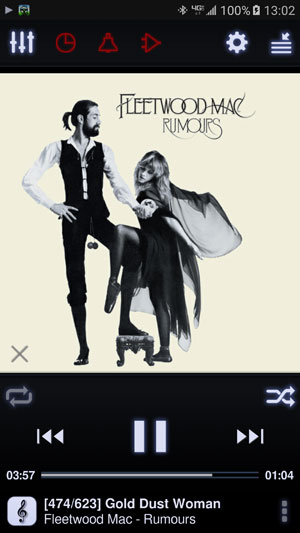
I saw Neutron over at Google play. Clean interface. $5.99. Seems kinda steep. But a 5 day free trial so I’ve nothing to loose. I read more. The description says, “Neutron is the professional music player with a high quality 32/64-bit audio rendering engine which provides the best possible sound quality on an Android device.” *Snork*, “Yeah right” I say to myself. I’ve heard that snake oil sales pitch before. Still, I like the interface so I download and install it.
Yesterday I’m in my truck listening to some 80’s metal. Nothing special about my stereo. Volume is at like 40%, sounds OK. Then I’m like “Hey, I’ve NEVER heard that background vocal before”. Hmmm… I crank it up. I start playing all the best quality songs I can think of.
The word that kept popping up in my head was, “Stunning”. This is audiophile stuff y’all.
I just bought the app. I liked it so much I thought I would share it with you.
Neutron Music Player
Neutron Music Player – Android Apps on Google Play
Tagged With: Android, This Site

Reader Interactions

Comments

  1. Sriracha says

    December 9, 2016, 11:28(EST) at 11:28

    Good info, I may have to check it out. Does Neutron have a shuffle by album function?

  2. Kelly says

    December 9, 2016, 16:24(EST) at 16:24

    Love me some Three Lock Box. Did I ever tell you the story where we were in Vegas eating at Cabo Wabo. Long story short, Michael Anthony was setting the next table over from us with his family.

  3. Constantinos Zeniou says

    December 12, 2016, 11:25(EST) at 11:25

    Awesome. Any advice on settings for best quality?

    • Eric (a.k.a. TweakHound) says

      December 12, 2016, 16:32(EST) at 16:32

      Not really. I did set it to use 64-bit Processing. Everything else is default.

      • Constantinos Zeniou says

        December 13, 2016, 13:57(EST) at 13:57

        Ok thanks. Loving it so far.

Primary Sidebar

Popular Articles

Windows 10

Tweaking Windows 10

My Windows 10 Tweaks

Windows 10 Privacy Settings

Win10 Diagnostics Tracking Service Gone?

Windows 10 Advanced Disk Cleanup

Win10 Customize Installation Options

Windows 10 Dark Theme

Win10 Wallpapers, Graphics, etc.

All Windows 10 Articles

Windows 8

Tweaking Windows 8.1

Advice On Installing Windows 8.1

Clean Install Windows 8.1

Cleanup After Windows 8.1 Upgrade

Create Shutdown, Restart, Logoff Tiles For Windows 8

Tweaking Windows 8

Install Windows 8 – Clean Install With Upgrade Media

Install Windows 8 – Upgrade

Windows 8 – Cleaning Up After You’ve Upgraded

Windows 8 Freeware Machine

Windows 8 SSD Settings, Etc.

How To Resize Your Windows 8 Partition

Create Windows 8 Recovery Media

Windows 8 – Elevated Command Prompt

How To Fix The Windows Bootloader

Windows 7

Installing Windows 7

Tweaking Windows 7

Windows 7 Diagnostics Tracking Service

The Windows 7 Freeware Machine

The Windows 7 Pagefile And Running Without One

Bad Tweaks

SSD Tweak Guide (sort of)

The noguiboot (no GUI Boot) Tweak

NtfsMemoryUsage=2 Tweak

More Windows 7 articles here.

Windows Vista

Installing Windows Vista

Tweaking Windows Vista

More Windows Vista articles here.

Windows XP

eXPired - The Last Windows XP Guide You'll Ever Need

The Right Way To Install Windows XP

Super XP Tweaking Guide

The Freeware XP Machine

Bad Tweaks

More XP Articles here and here.

Backup

Backup Article Greatest Hits – Vol. 1

Other

Cataloging Your Music Collection

Finding Good Album Art

Converting Vinyl Records To Digital Music – A Non-Audiophiles Guide

Windows All-In-One Recovery Flash Drive

SSD Tweak Guide (sort of)

Raidmax Blackstorm Case Review

Disk Partitioning

Ditch Those CD's! A Guide To Using USB Flash Drives

Checking Your Disks For Problems

Bad Tweaks

More articles here

Tags

Android Backup Beer Computer Hardware Computer News Cool Tools Freeware How-To's Linux Off Topic openSUSE Playlists Privacy Security Software This Site vacation Veterans Windows 7 Windows 8 Windows 10 Windows 11 Windows Vista Windows XP

TweakHound - Optimize Your Computing Experience! TweakHound - Optimize Your Computing Experience!

Copyright 2002-2025 by Eric Vaughan All material contain here is the property of the materials owner. Windows, Windows XP, Windows Vista, Windows Seven, Windows 8, Windows 10, Windows 11, Microsoft, and all associated logos are trademarks/property of Microsoft. You may not use or copy any material from tweakhound.com without expressed written permission. Hotlinking to any material within this site is forbidden. Privacy Policy