
• Skip to primary navigation
  • Skip to main content
  • Skip to primary sidebar

TweakHound

Computer stuff...

  • Home
  • Windows XP
  • Windows Vista
  • Windows 7
  • Windows 8
  • Windows 10
  • Windows 11
  • Linux
  • Tweak Guides
  • Site Info
    • About
    • About Me
    • TweakHound’s World
    • Contact
    • My Computers
    • Old Articles
    • Privacy Policy
    • Old Index
    • Advanced Search

Wednesday Morning Random Stuff…

win7orb

March 13, 2019, 07:37(EDT) By Eric (a.k.a. TweakHound)

Servicing stack update for Windows 7 SP1 and Windows Server 2008 R2 SP1: March 12, 2019
Readers Tim and Doug reminded me of the newest Servicing Stack Update for Windows 7.
The servicing stack is what installs Windows updates. Whether intentional or through incompetence, Microsoft has made updating Windows (especially Windows 7) somewhere between difficult and impossible. IMHO their servicing stack updates are meant to fix the problem they created. So if you have an issue with Windows Update, a servicing stack update is the place to start.
To download the latest servicing stack you look in the Microsoft Update Catalog. Search for servicing stack.
Windows 7: https://www.catalog.update.microsoft.com/Search.aspx?q=Servicing%20Stack%20Update%20for%20Windows%207
Windows 10: https://www.catalog.update.microsoft.com/Search.aspx?q=Servicing%20Stack%20Update%20for%20Windows%2010
Last month I had linked to an article outlining this. The newest servicing stack update for Windows 7 will be required by July 16. This should have been installed automatically with Windows Update this month. If not, manually check Windows Update or see the above links.

Google Chrome 73
For the desktop, Chrome has several “Fixes and improvements” and 60 security fixes.
Chrome for Android has 2 new features as well as “stability and performance improvements”.
Download for desktop
Download for Android

Firefox Send
https://send.firefox.com/
Introducing Firefox Send, Providing Free File Transfers while Keeping your Personal Information Private
Send is a free encrypted file transfer service that allows users to safely and simply share files from any browser. Additionally, Send will also be available as an Android app in beta later this week.

coollinks

Navy, Industry Partners Are ‘Under Cyber Siege’ by Chinese Hackers, Review Asserts
The assessment, delivered to Navy Secretary Richard Spencer last week and reviewed by The Wall Street Journal, depicts a branch of the armed forces under relentless cyberattack by foreign adversaries and struggling in its response to the scale and sophistication of the problem.
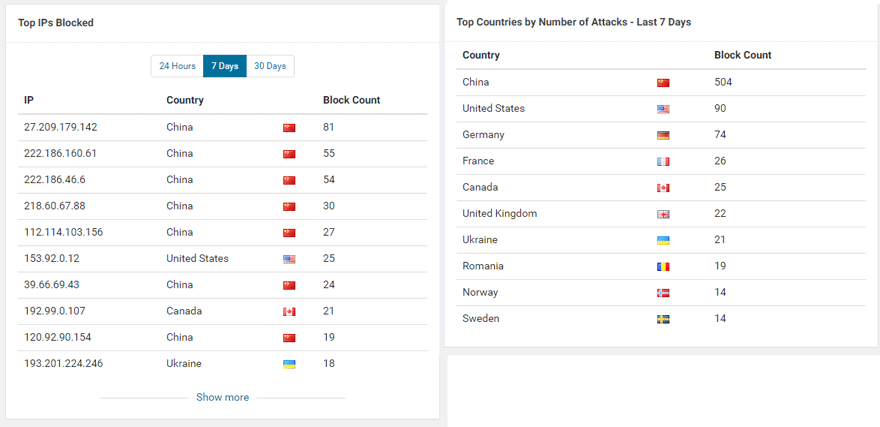
Relentless is the word. Most of the internet seems to be under constant attack from the Chinese. This site is just a tiny little site at the edge of the internet yet:
Tagged With: Computer News

Primary Sidebar

Popular Articles

Windows 10

Tweaking Windows 10

My Windows 10 Tweaks

Windows 10 Privacy Settings

Win10 Diagnostics Tracking Service Gone?

Windows 10 Advanced Disk Cleanup

Win10 Customize Installation Options

Windows 10 Dark Theme

Win10 Wallpapers, Graphics, etc.

All Windows 10 Articles

Windows 8

Tweaking Windows 8.1

Advice On Installing Windows 8.1

Clean Install Windows 8.1

Cleanup After Windows 8.1 Upgrade

Create Shutdown, Restart, Logoff Tiles For Windows 8

Tweaking Windows 8

Install Windows 8 – Clean Install With Upgrade Media

Install Windows 8 – Upgrade

Windows 8 – Cleaning Up After You’ve Upgraded

Windows 8 Freeware Machine

Windows 8 SSD Settings, Etc.

How To Resize Your Windows 8 Partition

Create Windows 8 Recovery Media

Windows 8 – Elevated Command Prompt

How To Fix The Windows Bootloader

Windows 7

Installing Windows 7

Tweaking Windows 7

Windows 7 Diagnostics Tracking Service

The Windows 7 Freeware Machine

The Windows 7 Pagefile And Running Without One

Bad Tweaks

SSD Tweak Guide (sort of)

The noguiboot (no GUI Boot) Tweak

NtfsMemoryUsage=2 Tweak

More Windows 7 articles here.

Windows Vista

Installing Windows Vista

Tweaking Windows Vista

More Windows Vista articles here.

Windows XP

eXPired - The Last Windows XP Guide You'll Ever Need

The Right Way To Install Windows XP

Super XP Tweaking Guide

The Freeware XP Machine

Bad Tweaks

More XP Articles here and here.

Backup

Backup Article Greatest Hits – Vol. 1

Other

Cataloging Your Music Collection

Finding Good Album Art

Converting Vinyl Records To Digital Music – A Non-Audiophiles Guide

Windows All-In-One Recovery Flash Drive

SSD Tweak Guide (sort of)

Raidmax Blackstorm Case Review

Disk Partitioning

Ditch Those CD's! A Guide To Using USB Flash Drives

Checking Your Disks For Problems

Bad Tweaks

More articles here

Tags

Android Backup Beer Computer Hardware Computer News Cool Tools Freeware How-To's Linux Off Topic openSUSE Playlists Privacy Security Software This Site vacation Veterans Windows 7 Windows 8 Windows 10 Windows 11 Windows Vista Windows XP

TweakHound - Optimize Your Computing Experience! TweakHound - Optimize Your Computing Experience!

Copyright 2002-2025 by Eric Vaughan All material contain here is the property of the materials owner. Windows, Windows XP, Windows Vista, Windows Seven, Windows 8, Windows 10, Windows 11, Microsoft, and all associated logos are trademarks/property of Microsoft. You may not use or copy any material from tweakhound.com without expressed written permission. Hotlinking to any material within this site is forbidden. Privacy Policy