 This article IS NOT FINISHED. I’m preoccupied with other stuff but folks have been asking for this so I thought I would show what I’ve got.
Please check back soon!
Notes On This Article
This article is specifically not for Linux newbies.
I use the KDE desktop exclusively.
Also, as much as I would like to be I am not a Linux expert. Like most ‘Nix users I learn by researching and doing.
– – – – –
Dual-Boot
Dual Boot openSUSE Leap and Windows 10 UEFI
– – – – –
BTRFS
openSUSE defaults to a new file system called BTRFS. As of Leap 42.1 I am not using it. I still use Ext4. While BTRFS has obvious advantages for server use I do not understand the reason for using it on a desktop. Almost every benchmark has and still shows BTFRS behind Ext4 all the way through kernel 4.3 (Leap is currently at 4.1).
– – – – –
SSD Setup:
– You need to use Ext4, Btrfs, FAT, GFS2, XFS as the filesytem.
– You need to add discard* as an option in your fstab for all the partitions on the SSD.
i.e. / , /home , but only for Ext4, Btrfs, FAT, GFS2, XFS formatted partitions (not swap, or Windows, etc.).
To edit your fstab to enable discard (trim)
– How I do it (openSUSE/KDE): press the alt + f2 keys > type kdesu kwrite > navigate to and open /etc/fstab >
find the partitions mentioned above > add discard to that line.
– What mine looks like:
/dev/disk/by-id/XXXXXX/ ext4 noatime,acl,user_xattr,discard
/dev/disk/by-id/XXXXXX/home ext4 noatime,acl,user_xattr,discard
* I’ve read several forum post saying “you don’t need discard”. Can someone, anyone please show me evidence of that?
– – – – –
Mounting Windows Drives
This is how I mount Windows drives.
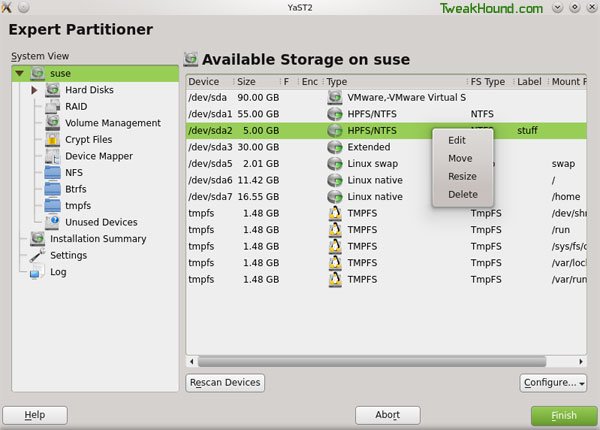
First I mount them via YaST Partitioner. Go to YaST > System > Partitioner
Right-click on the partition you wish to mount and choose Edit.
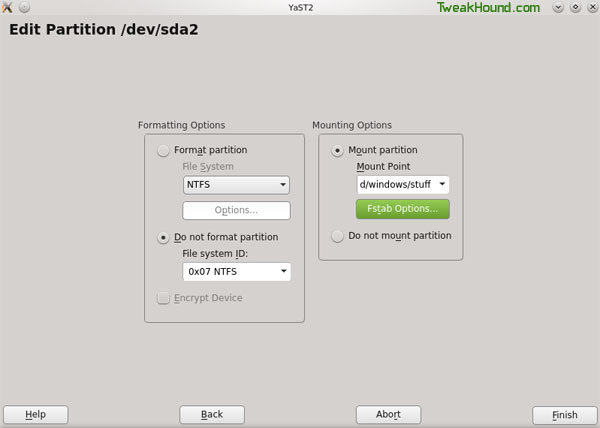
In the Mounting Options section, check the circle next to Mount partition.
Type in where you want to mount it. I like to mount my Windows partitions in a folder called Windows in my home folder.
I type /home/YOURUSERNAME/windows/NAMEFORYOURWINDOWSDRIVE
Now click Finish and Finish to exit out of Partitioner. Your new folder should appear an be accessible on reboot.
Next we are going to edit our FSTAB file. This is where openSUSE looks for info on what and how to mount drives/partitions.
Press the Alt + F2 keys and type kdesu kwrite /etc/fstab , enter your root password when prompted.
Edit your entry so that the end section looks like this:
/dev/disk/by-id/XXXYYY-part2 /home/tweakhound/windows/backups ntfs-3g defaults,locale=en_US.UTF-8 0 0
/dev/disk/by-id/XXXXXX-part1 /home/tweakhound/windows/docs ntfs-3g defaults,locale=en_US.UTF-8 0 0
Be sure to save fstab before closing.
– – – – –
Multimedia
Every guide I’ve seen so far does not install enough stuff to cover all the bases. Below is everything I install.
I created this for myself. If you copy / paste / Enter this into a terminal (as root) and run it you will have everything you need and then some.
Do each section (between lines) in order. Answer a to always accept, y for yes, and i to ignore.
– – – – – –
zypper --gpg-auto-import-keys ar -f http://linuxdownload.adobe.com/linux/x86_64/ AdobeFlash

zypper --gpg-auto-import-keys ar -f http://ftp.gwdg.de/pub/linux/misc/packman/suse/openSUSE_Leap_42.1/ Packman

zypper --gpg-auto-import-keys ar -f http://download.opensuse.org/repositories/KDE:/Applications/openSUSE_Leap_42.1/ KDEapps

zypper --gpg-auto-import-keys ar -f http://download.opensuse.org/repositories/KDE:/Extra/openSUSE_Leap_42.1/ KDEextra

zypper --gpg-auto-import-keys ar -f http://download.opensuse.org/repositories/mozilla/openSUSE_Leap_42.1/ Mozilla

zypper --gpg-auto-import-keys ar -f http://opensuse-guide.org/repo/openSUSE_Leap_42.1/ libdvdcss
– – – – – –
zypper ref
– – – – – –
zypper dup --from Packman
– – – – – –
zypper install audacity bleachbit clementine chromium chromium-ffmpeg chromium-pepper-flash k3b-codecs easytag fetchmsttfonts ffmpeg fifth-leg-font flac flash-plugin google-roboto-fonts gstreamer-plugins-bad gstreamer-plugins-good gstreamer-plugins-libav gstreamer-plugins-ugly gstreamer-plugins-ugly-orig-addon gstreamer-0_10 gstreamer-0_10-plugins-bad gstreamer-0_10-plugins-ffmpeg gstreamer-0_10-plugins-fluendo_mp3 gstreamer-0_10-plugins-good gstreamer-0_10-plugins-ugly lame libdvdcss2 libxine2-codecs mediainfo mediainfo-gui vlc vlc-codecs wine xine-ui xine-browser-plugin
– – – – – –
***OPTIONAL*** (remove what you don’t want)
zypper install dropbox kio_sysinfo avidemux3 avidemux3-gtk handbrake-gtk hplip gimp-save-for-web
– – – – – –
***OPTIONAL*** (remove what you want to keep)
zypper remove amarok choqok kmail konversation kontact kopete
– – – – – –
-END- (for now)
great … please add more!
Thanks! for all of this – I was having trouble getting Amarok to work correctly with my iPod and after following your suggestions now my
Leap 42.1 install is working exactly like I wanted.
If you add “packman” to the list of repositories (in Yast under “Software” there’s an item “Software Repositories”), most of the multimedia stuff (codecs etc) can then be installed through the graphical installer, now in Yast under “Software Management”. There are other repositories for Flash etc. Just a bit more “GUI” and less prone to typos.
M.
Hello
1) I install vlc , but it does not Play mp4 video
2) video in Twitter does not work
is there a solution
zypper install vlc-codecs
Very helpful and clear, thank you!