
“The Chrome team is delighted to announce the promotion of Chrome 59 to the stable channel for Windows, Mac and Linux…Chrome 59.0.3071.86 contains a number of fixes and improvements…This update includes 30 security fixes.”
Download: Google Chrome Web 32-bit Google Chrome 64-bit
New Webhost

This site never ran like it should with my last 2 Web Hosts. Slow, laggy, plugins not working correctly. Web host blaming the plugins. Plugin support repeatedly blaming the web host server configuration.
You all deserve better as do I.
Fortunately my old friend that hosted this site for many, many years (from it’s inception) is getting back into the web hosting business. He knows what he is doing and is willing to provide personal support and not buck-passing.
I have volunteered to be the first client and sort of guinea pig. I have given him carte blanche to tweak what he wants to. I will provide the details when he is ready to go full time.
This site is now running wicked fast!
Please let me know if you run in to any issues.
My New Old Case

Since I have a few minutes I thought I would re-post the pics of my new/old case with a little explanation.
[Read more…] about My New Old Case
Busy, Busy, Busy

Lots going on right now.
Site related is that a new server/web-host is in the works.
[Read more…] about Busy, Busy, Busy
Win10 Updated

Windows 10 has been updated
May 25, 2017—KB4020102 (OS Build 15063.332)
“This update includes quality improvements. No new operating system features are being introduced in this update.“
Wednesday Random Stuff…

CCleaner Updated
v5.30.6065 (23 May 2017)
– Improved Edge Cookie cleaning
– Updated Internet Explorer 10 and 11 History cleaning
– Updated Thunderbird 52 History cleaning
– Updated Windows Explorer MRU Cache cleaning
– Improved SSD detection algorithm
– Optimized Update Checking process
– Minor GUI improvements
– Minor bug fixes
Download
VMware Player 12.5.6
– Day 0 support of the Windows 10 Creators Update (version 1703).
– Bug fixes and security updates.
Download
Latest Video Drivers
AMD Crimson ReLive Edition 17.5.2 (5/18/2017)
Nvidia Ceforce Game Ready Driver 382.33 WHQL (5/22/2017)
MediaMonkey 4.1.16.1836
“It’s a significant update with over 30 fixes and improvements to music syncing, tagging, UPnP, podcasting, playback and more.”
Download & Info
Get Rid Of SMB1 In Windows 7

A reader was confused by all the steps in Microsoft’s How to enable and disable SMBv1, SMBv2, and SMBv3 in Windows and Windows Server.
Should he use PowerShell, Registry Editor, Group Policy? Should he disable it on Client or Server or both?
Because it is a security risk, it is important to ditch SMB1 on all platforms.
You should get rid of both the client and server.
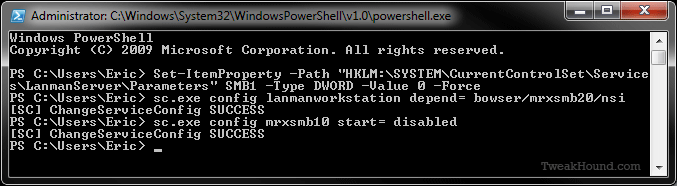
In Windows 7 I do this via PowerShell. It is fast and easy.
You must run PowerShell as Admin.
Press the Windows + R keys > type powershell (press the Enter key)
> copy and paste the following command:
Set-ItemProperty -Path “HKLM:\SYSTEM\CurrentControlSet\Services\LanmanServer\Parameters” SMB1 -Type DWORD -Value 0 -Force
> now press the Enter key
> copy and paste the following command: sc.exe config lanmanworkstation depend= bowser/mrxsmb20/nsi
> now press the Enter key
> copy and paste the following command: sc.exe config mrxsmb10 start= disabled
> now press the Enter key > Reboot
———-
Windows PowerShell
Copyright (C) 2009 Microsoft Corporation. All rights reserved.
PS C:\Users\Eric> Set-ItemProperty -Path “HKLM:\SYSTEM\CurrentControlSet\Service
s\LanmanServer\Parameters” SMB1 -Type DWORD -Value 0 -Force
PS C:\Users\Eric> sc.exe config lanmanworkstation depend= bowser/mrxsmb20/nsi
[SC] ChangeServiceConfig SUCCESS
PS C:\Users\Eric> sc.exe config mrxsmb10 start= disabled
[SC] ChangeServiceConfig SUCCESS
PS C:\Users\Eric>
———-
A Few Cool Tools Updated

Sysinternals Tools Updated
Among the ones updated are TweakHound favs:
Autoruns v13.71
This update to Autoruns, a comprehensive autostart execution point manager, adds Microsoft HTML Application Host (mshta.exe) as hosting image so it displays the hosted image details, and now doesn’t apply filters to hosting images.
Process Monitor v3.33
Procmon v3.33 includes bug fixes for destructive event filtering and is signed with certificate installed in the Win7 trusted roots store.
Process Explorer v16.21
This Process Explorer release includes a fix for an intermittent bug in the Virus Total scanning logic, and is signed with Win7 RTM-compatible certificate.
CCleaner 5.30
v5.30.6063 (16 May 2017)
– Improved Edge Cookie cleaning
– Updated Internet Explorer 10 and 11 History cleaning
– Updated Thunderbird 52 History cleaning
– Updated Windows Explorer MRU Cache cleaning
– Improved SSD detection algorithm
– Optimized Update Checking process
– Minor GUI improvements
– Minor bug fixes
More On Wanna Cry Attacks

I’d Rather Be Lucky Than Good
Some Geek registered the domain name involved in the attacks and slowed the attacks to a crawl. Despite the articles claim, it did not “put out the fire”. The attack is still alive.
But I’ll repeat myself
At the risk of being crude
There must be fifty ways
To leave your lover…
Get rid of SMB1 dammit!
(Paul Simon – 50 Ways to Leave Your Lover)
***Microsoft – Customer Guidance for WannaCrypt attacks***
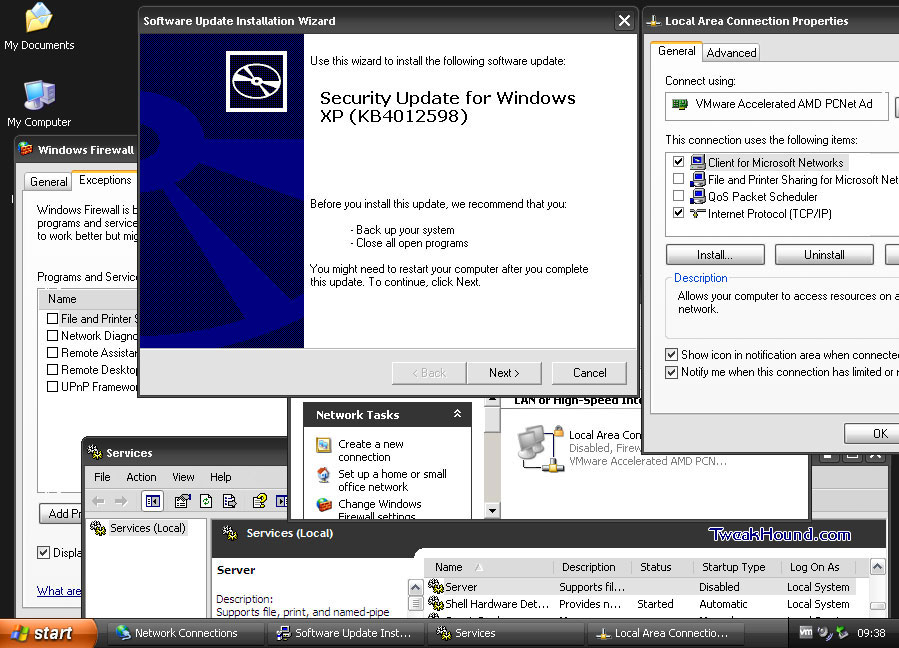
XP Patched Too
Hit the link above. Downloads at the bottom of the article.
Below is my XP Pro Virtual Machine.
As you can see I normally have the network connection disabled.
Other steps you can take.
– Disable all Exceptions on the firewall
– Disable the Server service
– Unbind file and printer sharing
There are other steps but XP is supposed to be dead. If you care about security you are only using it in a VM with no internet connection, if at all.
Win10 Troubleshooters
I took yesterday off to do the Cap2Cap bike ride. I’ve completed the following section for the tweak guide. So, I am getting closer at least. [Read more…] about Win10 Troubleshooters