 First draft: 15OCT2014
Purpose
This page contains my notes on BTRFS. I hope that others may find it useful.
This page will be updated as I gather more info.
If you have useful info please contact me.
[Read more…] about TweakHound’s BTRFS Notes
Computer stuff...
First draft: 15OCT2014
Purpose
This page contains my notes on BTRFS. I hope that others may find it useful.
This page will be updated as I gather more info.
If you have useful info please contact me.
[Read more…] about TweakHound’s BTRFS Notes
 Wow, updates wherever you look!
Time To Run Windows Update
Microsoft has whole slew of updates this month:
Microsoft Security Bulletin Summary for October 2014
Firefox 33
Update from within the program: Help > About Firefox > Check for updates
Download (Windows, EN-US)
Release Notes
Download other languages and operating systems
Firefox 33 for Android is available in the Play Store.
openSUSE users, FF 33 is available in the Mozilla Repo.
Google Chrome
“The stable channel has been updated to 38.0.2125.104 for Windows, Mac and Linux.
This release contains an update for Adobe Flash as well as a number of other fixes.”
Download or update from within the program.
Adobe Flash
Flash has been updated to version 15.0.0.189.
Download:
Flash for IE
Flash for other browsers
Main download page
Windows 8 users check Windows Update.
 The Week Ahead
Tuesday will see lots of Windows Updates. Adobe possibly too.
Microsoft Security Bulletin Advance Notification for October 2014
Software
openSUSE 13.2 RC1
VirtualBox 4.3.18
Interesting Reads
ARStechnica – Windows 10’s very different way of updating
Console Improvements in the Windows 10 Technical Preview
Systemd Adding Its Own Console To Linux Systems
 Chrome 38.0.2125.101
Download or update from within the program.
Source: Google Chrome Blog
The Chrome team is delighted to announce the promotion of Chrome 38 to the stable channel for Windows, Mac and Linux. Chrome 38.0.2125.101 contains a number of fixes and improvements, including:
– A number of new apps/extension APIs
– Lots of under the hood changes for stability and performance
Oh, Good Grief
Dunno what has gotten in to Neowin lately. Is this really a front page news story?
Especially since it was posted last January at WinAero :rolleyes:
 Going Around Your A$$ To Get To Your Elbow
Both Neowin And Betanews posted articles on how to install Win10 from a USB stick. Both posted the hard way. As immediately pointed out by Neowinians, just use the same tool we’ve all been using for Windows 7/8/8.1, the Windows 7 USB/DVD Download Tool. It is how I did it.
BTW – I’m going to keep calling it Win10. Remember, you saw it hear first 😉
Upgrade To Win10
I never do this but after installing Win10 straight up, I decided to see how upgrading to Win10 from Windows 8.1 would go…
I mounted the ISO and clicked setup.exe. 20 minutes later I was done. Event Viewer had a few issues but in general everything went OK. Even Start8 was in place and working. I don’t recommend this however. If you attempt this be sure to make a disk image first.
Quickie
PCMark got an update today. Below is the text of the email I received:
Hello Editor
We released a minor update for PCMark 8 today that adds a much requested feature.
By default, PCMark 8 runs each test workload three times, using the average to calculate the overall score. We’ve found that this is the best way to smooth out any variance introduced by operating system factors outside of the benchmark itself.
Repeating each test three times, however, does mean that it can take a long time to complete a benchmark run. We know that when troubleshooting or trying to improve performance it would be helpful to run a shorter test that completes in less time.
This update introduces a new command line option to PCMark 8 Professional Edition that allows you to set the number of passes for each test. Set –pass=1 for a quick test running each workload just once. Or set –pass to a higher number to repeat each test multiple times for highly accurate benchmark results.
You can read the complete release notes for this update below. PCMark 8 will prompt you to install the update, or you can download the latest version here: http://www.futuremark.com/downloads/pcmark8.zip (2.9 GB)
Best wishes,
Oliver
Feedback
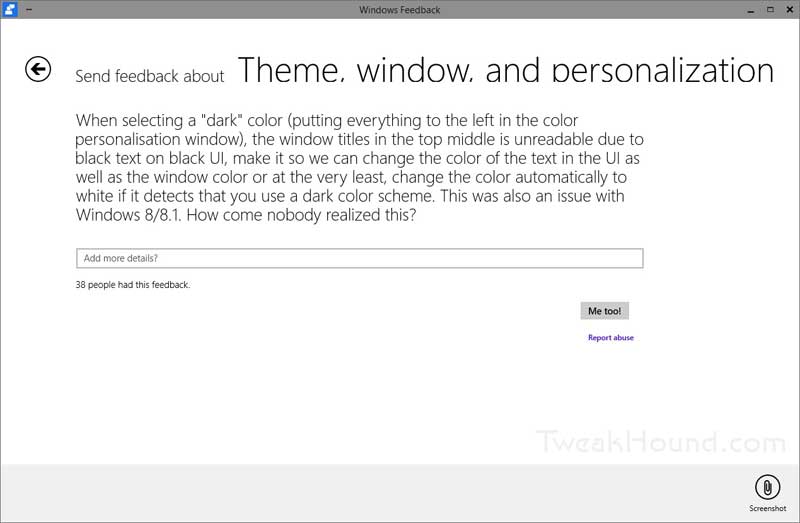
All you guys using Win10 be sure to leave feedback. I left one for some issues in Event Viewer. The feedback is searchable too. I found the one below and piled on (click Me Too!).
I saw this at Brobible. Had to post it…

 I don’t plan on doing too much with the tech preview article wise but I thought I would share a few quick notes.
[Read more…] about A Few Windows 10 Tech Preview Tweak Related Notes
Windows 10 Tech Preview Default Services (without description)
01OCT2014
[Read more…] about Windows 10 Tech Preview Default Services (without description)
Windows 10.
Yep, that’s the name of the next Windows version. When asked why “Windows 10”, Microsoft’s Terry Myerson said, “Because 7 8 9”.
I was keeping up with the Windows 10 announcement event via Tom Warren at The Verge, and Paul Thurrott & Mary Jo Foley’s Twitter feeds.
My notes:
1 – You can get the very rough and very unfinished Enterprise preview tomorrow.
2 – Release sometime after April 2015.
3 – No word on cost or free upgrades.
4 – Sounds…better than Windows 8/8.1.

Official Links:
Microsoft News Center – Microsoft unveils the future of Windows
Official Windows Blog – Announcing Windows 10
Windows Insider Program
Comprehensive Info:
The Verge – Posts tagged “Windows 10”
Neowin – Posts tagged “Windows 10”
Mary Jo Foley at ZDNet
Paul Thurrott
 The free, cross-platform, and awesome Audacity 2.0.6 is out.
Download
Release Notes
 AMD Catalyst 14.9 drivers are out.
Release Notes (Windows)
Release Notes (Linux)
Download Page