• Skip to primary navigation
  • Skip to main content
  • Skip to primary sidebar

TweakHound

Computer stuff...

  • Home
  • Windows XP
  • Windows Vista
  • Windows 7
  • Windows 8
  • Windows 10
  • Windows 11
  • Linux
  • Tweak Guides
  • Site Info
    • About
    • About Me
    • TweakHound’s World
    • Contact
    • My Computers
    • Old Articles
    • Privacy Policy
    • Old Index
    • Advanced Search

Eric (a.k.a. TweakHound)

3DMark 11 Is Out

December 7, 2010, 13:47(EST) By Eric (a.k.a. TweakHound)

Benchmark program 3DMark 11 has been released.
———-
CONTEST CLOSED
*** I have 2 keys for 3DMark 11 Advanced Edition to give away. So I’m going to have a little contest.***
The rules for the contest:
1 – Post a reply in this post with the name of your favorite PC game of all time. Only post 1 (one) game. One entry per person.
2 – Posts that violate rule #1 will not be considered.
3 – Contest begins now (07DEC2010) and runs until 5 pm (EST) tomorrow (08DEC2010).
4 – When making a reply you must use your real email address or I have no way to contact you.
5 – Winners will be picked at random using a random number generator. Winners will be notified within 24 hours of contest close. After being notified the winners must reply within 48 hours or I will pick someone else.
6 – Good Luck!
CONTEST CLOSED
———-
3DMark 11 Info:

Minimum requirements
3DMark 11 requires DirectX 11, a DirectX 11 compatible video card, and Windows Vista or Windows 7.
OS: Microsoft Windows Vista or Windows 7
Processor: 1.8GHz dual-core Intel or AMD CPU
Memory: 1 GB of system memory
Graphics: DirectX 11 compatible graphics card
Hard drive space: 1.5 GB
Audio: Windows Vista / Windows 7 compatible sound card

Links:
Download it from Major Geeks (they have 4 keys to give away).
3DMark 11 home page

Tagged With: Computer News, This Site

PerfectDisk 11 Updated

December 6, 2010, 20:48(EST) By Eric (a.k.a. TweakHound)

Raxco has released build 182 for PerfectDisk 11. Use “Check For Updates” from within the program.
*see notes below before updating

What’s new in PerfectDisk 11 (Build 182)
We corrected an issue which was preventing the PerfectDisk user interface from correctly saving user settings to the registry.
We corrected a scheduling bug on virtual computers. When the start time was missed the user interface displayed a date of 1899.
We corrected an issue with the welcome screen always displaying when PerfectDisk was launched even though is should not have.
We ensured compatability with Exchange 2007, SP3 and have allowed PerfectDisk to defragment data stores in this configuration.
We corrected a bug which caused PerfectDisk to crash if the MFT exceeded 80GB.

There is an issue after install according to the PD blog:

After updating to Build 182, you may be asked to register, even if you have previously registered. Select “Never Register” to avoid this issue.

Tagged With: Cool Tools

Autoruns v10.06

November 29, 2010, 18:11(EST) By Eric (a.k.a. TweakHound)

Download (source)

Autoruns v10.06: This release fixes a bug that could affect delete and disable operations on entries stored as multisz registry values.

What is Autoruns?

This utility, which has the most comprehensive knowledge of auto-starting locations of any startup monitor, shows you what programs are configured to run during system bootup or login, and shows you the entries in the order Windows processes them. These programs include ones in your startup folder, Run, RunOnce, and other Registry keys. You can configure Autoruns to show other locations, including Explorer shell extensions, toolbars, browser helper objects, Winlogon notifications, auto-start services, and much more. Autoruns goes way beyond the MSConfig utility bundled with Windows Me and XP.

Tagged With: Cool Tools, Freeware

New Windows 7 Theme – Holiday Lights

November 26, 2010, 14:13(EST) By Eric (a.k.a. TweakHound)

Windows 7 Theme – Holiday Lights (source)
See: All official Microsoft Windows 7 Themes (for another holiday theme check out the Twinkle Wish Theme)
Great Christmas wallpapers at DeviantArt. (be sure to check the HDTV & Widescreen section).
Also see wallpapers labeled “winter” at DeviantArt.

Tagged With: Freeware, Windows 7

Acronis True Image Home 2011 – New promotion and discount

November 26, 2010, 12:44(EST) By Eric (a.k.a. TweakHound)

You must use the links and coupon code on this page!
Current offer is 5% off and FREE copy of Plus Pack add-on till November 30th.
5% off runs until Jan. 17th, 2011.

Tagged With: Cool Tools

Acronis True Image Home 2011 Updated

November 26, 2010, 12:41(EST) By Eric (a.k.a. TweakHound)

Acronis True Image Home 2011, build 6574 has been released. Log in to your account to get the update.
Release notes:
[Read more…] about Acronis True Image Home 2011 Updated

Tagged With: Cool Tools

CCleaner v3.01

November 26, 2010, 09:35(EST) By Eric (a.k.a. TweakHound)

Download CCleaner (slim)
Is this version a little slow on startup for anyone else?

Change log:
* Improved application startup time and INI loading speeds.
* Removed need to reboot for Index.dat cleaning.
* Improved cookie cleaning in Firefox 4.0 Beta 7.
* Improved Chromium based browser detection and cleaning.
* Added support for Adobe Reader 10 and Acronis True Image.
* Improved cleaning for 7-Zip, Adobe Reader 9.0, Microsoft Silverlight Isolated Storage, WinPatrol and Microsoft Management Console.
* Added support for local domains in “Cookies to Keep” list.
* Improved debugging with log file support using /DEBUG command-line parameter.
* Improved detection algorithm for 64-bit and Program Files.
* Improved folder drag and drop in Include options.
* Fixed bug in Uninstall Tool during cancellation.
* Improved drive detection in Drive Wiper screen.
* Added support to refresh cleaning rules using F5.
* Improved translations.
* Minor GUI improvements.

Tagged With: Cool Tools, Freeware

New Windows 0-day vulnerability emerges, bypasses UAC

November 25, 2010, 13:25(EST) By Eric (a.k.a. TweakHound)

Story found via Neowin, via Winrumors, original at Prevx. It being the Thanksgiving Holiday here in the states I assume most of the MS staff here is off and the only official statement I can find from Microsoft at the moment is from a German Microsoft TechNet blog post. Microsoft is investigating new vulnerability in Windows Kernel (translated).

Being a privilege escalation exploit, it bypasses by design even the protection given by the User Account Control and Limited User Account technology implemented in Windows Vista and Windows 7. All Windows XP/Vista/7 both 32 and 64 bit are vulnerable to this attack.

Tagged With: Computer News, Security

Android Phone On Your Home Network

November 25, 2010, 12:27(EST) By Eric (a.k.a. TweakHound)

New article up: Android Phone On Your Home Network

Tagged With: Android, How-To's, This Site

Android Phone On Your Home Network

November 25, 2010, 12:22(EST) By Eric (a.k.a. TweakHound)

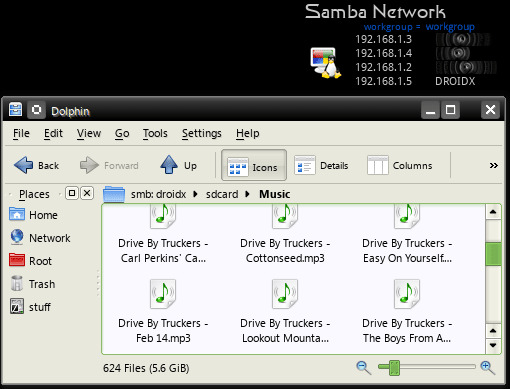
There are various ways to transfer files to and from your Droid phone. This article will show you how I put my Droid X on my Windows / Linux home network.

I cannot verify which Android phones this all works on, I only know that it works from mine.

*Fair warning: This is a slightly advanced procedure that requires your phone to be rooted.

All this is done from Wi-Fi.

For those who do not know, Android runs off a modded Linux kernel. So a little explanation for those not familiar with Linux networking. I’m going to try and explain this in layman’s terms so please Geeks, cut me a little slack here. Linux requires a network “client” to go to another machine and a network “server” to allow other machines to access your machine. Linux uses Samba to network so the terms are Samba Client and Samba Server.

Your Windows / Linux computer(s) network and shares must already be setup. How to do this is beyond to scope of this article.

Accessing other computers from your Droid phone.

There are a few ways to do this. I use a program called Astro File Manager as my main file explorer and it has a Samba client add-on. Both are available in the Market.

Astro File Manager main app is here: http://androlicious.com/details/com.metago.astro


The Astro File Manager Samba client is called Astro SMB Module and is here: http://androlicious.com/details/com.metago.astro.smb

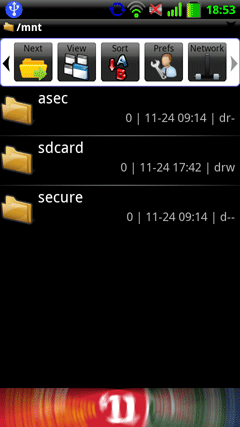
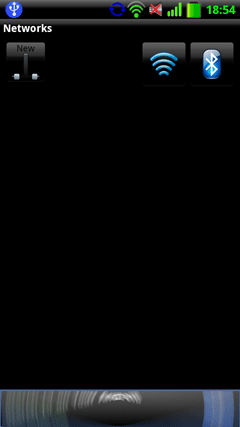
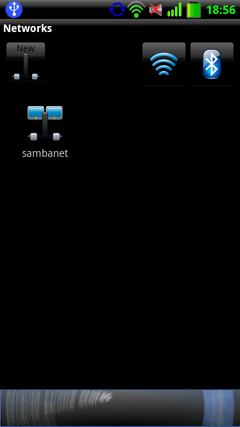
Once downloaded and installed. Open Astro, navigate to the Network icon, and click on it.

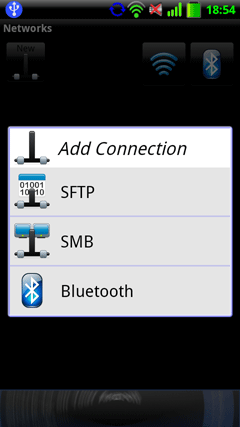
Click on New.

Click on SMB.

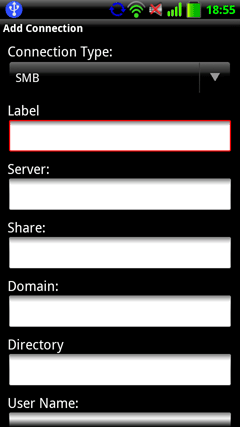
Fill in your info. Each computer is a “Server” and needs it’s own entry (that computers name).

Share, Domain, and Directory are not necessary.

Your new network connection will appear. Mine is labeled sambanet. Click on your entry.

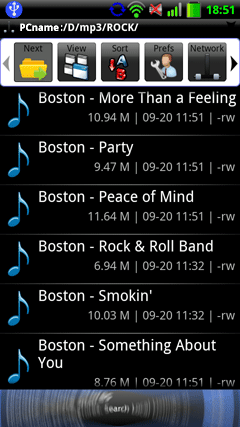
Now simply navigate to the folder of your choice.

Accessing your Droid phone from your computer.

I find accessing my phone from my computer to be faster and easier than the other way around. Fortunately someone has come up with a Samber server app. I am not going to go in to the details of how to install it, that info and the download link are here: http://forum.xda-developers.com/showpost.php?p=8239139&postcount=128 . See the entire thread for more info and questions. It is an excellent program and it is my hope that this will make it’s way to the Market.

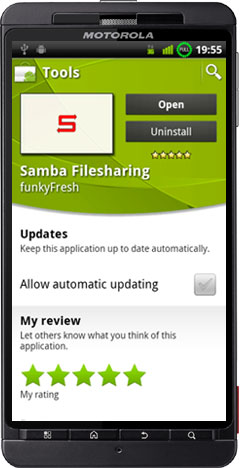
*edit 31 January, 2011 – This app is now available in the market. Search for Samba Filesharing, or funkyfresh. It is also still available at the above link.
sfsmarket1

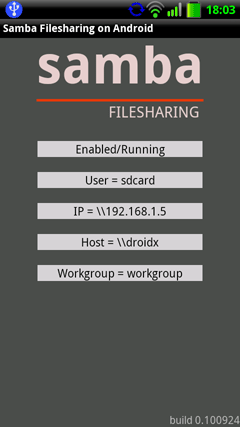
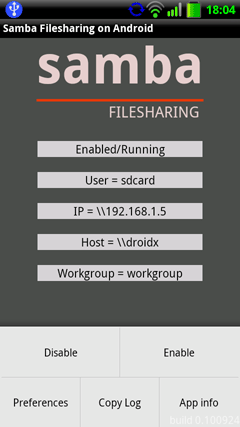
Once downloaded and installed open Samba Filesharing on Android.

This is the option screen.

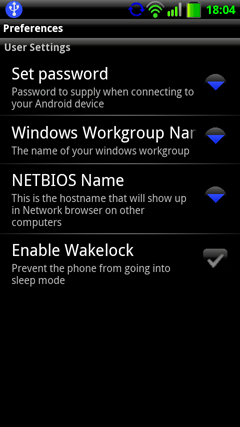
Click on Preferences and fill out each setting.

Click Enable when finished.

Advanced users: The samba configuration file is located at:  /data/data/com.funkyfresh.samba/files/smb.conf

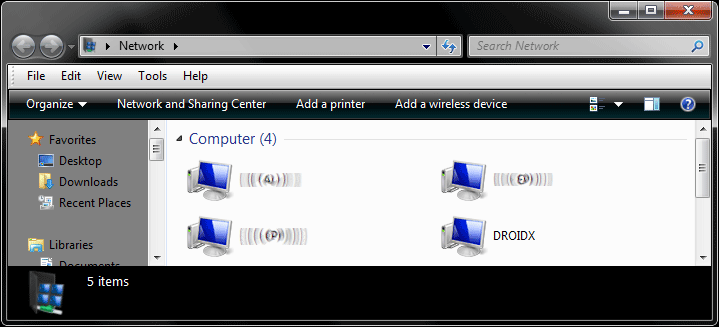
You should now see it on your network.

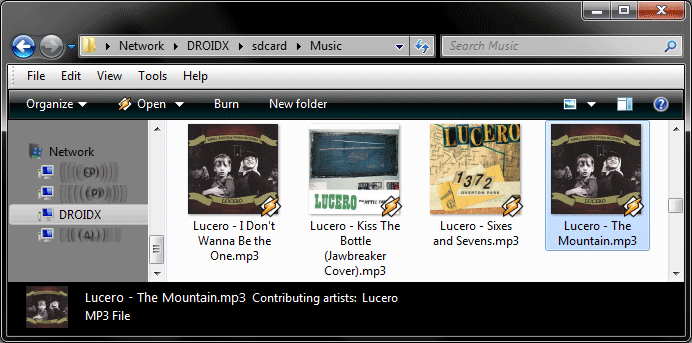
Browse to it just like any other computer.

Yep, works on Linux too!

Conclusion

I hope my fellow Android users will find this info useful. Anyone got any tips on this issue?

Other Samba apps: http://www.appbrain.com/search?q=smb

created 25 November, 2010. Last edited 31 January, 2011

« Previous Page
Next Page »

Primary Sidebar

Popular Articles

Windows 10

Tweaking Windows 10

My Windows 10 Tweaks

Windows 10 Privacy Settings

Win10 Diagnostics Tracking Service Gone?

Windows 10 Advanced Disk Cleanup

Win10 Customize Installation Options

Windows 10 Dark Theme

Win10 Wallpapers, Graphics, etc.

All Windows 10 Articles

Windows 8

Tweaking Windows 8.1

Advice On Installing Windows 8.1

Clean Install Windows 8.1

Cleanup After Windows 8.1 Upgrade

Create Shutdown, Restart, Logoff Tiles For Windows 8

Tweaking Windows 8

Install Windows 8 – Clean Install With Upgrade Media

Install Windows 8 – Upgrade

Windows 8 – Cleaning Up After You’ve Upgraded

Windows 8 Freeware Machine

Windows 8 SSD Settings, Etc.

How To Resize Your Windows 8 Partition

Create Windows 8 Recovery Media

Windows 8 – Elevated Command Prompt

How To Fix The Windows Bootloader

Windows 7

Installing Windows 7

Tweaking Windows 7

Windows 7 Diagnostics Tracking Service

The Windows 7 Freeware Machine

The Windows 7 Pagefile And Running Without One

Bad Tweaks

SSD Tweak Guide (sort of)

The noguiboot (no GUI Boot) Tweak

NtfsMemoryUsage=2 Tweak

More Windows 7 articles here.

Windows Vista

Installing Windows Vista

Tweaking Windows Vista

More Windows Vista articles here.

Windows XP

eXPired - The Last Windows XP Guide You'll Ever Need

The Right Way To Install Windows XP

Super XP Tweaking Guide

The Freeware XP Machine

Bad Tweaks

More XP Articles here and here.

Backup

Backup Article Greatest Hits – Vol. 1

Other

Cataloging Your Music Collection

Finding Good Album Art

Converting Vinyl Records To Digital Music – A Non-Audiophiles Guide

Windows All-In-One Recovery Flash Drive

SSD Tweak Guide (sort of)

Raidmax Blackstorm Case Review

Disk Partitioning

Ditch Those CD's! A Guide To Using USB Flash Drives

Checking Your Disks For Problems

Bad Tweaks

More articles here

Tags

Android Backup Beer Computer Hardware Computer News Cool Tools Freeware How-To's Linux Off Topic openSUSE Playlists Privacy Security Software This Site vacation Veterans Windows 7 Windows 8 Windows 10 Windows 11 Windows Vista Windows XP

TweakHound - Optimize Your Computing Experience! TweakHound - Optimize Your Computing Experience!

Copyright 2002-2025 by Eric Vaughan All material contain here is the property of the materials owner. Windows, Windows XP, Windows Vista, Windows Seven, Windows 8, Windows 10, Windows 11, Microsoft, and all associated logos are trademarks/property of Microsoft. You may not use or copy any material from tweakhound.com without expressed written permission. Hotlinking to any material within this site is forbidden. Privacy Policy