• Skip to primary navigation
  • Skip to main content
  • Skip to primary sidebar

TweakHound

Computer stuff...

  • Home
  • Windows XP
  • Windows Vista
  • Windows 7
  • Windows 8
  • Windows 10
  • Windows 11
  • Linux
  • Tweak Guides
  • Site Info
    • About
    • About Me
    • TweakHound’s World
    • Contact
    • My Computers
    • Old Articles
    • Privacy Policy
    • Old Index
    • Advanced Search

Windows

Patch Tuesday

July 9, 2019, 15:00(EDT) By Eric (a.k.a. TweakHound)

windows security

Patch Tuesday
Windows 7
July 9, 2019—KB4507456 (Security-only update)
Security updates to Windows Server, Microsoft Graphics Component, Windows Storage and Filesystems, Windows Shell, Windows Input and Composition, and Windows Kernel.
July 9, 2019—KB4507449 (Monthly Rollup)
Security updates to Windows Server, Microsoft Graphics Component, Windows Storage and Filesystems, Windows Shell, Windows Input and Composition, and Windows Kernel.

Windows 8.1
July 9, 2019—KB4507457 (Security-only update)
Security updates to Windows Wireless Networking, Windows Server, Windows Storage and Filesystems, Microsoft Graphics Component, Windows Input and Composition, Windows Kernel, and Windows App Platform and Frameworks.
July 9, 2019—KB4507448 (Monthly Rollup)
This security update includes improvements and fixes that were a part of update KB4503283 (released June 20, 2019) and addresses the following issues:
– Addresses an issue that may cause BitLocker to go into recovery mode if BitLocker is being provisioned at the same time as updates are being installed.
– Security updates to Windows Wireless Networking, Windows Server, Windows Storage and Filesystems, Microsoft Graphics Component, Windows Input and Composition, Windows Kernel, and Windows App Platform and Frameworks.

Windows 10
1903 – July 9, 2019—KB4507453 (OS Build 18362.239)
This update includes quality improvements. Key changes include:
– Addresses an issue that may cause BitLocker to go into recovery mode if BitLocker is being provisioned at the same time as updates are being installed.
– Addresses an issue that may cause Mixed Reality users to see a tilted world after connecting their headsets.
– Addresses visual quality issues some users may have seen with Windows Mixed Reality (WMR) headsets and Steam®VR content.
– Security updates to Windows Wireless Networking, Microsoft Scripting Engine, Windows Server, Windows Storage and Filesystems, Windows Kernel, Microsoft HoloLens, Internet Explorer, Windows Input and Composition, Windows Virtualization, Windows App Platform and Frameworks, Microsoft Graphics Component, Microsoft Edge, and Windows Cryptography.

1809 – July 9, 2019—KB4507469 (OS Build 17763.615)
This update includes quality improvements. Key changes include:
– Addresses an issue that may cause the system to become unresponsive when an application uses the CameraCaptureUI API.
– Addresses an issue that may cause BitLocker to go into recovery mode if BitLocker is being provisioned at the same time as updates are being installed.
– Security updates to Windows Server, Microsoft Scripting Engine, Microsoft Graphics Component, Internet Explorer, Windows Input and Composition, Windows Virtualization, Windows App Platform and Frameworks, Windows Kernel, Microsoft Edge, Windows Cryptography, and Windows Fundamentals.

1803 – July 9, 2019—KB4507435 (OS Build 17134.885)
This update includes quality improvements. Key changes include:
– Addresses an issue that may cause BitLocker to go into recovery mode if BitLocker is being provisioned at the same time as updates are being installed.
– Security updates to Windows Wireless Networking, Windows Server, Microsoft Scripting Engine, Windows Storage and Filesystems, Microsoft Graphics Component, Windows Kernel, Internet Explorer, Windows Input and Composition, Windows Virtualization, Windows App Platform and Frameworks, Microsoft Edge, Windows Cryptography, and Windows Fundamentals.

– – – – – – – – – –

Firefox 68
Download | Release Notes
This means Tails has been updated and Tor Browser will be.

Nvidia Geforce Game Ready WHQL Driver 431.36
“Provides the optimal gaming experience for Tom Clancy’s The Division 2, Strange Brigade, and Metro Exodus”
Download | Release Notes

Tagged With: Computer News, Security, Windows 10, Windows 7, Windows 8

The Never Ending Train Wreck That Is Windows 10

June 28, 2019, 08:50(EDT) By Eric (a.k.a. TweakHound)

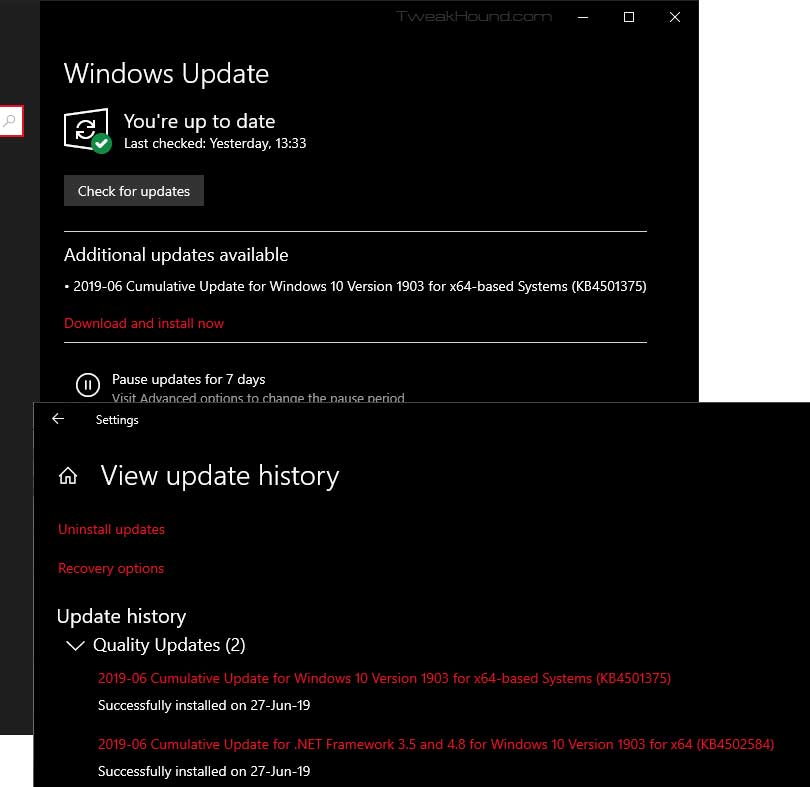
KB4501375 is installed. Win10 doesn’t seem to know and wants to do it again. This isn’t the first time it has happened.
Hey Microsoft, Your Windows 10 model isn’t working. Fix it.

Tagged With: Windows 10

Win10 1903 Stuff

May 24, 2019, 14:23(EDT) By Eric (a.k.a. TweakHound)

win10_logo

Win10 1903 Stuff
I rarely re-post Windows changes and known issues. Microsoft posts this and we’re all most of us are literate adults. As such you don’t need me or anyone else regurgitating this for you.
Windows 10 release information: has “Known issues and notifications” and “Resolved issues” of every Win10 version.

Features removed or planned for replacement starting with Windows 10, version 1903

How to get the Windows 10 May 2019 Update
Get the Windows 10 May 2019 Update

What’s new in Windows 10, version 1903 IT Pro content

Windows 10 and Windows Server 2019 update history

What’s new in recent Windows 10 updates

Windows lifecycle fact sheet – “The lifecycle begins when a product is released and ends when it’s no longer supported.”

Windows 10 and reserved storage
“Starting with the next major update we’re making a few changes to how Windows 10 manages disk space. Through reserved storage, some disk space will be set aside to be used by updates, apps, temporary files, and system caches. Our goal is to improve the day-to-day function of your PC by ensuring critical OS functions always have access to disk space. Without reserved storage, if a user almost fills up her or his storage, several Windows and application scenarios become unreliable.”

Improving the Windows 10 update experience with control, quality and transparency

Tagged With: Windows 10

Win10 1903 Available Now

May 21, 2019, 16:00(EDT) By Eric (a.k.a. TweakHound)

Well…kinda sorta…
Saw over at Neowin that some people have 1903 showing up via “check for update”. Not for me. All I had was May 21, 2019—KB4497934 (OS Build OS 17763.529). 1903 is available for download:
https://www.microsoft.com/en-us/software-download/windows10
I’ll wait and see if it shows up tomorrow.

Tagged With: Windows 10

Patch Tuesday

May 14, 2019, 13:14(EDT) By Eric (a.k.a. TweakHound)

audacity

Windows 7-10 updated.
This may or may not be the last update before the May 2018 feature update.

Windows 7
May 14, 2019—KB4499175 (Security-only update)
May 14, 2019—KB4499164 (Monthly Rollup)

Windows 8.1
May 14, 2019—KB4499165 (Security-only update)
May 14, 2019—KB4499151 (Monthly Rollup)

Windows 10
1809 – May 14, 2019—KB4494441 (OS Build 17763.503)
1803 – May 14, 2019—KB4499167 (OS Build 17134.765)
1709 – May 14, 2019—KB4499179 (OS Build 16299.1146)

Other Software:

Audacity 2.3.2
Download | Release Notes | Home Page

CCleaner 5.57
A whole lotta ‘meh’. I’d skip it.
Download (I use portable) | Release Announcement
See also: Blocking A Programs Internet Access Via The Windows Firewall

Adobe Reader Updated
Download en-US | All Downloads | Security Bulletin | Release Notes

Tagged With: Computer News

Win10 1903, Are You Ready?

May 13, 2019, 08:12(EDT) By Eric (a.k.a. TweakHound)

Windows 10 May 2019 Update
Win10 1903 brings several changes, most of which the average user won’t care about. Two changes of note are supposed increased performance and improved control of Windows Update. The best breakdown I’ve seen to date is:
Neowin – The Windows 10 May 2019 Update is coming – here’s what’s new

Release Date
– “Official” date unknown at this time. “End of May” often quoted. Expect it somewhere between tomorrow and hell freezing over.
– ISOs are floating around now

Blocking 1903
– Easy way: Use O&O ShutUp10
See also: Windows Update section of the Tweak Guide.
(1903 will bring major changes to this.)

Preparing for 1903
– Update all your apps and drivers.
– Backup everything. Make a system image. I use the free Macrium Reflect. This is also a good time to backup everything else.
See also: Windows 10 Backup And Recovery Options

My Recommendation
– Put off installing 1903 at least one month.
– Better safe than sorry. Microsoft will, at some point, state that 1903 is “safe for business”. The October 2018 Update was declared safe on March 28th, 2019.

Tweaking Windows 10
It will be at least a month after release before the Win10 Tweak Guide is updated.

Tagged With: This Site, Windows 10

Bad Tweak – Optimize USB Storage

April 9, 2019, 12:35(EDT) By Eric (a.k.a. TweakHound)

th

I don’t know why but a setting introduced in Win10 1809 is just recently making the rounds as a performance tweak.
[Read more…] about Bad Tweak – Optimize USB Storage

Tagged With: Computer Hardware, This Site, Windows 10

Win10 1809 Updated

April 3, 2019, 09:29(EDT) By Eric (a.k.a. TweakHound)

win10_logo

The latest version of Win10 did not get updated with other versions a few weeks ago. Yesterday that changed. It’s a whole bunch of “Addresses an issue” stuff. With Win10 version 1903 imminent IMHO I wouldn’t go out of my way to install this.
April 2, 2019—KB4490481 (OS Build 17763.404)

Tagged With: Windows 10

Changing Your DNS Server

February 19, 2019, 10:45(EST) By Eric (a.k.a. TweakHound)

th

This guide will show you how to change your DNS Server. In addition it covers benchmarking DNS servers and if you should change your DNS server.
[Read more…] about Changing Your DNS Server

Tagged With: How-To's, This Site, Windows 10, Windows 7, Windows 8

Patch Tuesday

February 12, 2019, 13:20(EST) By Eric (a.k.a. TweakHound)

windows security

Updates available for all supported versions of Windows.
Office updates available too. (how to check for Office updates)

Win10 1809 – February 12, 2019—KB4487044 (OS Build 17763.316)
Win10 1803 – February 12, 2019—KB4487017 (OS Build 17134.590)
Win10 1709 – February 12, 2019—KB4486996 (OS Build 16299.967)

Windows 8.1 – February 12, 2019—KB4487028 (Security-only update)

Windows 7 – Windows 7 SP1 and Windows Server 2008 R2 SP1 update history

Office 365 11231.20174 and other versions

Note from Microsoft:
February 11, 2019 12:45 PM PST
Windows Update customers were recently affected by a network infrastructure event caused by an external DNS service provider’s global outage. A software update to the external provider’s DNS servers resulted in the distribution of corrupted DNS records that affected connectivity to the Windows Update service. The DNS records were restored by January 30, 2019 (00:10 UTC), but downstream effects continued. We believe the issue to be fully mitigated because the majority of local Internet Service Providers (ISP) have refreshed their DNS servers and customer services have been restored. If you are still encountering download failures, please contact your local ISP.
While this was not an issue with Microsoft’s services, we take any service disruption for our customers seriously. We will work with partners to better understand this so we can provide higher quality service in the future even across diverse global network providers.

Tagged With: Security, Windows 7, Windows 8

« Previous Page
Next Page »

Primary Sidebar

Popular Posts

Tweaking Windows 10

Software I Use – 2021 Edition

Timer Tweaks Benchmarked

Win10 – Get Auto-Login Back

Recent Posts

  • Weekend News
  • Patch Tuesday
  • Tuesday News
  • Weekend News
  • Sunday News
  • Patch Tuesday
  • Wednesday News
  • Patch Tuesday
  • Monday News
  • Patch Tuesday
buywin10th2

Tags

  • Android
  • Backup
  • Beer
  • Computer Hardware
  • Computer News
  • Cool Tools
  • Freeware
  • How-To's
  • Linux
  • Off Topic
  • openSUSE
  • Playlists
  • Privacy
  • Security
  • Software
  • This Site
  • vacation
  • Veterans
  • Windows 10
  • Windows 11
  • Windows 7
  • Windows 8
  • Windows Vista
  • Windows XP

Catagories

  • Android
  • Backup
  • Beer
  • Computer Hardware
  • Computer News
  • Cool Tools
  • Freeware
  • Freeware Machines
  • How-To's
  • Linux
  • News From The Web
  • Off Topic
  • openSUSE
  • Privacy
  • Security
  • Software
  • Tweak Guides
  • Veterans
  • Windows
  • Windows 10
  • Windows 11
  • Windows 7
  • Windows 8
  • Windows Vista
  • Windows XP

TweakHound - Optimize Your Computing Experience! TweakHound - Optimize Your Computing Experience!

Copyright 2002-2025 by Eric Vaughan All material contain here is the property of the materials owner. Windows, Windows XP, Windows Vista, Windows Seven, Windows 8, Windows 10, Windows 11, Microsoft, and all associated logos are trademarks/property of Microsoft. You may not use or copy any material from tweakhound.com without expressed written permission. Hotlinking to any material within this site is forbidden. Privacy Policy