 This is an updated and reformated version of Installing Windows 7 (previously found here)
Installing Windows 7
A start-to-finish, step-by-step guide to properly installing Windows 7.
created 15 October, 2009
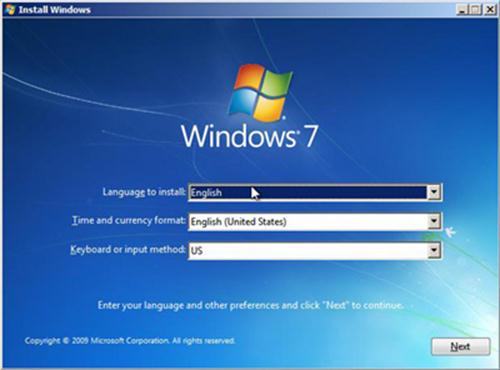
Please read through this entire guide before doing anything.
If you do not have Windows 7 Service Pack One on your install DVD you can get it here:
Windows 7 SP1
If you want to download refreshed Windows 7 SP1 ISOs you can get them here:
Download Windows 7 Disc Images (ISO Files)
1 – Download all your drivers.
To find out all the specifics of your computer and its hardware download Speccy and run it (I just use the portable version).
You can get the drivers from the website of the manufacturer of you computer and/or hardware (Google is your friend).
If you cannot find a specific Windows 7 driver for your hardware then download the latest one for Vista (it is possible it may work).
Once you’ve got them all, burn them to a CD and/or a USB drive.
2 – Backup any and everything you may want that is currently installed on the computer. This means to a location other than the computer that 7 is to be installed on. For a few suggestions on how look here for Windows Vista, and here for Windows XP.
3 – Optional but highly recommended, Wipe the target installation drive. No self-respecting Geek would ever do an upgrade install to a new OS (previous to Win10). If you insist on doing an upgrade then skip this step. I usually use an Acronis Disk Director boot disk for this but there are other tools available. Please note, I do not recommend using any method other than the installation disk to format the drive. I’ve heard scattered reports of problems using other methods. For UEFI systems I prefer to wipe the drive and then let Windows do its thing on install.
This is for non-UEFI systems:
My preferred method is to backup all my files to an external hard drive (this is what I have). Then boot computer with either an Acronis Disk Director boot disk or UBCD4Win disk. Once I boot these up I delete and wipe the partitions, then create new ones (ensure the partition you install 7 on is an active partition). I format the partitions again from the Windows 7 disk during the install.
Advanced users who aren’t afraid of the command line see Windows 7 Installation Advanced Drive Formatting below.
*Avoiding the 200MB partition: Folks have discovered that on an unpartitioned drive Windows 7 will create a 200MB system partition. This is easily avoided by creating a partition before attempting to install Windows 7 (see above). (for some this partition will be 100MB)
*Bitlocker requires this partition. (thanks to eaglewind for the tip!)
TrueCrypt is a better alternative.
**Exception for SSD drives to avoid the 200MB partition and partition / format the drive.
Partitioning is a little different for SSD (Solid State Drives). This is because of something called NTFS partition alignment. Basically this refers to where on the drive the partition starts. Vista and 7 will create a single partition optimally for SSD’s. XP and most program boot disks will not. If possible you should partition the disk under an already installed Windows 7 or Windows Vista machine and then proceed with the usual installation steps. If not then this is the way to do it:
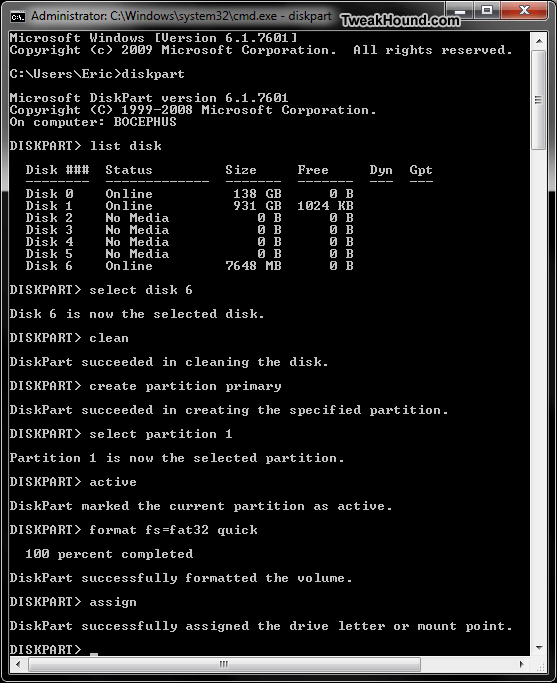
Windows 7 Installation Advanced Drive Formatting
1 – Boot up from the Windows 7 installation disc.
2 – Choose Repair your computer.
3 – In the System Recovery Options screen, choose Use recovery tools… and click Next.
4 – Open the Command Prompt.
5 – Type diskpart and hit Enter.
6 – Type list disk . Find the disk you wish to install Windows 7 on. If you only have one disk then it will show as disk 0. If you have multiple disks find the drive you wish to install 7 on.
7 – Type select disk 0 (or use the number of the disk you wish to install Windows 7 on)(note – that is a zero)
8 – Type list partition. There shouldn’t be any.
9 – Type create partition primary.
10- Type select partition 1.
11- Type active.
12- Type format quick.
13- When finished reboot and begin your installation.
( DiskPart Command-Line Options )
*The above section must have really been good. It has been ripped off around the web.
Example of diskpart (click on thumbnail for a larger image)
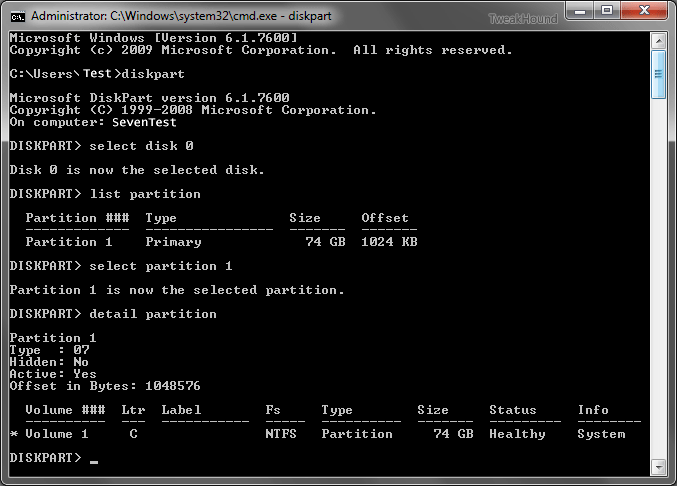
Please note: This is for a single partition setup. If you need multiple partitions on the SSD then you can shrink the Windows 7 partition after you install.
More info on Windows 7 and SSD’s:
Engineering Windows 7 – Support and Q&A for Solid-State Drives
Windows 7 Enhancements for Solid-State Drives (ppt slides viewed thru Google cache)
MUST READ! Anandtech SSD article #1 and article #2.
3a – How I Partiton My Hard Drives
BIOS (non-UEFI) System
Single disk system – Operating System on first partition – Docs (libraries) on the second partition made from the remaining space.
Multi-disk system – OS on first drive – Docs (libraries) on second – Other drives for storage.
Multi-disk system (advanced) – OS on first drive – Second drive, a second Page File on the first partition (only if it is as fast as the OS drive), Docs (libraries) on second partition – Other drives for storage.
UEFI System
Single disk system – Recovery on 1st partition, EFI on 2nd partition, Operating System on 3rd partition – Docs (libraries) on the second partition made from the remaining space.
The rest as above.
4 – Consider hardware upgrades.
– Memory – Get +2GB for Windows 7 32-bit, 8GB (of more) for 64-bit. Speccy (linked to above) can tell you what kind of memory your system has, look under the Hardware > Memory section.
– Video Card – A 1GB (or more) card would put you in excellent position to enjoy Windows 7. A good place to start looking for which card to buy would be AnandTech. Check their Guides / System Buyers Guides and pick your price range. For the more high end minded folks, you can check [H]ardOCP and AnandTech for those reviews and recommendations (good computer hardware advice can also be found in their forums).
– Hard Drive – Get rid of it. At least for the OS drive. SSDs are wicked fast and are cheap. As of this writing I prefer Samsung and Crucial SSD’s.
*You can do the above upgrades yourself. They are not complicated, can be done in a few minutes, and usually involve little more than a screwdriver. Take your time and read the guides that come with the hardware (we Geeks call that RTFM). If that guide leaves you confused simply do a Google search, i.e. “how to install a hard drive”.
5 – Clean The Inside Of Your Computer. As anyone who works on others computers can tell you, the inside of a computer can get quite nasty. I’ve worked of computers that have left me sneezing and longing for a shower. Cleaning your computer can reduce heat inside the box allowing it to last longer (heat is the enemy of a computer). Bleepingcomputer has a good guide.
6 – Download the following Windows Update:
KB3102810 Installing and searching for updates is slow and high CPU usage occurs in Windows 7 and Windows Server 2008 R2
I want you to install this after you install your drivers and BEFORE you run Windows Update.
Installing Windows Seven
Installing Seven is almost idiot proof. I will show just a few select screenshots. Pop in the DVD and let’er rip. The few questions you have to answer are straight forward.
Partition Sizes: Officially listed as 16 GB available hard disk space (32-bit) or 20 GB (64-bit). I would recommend 30 GB as a good size for a partition, more if you have the space. Remember once multiple partitions are set up, it is easier to make the partition larger than you think you need at the beginning and shrink it than it is to make a minimum size partition and have to enlarge it later. (please see How I Partiton My Hard Drives above for how I do my partitioning)
Clean Install ( I recommend using these steps regardless to whether or not you have a full or upgrade disk)
You cannot do a clean install from an upgrade disk.
There are several workarounds. See: Paul Thurrott – Clean Install Windows 7 with Upgrade Media
I would recommend doing it as he describes in Method #1:
1 – Wipe drive/partition (see above for partitioning recommendations)
2 – Install Seven. If using an upgrade disk, DO NOT ENTER YOUR KEY
3 – If using an upgrade disk. On first boot,install your drivers then run Windows Update until there are no more updates.
4 – In the start menu search box type activate , enter your key and then activate Windows.
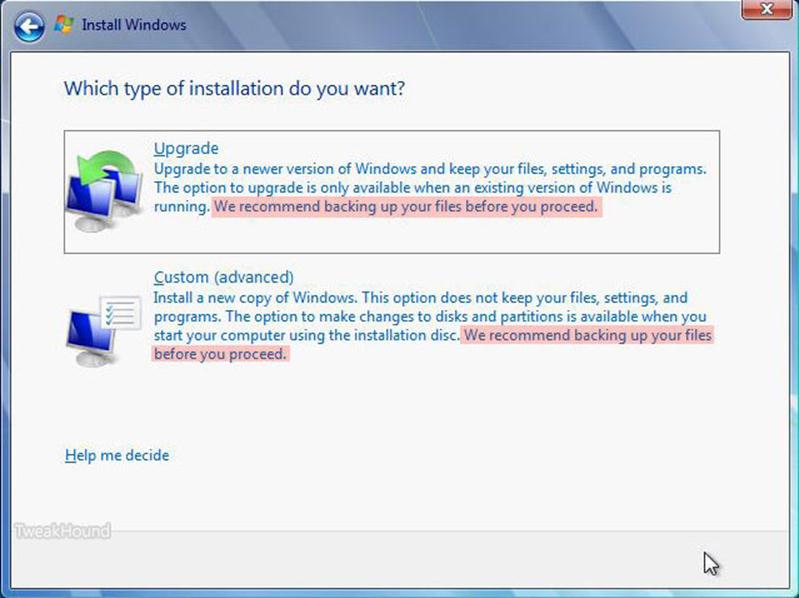
Choose Upgrade or Clean Install.
To do a clean install click on Custom (advanced).
As stated above I highly suggest a clean install. See the backup warnings???
Click on Drive options (advanced) to be able to format your partition.
Got RAID or is your disk not showing up? Click Load Driver.
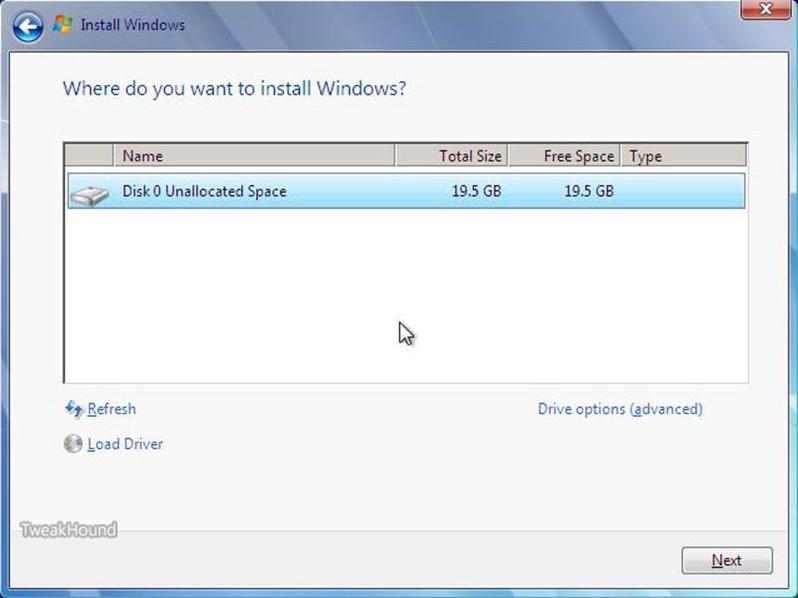
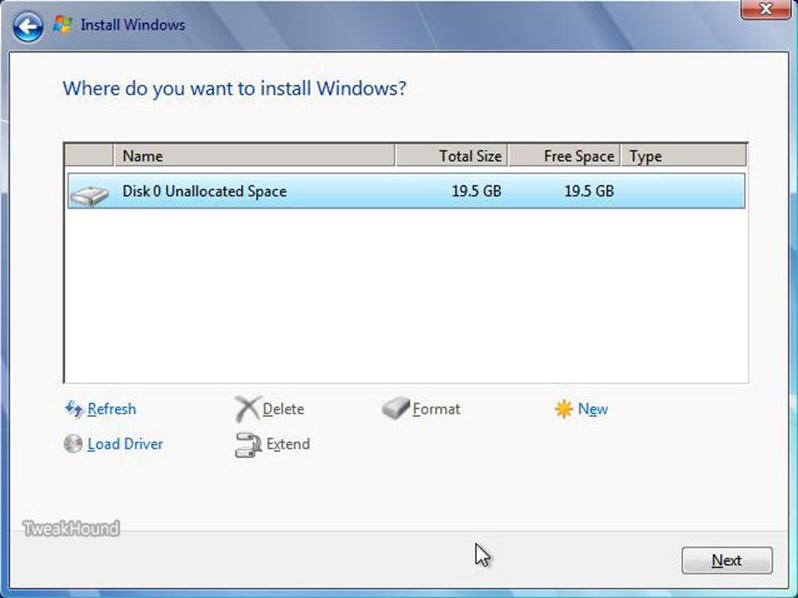
Here are your drive options.
See above for partition recommendations (I’ve got 19.5 here because the screenshots were taken from a virtual machine).
You should at least format the partition.
First Boot
If you are going to disable UAC the do so now (see below for how).
Uninstall stuff you aren’t going to use.
Open the Control Panel:
– From the default screen – Go to Start > Control Panel > Programs > Uninstall a program > Turn Windows Features on or off
– Better option, switch view to Large Icons (look on the upper right of the Control Panel window for “View by:” Then go to Programs and Features > Turn Windows Features on or off.
– Fastest way – Press the Windows + R keys and type appwiz.cpl > Turn Windows Features on or off.
Deselect (uncheck) things you don’t want. What is available depends on the edition of 7 you have. If you see something listed here that isn’t in your list don’t worry, you don’t have it. I choose to uninstall:
-Games (all)
-Print and Document Services (all) (careful, check out the individual parts)
-Remote Differential Compression
-Tablet PC Components
-Windows Search (only if you aren’t going to use indexing)
Click OK and then reboot if prompted
Install Drivers
tip #1 – To quickly access Device Manager, hit the Windows + R keys and type devmgmt.msc
tip #2 – In Device Manager, if an item has an exclamation icon then it needs a driver.
The order I use to install drivers is:
-Chipset
-RAID and/or other drivers involving storage
-Graphics
-Sound
-LAN
Setup Advanced Cleanup
Press the Windows + R keys, type cleanmgr /sageset:50 .
Select the options you desire, I choose them all. Click OK and close out the window.
Press the Windows + R keys, type cleanmgr /sagerun:50 .
(note – there is a space between the r and the /)
See HERE and HERE for more on this.
* You can use this command at any time for regular disk cleanups. I use the number 50 because it is easy to remember, you can use any number you want.
*tip – this works in Safe Mode too.
Windows Update
Above I said to download the following Windows Update:
KB3102810 Installing and searching for updates is slow and high CPU usage occurs in Windows 7 and Windows Server 2008 R2
Install it now and reboot.
Now Run Windows Update. Deselect everything and install Internet Explorer 11 there and reboot.
Block Windows 10 upgrade (GWX) related nonsense by using GWX Control Panel. Run it now and reboot.
Now run Windows Update and keep running it until all Critical Updates are installed and any Optional Updates you want are installed. Updated drivers may be available too.
Optional – After all critical updates are installed Run Windows Update but do not install anything. Close Windows update then run my script here:
https://www.tweakhound.com/2015/11/01/remove-and-block-gwx-in-windows-7-2/
Then Run Windows Update again and install any/all optional updates
Backup – Make An Image (I used an Acronis TI Boot Disk)
(please note I did not say install a backup program (yet). Both Acronis True Image and Norton Ghost have the ability to make boot disks)
Install Your Programs
***Very important.
If you intend to disable User Access Control (UAC) as I have then you should do this BEFORE YOU INSTALL ANY PROGRAM. Not doing so can lead to problems later.
To Disable UAC:
– Type or copy and paste UserAccountControlSettings.exe into the Start menu search box.
– In the resulting window, move the slider all the way to the bottom.
– Reboot
PAY ATTENTION to what you are installing (in other words, don’t keep clicking Next). Don’t install more than you need. Don’t install toolbars or let it change your home page either. Decide what apps you want to do what. For instance:
I use Winamp Lite (and I use a very basic install for that) as the Default for playing .wav and .mp3 files because it opens faster and with a smaller footprint than say Windows Media Player or iTunes. Also, I have no application launching when I insert a music CD or DVD either.
Major Applications
I recommend you install the major applications first (i.e. anti-virus, software firewalls, Office, and the applications that come with your hardware). Always use the custom or advanced installation method and pay attention to the options screens. I install all the applications to the same drive as the OS. That is because I use backup program, and use it often! Pick and choose the parts you install carefully. If you don’t install it. Avoid allowing anything that isn’t necessary to “load at startup.” As you install each application, download (if you haven’t already) and install all updates and patches before you move on to the next application. I prefer to load my backup program first and make an image before I go further. The very next thing I install is anti-vrus software.
Minor Applications
Next install the minor applications (Sound, graphics, utilities, etc.) Check for the most recent versions first. Before you install them, decide which applications you want to perform what. If you have multiple applications that can do or play the same thing, decide which you prefer. For example; I have Windows Media Player, Winamp, MediaMonkey, and iTunes all wanting to be the default player for many of the same files. If not configured properly, they will fight for dominance. Giving each player it’s own default settings doesn’t mean you can’t ever play it in another application. After you install each application, open them and double check configuration settings, some applications don’t play nice!
Use cleanmgr /sagerun:50 again!
Move Your Libraries
This is a critical step in the way I set up computers. A problem free backup / restore process depends on you having your docs, music, pics, etc. on a drive or partition other than the one Windows 7 is on. Using this method you do not have to worry that some issue (virus, crash, hardware failure, etc) will mean losing your data.
How To Move Windows 7 Libraries
Decide where you want to move these to.
A second disk is your best option but in a single disk system a second partition will do.
Right-click on your User Name in the Start Menu and choose Open.
Select the libraries you wish to move and copy / paste them to the new location.
Pick the stuff you wish to be safe from any problems.
I would do at least: Contacts, Downloads, My Documents, My Music, My Pictures, My Videos.


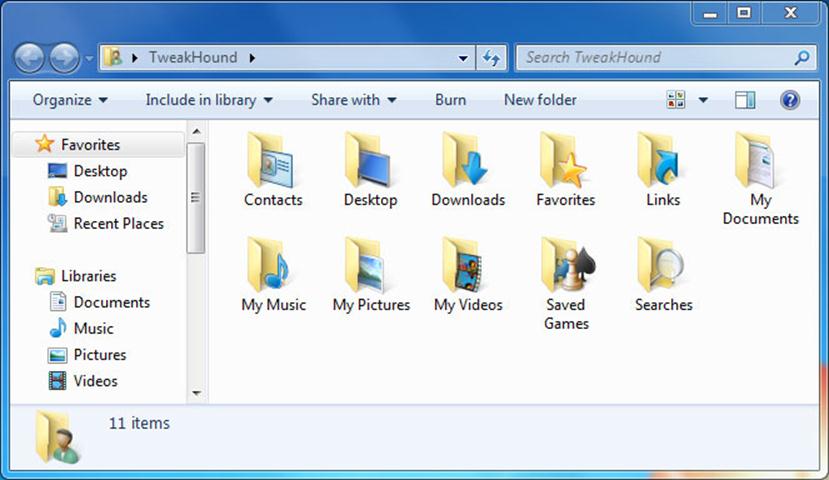
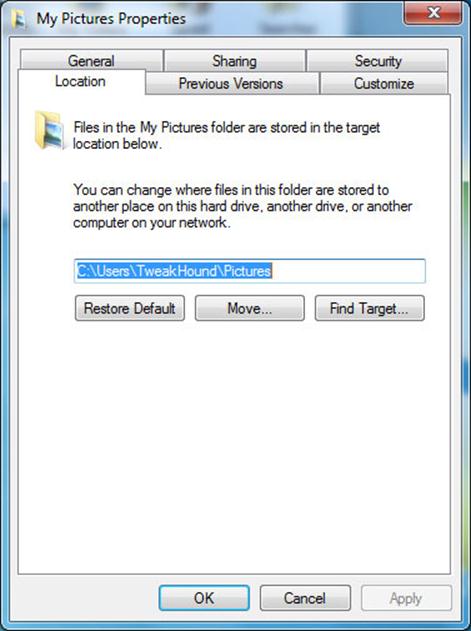
Once you have finished copying the files. Go back to the original Library, right-click on each folder you moved.
Choose Properties from the menu. In the resulting window, click on the Location tab, and then the Move… button.
Browse the the location you copied the files to.
Click once on the folder you want it moved to and then click the Select Folder button (bottom right of the screen).
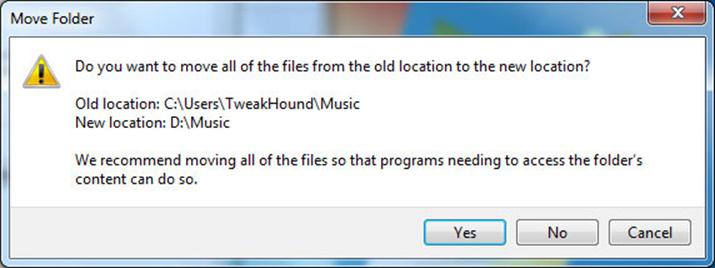
This screen will pop up. Click Yes.
Repeat this step for all the folders you copied.
Add new folders to your Library
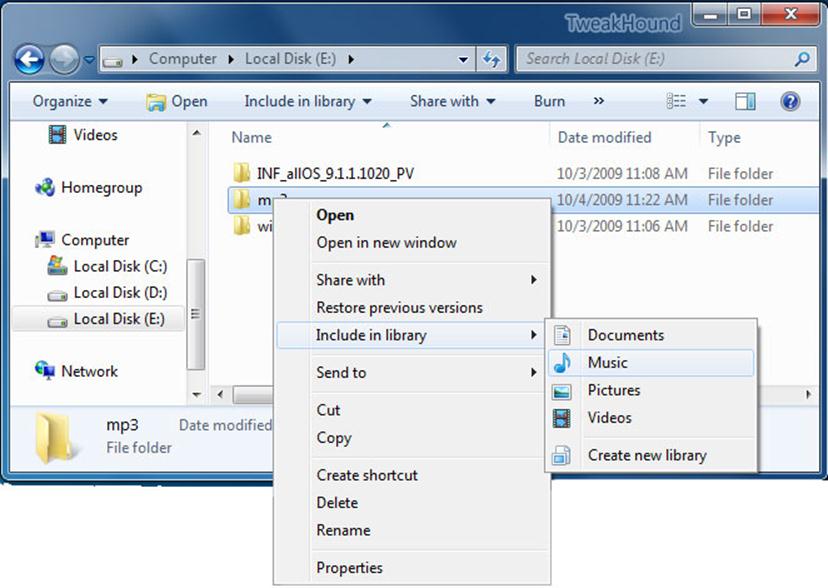
All your files do not have to be in the actual library folder. Windows 7 lets you add folders from other locations to your library without actually moving them into the actual library location.
To add a folder to a library. Right-click on that folder and choose Include in library > and choose the appropriate library.
Configure Your Email
If your ISP software didn’t do it, configure your email now.
Configure Programs That Start With Windows 7
Get everything you possibly can out of the System Tray (by the clock in the lower right hand of the screen). The best way to do this is in the applications options. If that fails, use Autoruns.
Autoruns
Download Autoruns.
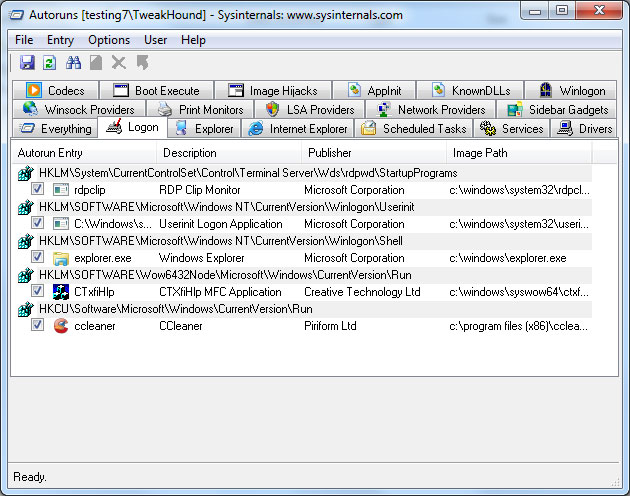
Extract the folder to your root drive (usually C). Open the Autoruns folder and double-click autoruns.exe. Click on the Logon tab, Uncheck anything you do not want to start with Vista. The fewer things the better. If you don’t know what it is, leave it alone. Advanced users may want to go to the SERVICES tab and make modifications there.
Autoruns (click on image for a larger picture)
CCleaner
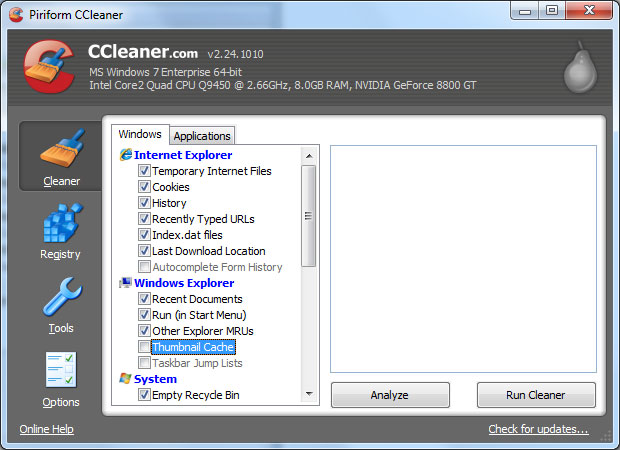
Download and install CCleaner Slim.
Configure it – Poke around and choose your options (I enable Run CCleaner when the computer starts).
Run it.
CCleaner (click on image for a larger picture)
Final Cleanup & Defrag
– Start up in Safe Mode and use cleanmgr /sagerun:50 again!
– Run CCleaner.
Next, go to START > ALL PROGRAMS > ACCESSORIES > SYSTEM TOOLS > DISK DEFRAGMENTER. Highlight the drive you installed Windows 7 on, click the DEFRAGMENT button. This will take a while. When finished shut down and restart.
Get there faster: type dfrgui in the Start Menu search box.
Backup
Whatever backup method you prefer, make a backup.
You’re done!