New reader inspired article up:
Ditch Those CD’s! A Guide To Using USB Flash Drives
Page 1 – Article Intro, Flash Drive Booting, Advanced USB Drive Formatting
Page 2 – Install Windows 7 or Windows Vista From A USB Flash Drive
Page 3 – Install Windows XP From A USB Flash Drive
Page 4 – Install a Linux Operating From A USB Flash Drive or Boot from one or more Linux Live CD’s on a USB Flash Drive
Page 5 – Utility And Rescue Bootable USB Flash Drive
Page 6 – Portable Apps And USB Flash Drive PC Toolbox
Page 7 – What I Use & Other USB Info
Adobe Reader X, Adobe Flash & Shockwave Players Updated
Security Fixes. Get them from Major Geeks to avoid the Adobe Download Manager:
Adobe Flash
Adobe Reader X
Adobe Shockwave
Time To Run Windows Update
A whole lotta updates today! Microsoft Security Bulletin Advance Notification for June 2011

Backup Your Phone Contacts
I wrote a quick guide for my friends on this topic (mostly just links on how-to). I’m the only Geek among them. The article is unnecessary for my fellow Geeks I know.
Backup Your Phone Contacts
Backup Your Phone Contacts!
Lately there seems to have been a rash of broken, lost, or stolen phones amongst my friends.
For many of you this means lost contacts.
In an endeavor to save you this problem in the future I have prepared the following quick guide (mostly just links on how-to).
As a side note. Some of you that have lost your contacts may in fact have had the below solutions already running without your knowledge.
Running the restore feature of the below apps could restore your contacts.
Bottom line is that every phone has an option and/or method for you to backup and restore your contacts.
How To backup Your Phone Contacts
Apps
There are several apps that will backup contacts for iPhones, Blackberrys, and Android phones.
Search your particular app store for:
iDrive – The “lite” version is free. Does iPhone, Blackberry, Android.
MyBackup Pro – $5 in the Android Market.
Titanium Backup – $6 in the Android market. Requires ROOT (if you don’t know what that is then you don’t want this).
There are of course other backup apps. You’ll just have to search your App Store / Market. Be sure to read the reviews!
iPhone
When you get an iPhone you’ve committed yourself to having to use iTunes to manage your phone from a computer.
http://support.apple.com/kb/HT1766
Android
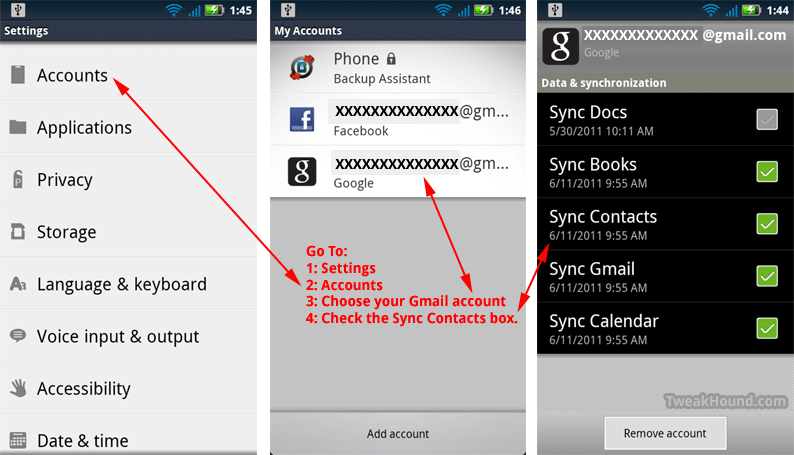
Droids are built to use Gmail (rather the OS is). If you’ve got a droid get a Gmail account.
You can configure your phone to sync automatically.
Although your phone isn’t going to look exactly like the pic below, the steps to turn this feature on will be similar enough for you to figure it out.
Carriers
AT&T
AT&T uses an application called Mobile Backup.
https://mobilebackup.att.com/jebber/public/att/faqs.html
It works with most AT&T phones EXCEPT iPhones.
Sprint
Sprint uses an application called Mobile Sync.
http://ecenter.custhelp.com/app/answers/detail/a_id/850/~/access-sprint-mobile-sync-online-after-you%27ve-registered
Tmobile
Same deal as AT&T.
http://support.t-mobile.com/doc/tm23951.xml;jsessionid=wts6BW3IIB8Ef8_4Fs
Verizon
Verizon uses an application called Backup Assistant.
http://support.vzw.com/how_to_use/backup_assistant.html
for iPhone:
http://support.vzw.com/how_to_use/transfer_contacts/iphone_vz_transfer.html
———-
FWIW – I’ve got a rooted Droid X on Verizon. I use Gmail sync and Titanium Backup (I also export those contacts from Gmail to a .csv file to my computer). I’m currently not using the Backup Assistant.
iTunes 10.3
Download Be sure to see Ed Bott’s – The unofficial guide to installing iTunes 10 without bloatware
Introducing iTunes in the Cloud beta. The music you purchase in iTunes appears automatically on all your devices. You can also download your past iTunes purchases. Where you want, when you want.
Adobe Flash Player Security Update
Download Adobe Flash Player
Security update available for Adobe Flash Player
Release date: June 5, 2011
Platform: All Platforms
An important vulnerability has been identified in Adobe Flash Player 10.3.181.16 and earlier versions for Windows, Macintosh, Linux and Solaris, and Adobe Flash Player 10.3.185.22 and earlier versions for Android. This universal cross-site scripting vulnerability (CVE-2011-2107) could be used to take actions on a user’s behalf on any website or webmail provider, if the user visits a malicious website. There are reports that this vulnerability is being exploited in the wild in active targeted attacks designed to trick the user into clicking on a malicious link delivered in an email message.
Acronis True Image Home 2011 Updated
Acronis True Image Home 2011 build 6857 has been released (release notes).
Log in to your account to download, be sure to download to bootable media too.
Nvidia 275.33 WHQL Drivers
Download’em here.
CCleaner v3.07
Change Log:
Added Flash Player SOL setting file cleaning and management.
Added Safari Icon history cleaning.
Added cleaning for Windows Elevated Diagnostics.
Added cleaning for Kantaris Media Player, KMPlayer, Orbit Downloader, Pando, Sandboxie and Snagit.
Improved cleaning for XFire, Real Player, Windows Log Files, Macromedia Shockwave 10 and 11.
Improved Google Chrome thumbnails and favicons cleaning.
Improved Google Chrome Saved Form Information cleaning.
Improved Google Chrome Save Passwords cleaning.
Improved Opera Last Download Location cleaning.
Improved Remote Desktop cleaning.
Improved Recent Documents cleaning.
Improved Exclusion functionality for Registry cleaning.
Improved Registry cleaning for Windows Services.
Improved Drive Wiper functionality and feedback.
Fixed bug in Cookie importing/exporting.
Minor translation fixes.