
• Skip to primary navigation
  • Skip to main content
  • Skip to primary sidebar

TweakHound

Computer stuff...

  • Home
  • Windows XP
  • Windows Vista
  • Windows 7
  • Windows 8
  • Windows 10
  • Windows 11
  • Linux
  • Tweak Guides
  • Site Info
    • About
    • About Me
    • TweakHound’s World
    • Contact
    • My Computers
    • Old Articles
    • Privacy Policy
    • Old Index
    • Advanced Search

Android Phone On Your Home Network

November 25, 2010, 12:22(EST) By Eric (a.k.a. TweakHound)

There are various ways to transfer files to and from your Droid phone. This article will show you how I put my Droid X on my Windows / Linux home network.

I cannot verify which Android phones this all works on, I only know that it works from mine.

*Fair warning: This is a slightly advanced procedure that requires your phone to be rooted.

All this is done from Wi-Fi.

For those who do not know, Android runs off a modded Linux kernel. So a little explanation for those not familiar with Linux networking. I’m going to try and explain this in layman’s terms so please Geeks, cut me a little slack here. Linux requires a network “client” to go to another machine and a network “server” to allow other machines to access your machine. Linux uses Samba to network so the terms are Samba Client and Samba Server.

Your Windows / Linux computer(s) network and shares must already be setup. How to do this is beyond to scope of this article.

Accessing other computers from your Droid phone.

There are a few ways to do this. I use a program called Astro File Manager as my main file explorer and it has a Samba client add-on. Both are available in the Market.

Astro File Manager main app is here: http://androlicious.com/details/com.metago.astro


The Astro File Manager Samba client is called Astro SMB Module and is here: http://androlicious.com/details/com.metago.astro.smb

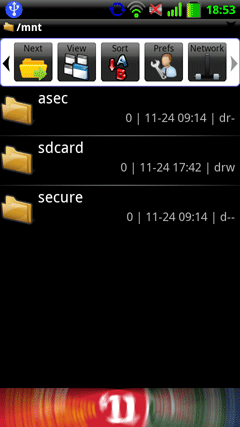
Once downloaded and installed. Open Astro, navigate to the Network icon, and click on it.
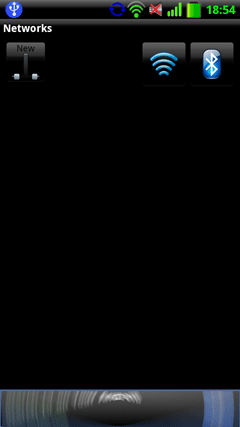
Click on New.
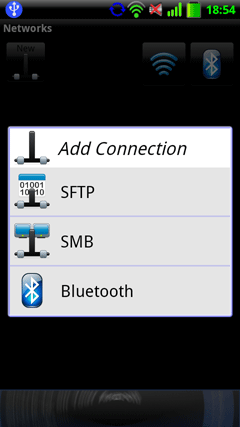
Click on SMB.
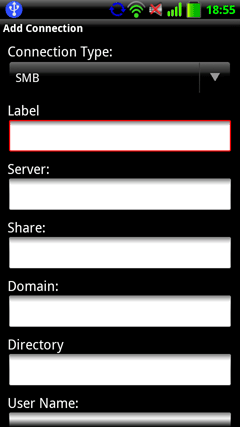
Fill in your info. Each computer is a “Server” and needs it’s own entry (that computers name).

Share, Domain, and Directory are not necessary.
Your new network connection will appear. Mine is labeled sambanet. Click on your entry.
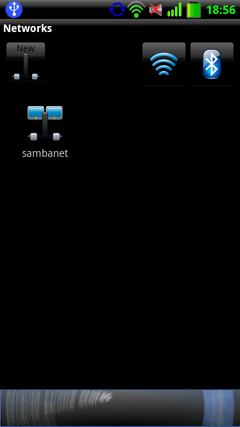
Now simply navigate to the folder of your choice.
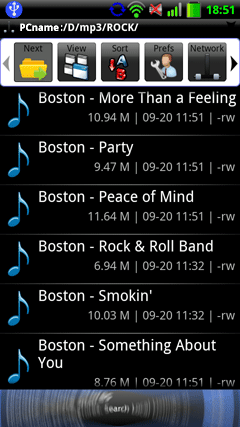
Accessing your Droid phone from your computer.

I find accessing my phone from my computer to be faster and easier than the other way around. Fortunately someone has come up with a Samber server app. I am not going to go in to the details of how to install it, that info and the download link are here: http://forum.xda-developers.com/showpost.php?p=8239139&postcount=128 . See the entire thread for more info and questions. It is an excellent program and it is my hope that this will make it’s way to the Market.

*edit 31 January, 2011 – This app is now available in the market. Search for Samba Filesharing, or funkyfresh. It is also still available at the above link.
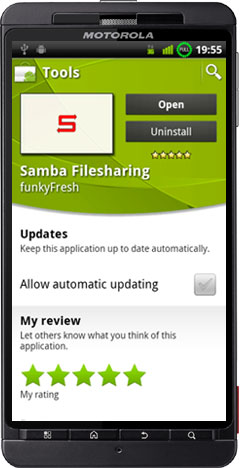
sfsmarket1

Once downloaded and installed open Samba Filesharing on Android.
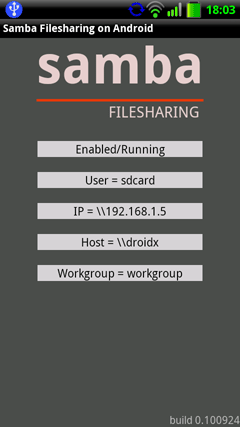
This is the option screen.
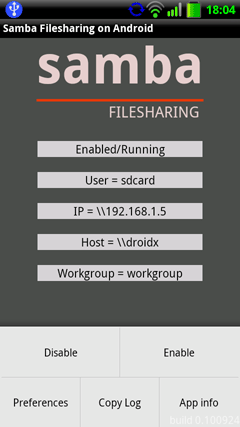
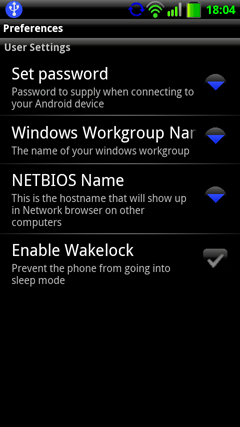
Click on Preferences and fill out each setting.

Click Enable when finished.

Advanced users: The samba configuration file is located at:  /data/data/com.funkyfresh.samba/files/smb.conf
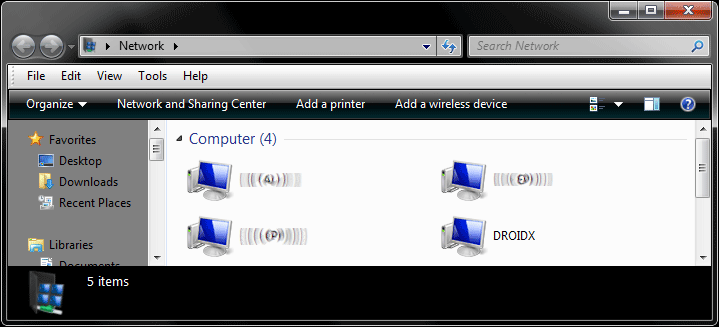
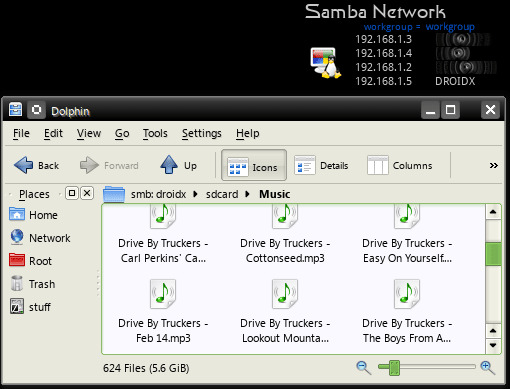
You should now see it on your network.
Browse to it just like any other computer.
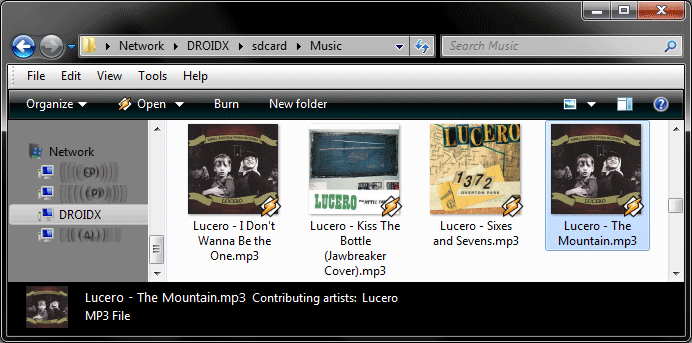
Yep, works on Linux too!
Conclusion

I hope my fellow Android users will find this info useful. Anyone got any tips on this issue?

Other Samba apps: http://www.appbrain.com/search?q=smb

created 25 November, 2010. Last edited 31 January, 2011

Time To Run Windows Update

November 23, 2010, 17:19(EST) By Eric (a.k.a. TweakHound)

I don’t see anything critical since the last round of updates but there are “important” updates available. What you get depends on what OS you are running.

Tagged With: Computer News

New Poll Up

November 23, 2010, 17:11(EST) By Eric (a.k.a. TweakHound)

I decided to bring back the polls widget. Nothing fancy here and certainly not scientific! It’s over there – – – – >

Tagged With: This Site

Process Explorer v14.01, Autoruns v10.05

November 23, 2010, 15:29(EST) By Eric (a.k.a. TweakHound)

Microsoft/Sysinternals updates: Process Explorer v14.01, Autoruns v10.05 (source Sysinternals Blog)

Process Explorer v14.01: This update fixes a bug related to the DLL view and adds a tab to the new system information dialog, Summary, that displays all the performance graphs together.

Autoruns v10.05: This Autoruns update adds ActiveSync autostart locations, fixes a bug in that prevented offline scanning from working in some cases, and fixes a formatting bug in the scheduled tasks display.

Tagged With: Cool Tools, Freeware

Update: Adobe Reader vs. Foxit

November 23, 2010, 14:50(EST) By Eric (a.k.a. TweakHound)

Leonard Rosenthol (PDF Architect, Adobe Systems) stopped by the blog and answered a few questions. The update is at the bottom of the article.

Tagged With: This Site

GeForce/ION Driver Release 263.09 WHQL

November 23, 2010, 14:14(EST) By Eric (a.k.a. TweakHound)

“This is a WHQL-certified driver for the new GeForce GTX 580 and GeForce GTX 460 SE.”

No reason to download if you don’t have one of those cards. Available for XP, Vista, and Seven.  Get’em here.

Tagged With: Computer Hardware

Adobe Reader vs. Foxit

November 22, 2010, 18:49(EST) By Eric (a.k.a. TweakHound)

This article is intended to give the average home user some insight into the two most popular PDF readers. Folks in a corporate environment or that do more than just read PDF’s will obviously have different requirements and / or constraints. Please take that into consideration when reading this article.
[Read more…] about Adobe Reader vs. Foxit

Tagged With: Cool Tools, Freeware, This Site

ATI Catalyst 10.11’s Released

November 17, 2010, 18:04(EST) By Eric (a.k.a. TweakHound)

ATI Catalyst 10.11 drivers are available for XP, Vista, and Windows 7. Linux drivers also available here.

Tagged With: Computer Hardware

iTunes 10.1

November 12, 2010, 14:20(EST) By Eric (a.k.a. TweakHound)

Download iTunes

What’s new in iTunes 10.1
* Use AirPlay to instantly and wirelessly stream videos from iTunes to the all-new Apple TV.
* Sync with your iPhone, iPad, or iPod touch with iOS 4.2.
* Provides a number of important stability and performance improvements.

CCleaner v3.0

October 28, 2010, 12:32(EDT) By Eric (a.k.a. TweakHound)

This a a new version of CCleaner. Download CCleaner. According to the forums there is no longer a “slim” version.
*edit – apparently the forums were mistaken, The slim version showed up.

* A new 64-bit native EXE designed specifically for 64-bit systems.
* A new Drive Wiper tool screen under the Tools section, which allows users to securely erase the contents or free space on a specified drive.
* Improved support for Internet Explorer 9 and the Google Chrome browsers.
* We have also added improved cleaning support for HTML5 database storage, allowing CCleaner to effectively manage the next generation of web applications.
* Additional cleaning support for Microsoft Silverlight Isolated Storage.
* We’ve added three new environment variables (%SystemDirectory%, %SystemDirectory32%, and %SystemDirectory64%).
* New application icon.
* New Intelligent cookie keeping feature.
* and more…

Tagged With: Cool Tools, Freeware

« Previous Page
Next Page »

Primary Sidebar

Popular Posts

Tweaking Windows 10

Software I Use – 2021 Edition

Timer Tweaks Benchmarked

Win10 – Get Auto-Login Back

Recent Posts

  • Patch Tuesday
  • Weekend News
  • Patch Tuesday
  • Tuesday News
  • Weekend News
  • Sunday News
  • Patch Tuesday
  • Wednesday News
  • Patch Tuesday
  • Monday News
buywin10th2

Tags

  • Android
  • Backup
  • Beer
  • Computer Hardware
  • Computer News
  • Cool Tools
  • Freeware
  • How-To's
  • Linux
  • Off Topic
  • openSUSE
  • Playlists
  • Privacy
  • Security
  • Software
  • This Site
  • vacation
  • Veterans
  • Windows 10
  • Windows 11
  • Windows 7
  • Windows 8
  • Windows Vista
  • Windows XP

Catagories

  • Android
  • Backup
  • Beer
  • Computer Hardware
  • Computer News
  • Cool Tools
  • Freeware
  • Freeware Machines
  • How-To's
  • Linux
  • News From The Web
  • Off Topic
  • openSUSE
  • Privacy
  • Security
  • Software
  • Tweak Guides
  • Veterans
  • Windows
  • Windows 10
  • Windows 11
  • Windows 7
  • Windows 8
  • Windows Vista
  • Windows XP

TweakHound - Optimize Your Computing Experience! TweakHound - Optimize Your Computing Experience!

Copyright 2002-2025 by Eric Vaughan All material contain here is the property of the materials owner. Windows, Windows XP, Windows Vista, Windows Seven, Windows 8, Windows 10, Windows 11, Microsoft, and all associated logos are trademarks/property of Microsoft. You may not use or copy any material from tweakhound.com without expressed written permission. Hotlinking to any material within this site is forbidden. Privacy Policy