
I Love HP Printers

My old HP Officejet Pro L7780 died a few weeks ago. I replaced it with HP Officejet Pro 8720.
[Read more…] about I Love HP Printers
Random Monday Stuff…

It’s the last day of a 3 day holiday weekend here in the U.S. That means it is the unofficial end of summer and the start of football!
Back In Black
I must apologize to those who liked the gray background in the new theme. It never looked right to me and I just couldn’t take it anymore.
[Read more…] about Random Monday Stuff…
Nope
Liar, liar, pants on fire…
Windows 10 may freeze after installing the Anniversary Update – Updated 8-31-16
“The Windows Update released on August 31st for Windows 10 includes a fix for this issue.”
NOPE. All updates applied. Still freezing.
Neowin – Microsoft has finally fixed the freezing issue in the Windows 10 Anniversary Update
“Microsoft stated that this occurred due to the apps and operating system being installed on separate drives.”
NOPE. Apps in default location.
Paul Thurrott – Microsoft Fixes the Windows 10 Freezing Issues
“And if for some reason you’re still experiencing freezing problems after all this, Microsoft recommends creating a second administrator account on your PC, and signing in to that account. Once you do so, your regular account should work fine again. Why? Because Windows 10, that’s why.”
NOPE. Didn’t work. All workarounds attempted.
PC World – Microsoft fixes Windows 10’s Anniversary Update freezing
“Once that’s done, reboot your PC and you should be able to login to your original account with no problems. If it doesn’t, you can roll back your PC to vanilla Windows 10 and reinstall the Anniversary Update once again.”
NOPE. See: Infinite Loop or HCF or “The definition of insanity is doing the same thing over and over and expecting different results.”
Win10 still unusable…
Win10 Updated

Cumulative Update for Windows 10 Version 1607: August 31, 2016
August 31, 2016 — KB3176938 (OS Build 14393.105)
This update includes quality improvements. No new operating system features are being introduced in this update. Key changes include:
-Improved reliability of Windows Ink Workspace, Microsoft Edge, File Server, Windows kernel, Microsoft Component Object Model (COM), Cluster Health Service, Hyper-V, multi-factor authentication (MFA), NTFS file system, PowerShell, Internet Explorer 11, facial recognition, graphics, Windows Store, and Windows Shell.
-Improved performance related to purchasing Windows Store apps.
-Improved battery life of wearable devices (such as the Microsoft Band) while Bluetooth is connected and idle.
-Improved compatibility of using Xbox One controllers with various games.
-Addressed issue with incorrect character mapping between Japanese and Unicode for the question mark.
-Addressed issue that prevents the download and initialization of .NET objects in Internet Explorer 11.
-Improved support of new near-field communication (NFC) chips for Windows 10 Mobile.
-Addressed issue with game or app audio not resuming after ending a call on Windows 10 Mobile.
-Addressed additional issues with compatibility, remote desktop, BitLocker, PowerShell, Direct3D, networking policies, Dynamic Access Control (DAC) rules, Microsoft Edge, Connected Standby, mobile device management (MDM), printing, Fingerprint logon, and Cortana.
This did not fix my freezing issue. Win10 AnniUpdate is still unusable on my main rig. Ridiculous.
Are you guys at Microsoft trying to drive me to go to Linux full time?
Random Wednesday Stuff…

Start10 Updated
New in Start10 v1.5:
– Integrate Fences and desktop icons into “All Programs”.
– Search results can be filtered
– WindowBlinds tweaks
– Bug fixes
Download & Info
Nvidia 372.70 WHQL Drivers Are Out
“Provides the optimal experience for World of Warcraft: Legion, Battlefield 1: Open Beta, Deus Ex: Mankind Divided, and Quantum Break on STEAM.”
Download
Thank you all for your feedback and patience while I changed the sites theme!
Welcome To The New Theme

Update…Tried new plugin. Broke site. No time to fix. Will fix later…
Thanks to everyone who gave their feedback!
This is the sites new theme. It is using Genesis Framework and I’ve customized the Sample Child Theme to suit my needs.
One thing remains under testing and I would like your feedback. I’m trying to max out the size of this theme under it’s responsive, content / sidebar design.
So I’ve set the deminsions to this:
/* Primary Sidebar */

.sidebar-primary {

float: right;

width: 240px;

}
/* Content */
.content {
float: right;
width:1000px;
}
Now obviously this may cause issues with smaller screens on desktops but it should not affect mobile devices as I use WPtouch Pro for that.
What I need to know is if you are having layout issues. See pic below:
Any other suggestions welcome!
OK. How About This Theme?
This is Genesis Framework.
I’ve just been customizing the basic child theme.
Feedback please.
Trying Out New Theme. What Do You Think?
Please comment.
edit – 1851hrs
The current theme is called Divi. I’m not sure if I will keep it (fortunately it has a 30 day money back guarantee). Working with it is slow on the server. Customizing is a little odd.
I can’t figure out how to put a border between posts on the front page and I don’t like that. Post seem jumbled together.
No customization of the widget area so I will have to do that via code.
I may try Genesis Framework tomorrow.
Please post any alternatives you may have.
edit 29AUG, 1100hrs
Uninstalling DIVI, switching themes. Stand by.
Random Weekend Stuff…

Win10 AnniUpdate Woes
I gotta tell ya, I’m not a fan of the Win10 AnniUpdate. Less so by the day.
For many (including myself) the entire Win10 AnniUpdate experience seems to be a PITA…
– “Rolling Out”. You’ll get in when you get it. Maybe. This is a Win10 thing. That never happened previously. When a Service Pack was released, everyone got it. Also, ever since the AnniUpdate when updates do appear they have often been slow to download. So slow it often appears that Windows Update is frozen.
– It reinstalled apps you had uninstalled.
– Group policy settings removed.
– Power Shell broken.
– It has major hardware issues that still are not fixed as of this writing. Folks reporting broken webcams, mice acting strangely, “broken” or unbootable computers, and “freezing”. On my main rig (7/10 dual-boot) I get sporadic mini-freezes resulting in Win10 being utterly unusable. And no, I’m not going to try fixing it. Microsoft broke it, they can fix it. I’m happily using Windows 7 and doing my internet stuff in an openSUSE VM.
Win10 has more Alpha and Beta testers than ever and Microsoft just can’t seem to get things right. What is the point of the Insider Program if it doesn’t help detect problems before release?
DarkAudacity
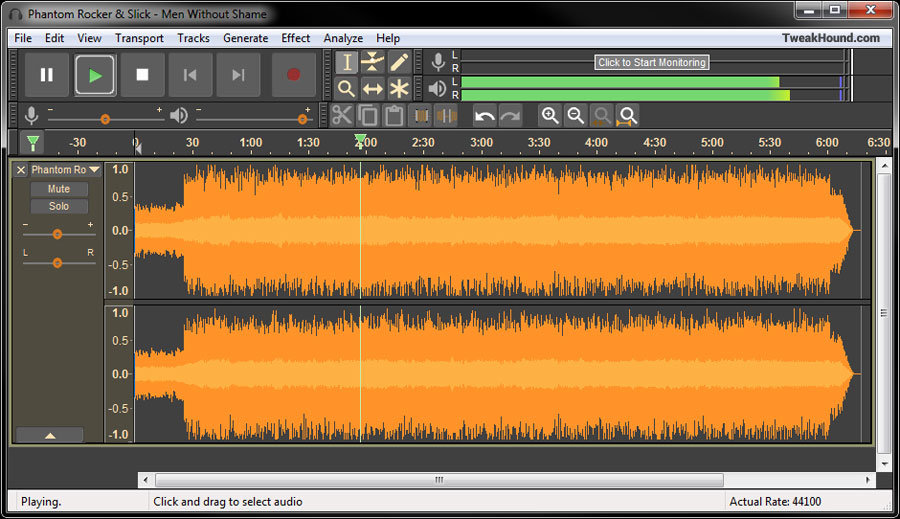
There is now a dark version of Audacity. Windows only unfortunately. Check out the DarkAudacity website to get all the info and differences.
Bleachbit
The program I use as a “CCleaner like” app in Linux is in the news. Apparently a certain Presidential candidate’s IT staff used it to wipe info.
The folks at Bleachbit are rather proud of the attention they are getting.
(NOTE – As the “About Comments” note states, “NO POLITICS”. I will delete any political comments. Take it somewhere else.)
Other Computer News
Anandtech – Intel Launches 3D NAND SSDs For Client And Enterprise
CNN – MIT scientists think they can make your WiFi 10x faster
Off Topic
One more reason not to eat vegetables
The Macaroni in ‘Yankee Doodle’ is Not What You Think