
VirtualBox 4.0.12 (released 2011-07-15)
This is a maintenance release. The following items were fixed and/or added:
Mac OS X hosts: Lion fixes
Solaris hosts: fixed preemption issue with Solaris 11 hosts (builds 166 and above)
VBoxManage: more convenient configuration of storage controller attachments by automatically determining the port or device parameter when a storage controller has only one port or device per port (bug #9188)
Storage: fixed possible data corruption under certain circumstances whith VHD and Parallels images (bug #9150)
Storage: fixed access to CD/DVD images beyond 4GB when using the SATA controller (bug #8592)
Floppy: make it possible to unmount a host floppy disk (bug #6651)
Networking: fixed the problem with segmentation offloading when several VMs were transmitting at once
3D support: fixed GL_VERSION string for different locales (bug #8916)
Sources: fixed USB 2.0 support using extension packs for non-official builds
Solaris Additions: fixed automounting of shared folders (bug #8014)
Checking Your Disks For Problems
 New article up: Checking Your Disks For Problems
Checking Your Disks For Problems
How To Check Your Disks For Problems
Windows contains a few utilities to correct disk and system file errors.
These are often used by Geeks and techs as a way to quickly eliminate a cause of problems and/or after cleaning a virus from a system.
Note – With NTFS file systems these tools do not need to be, and should not be run unless a problem is suspected.
Check Disk
The most commonly used is Check Disk (a.k.a. – chkdsk, or disk check).
This checks the file system for errors. This can also be useful if the system was shut down unexpectedly due to a power loss.
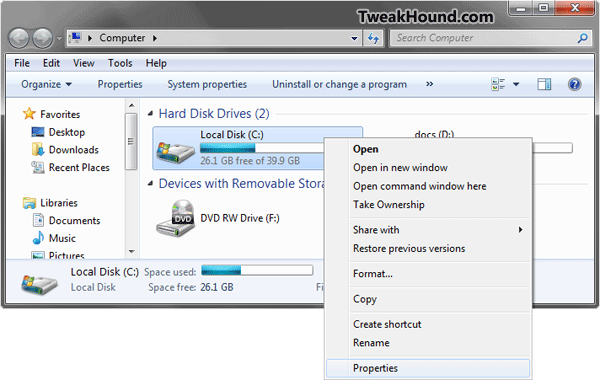
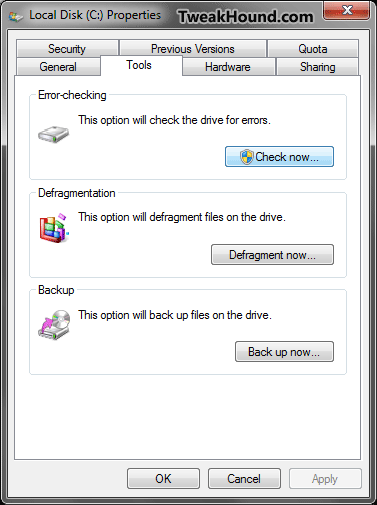
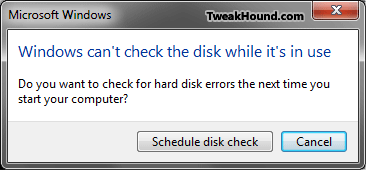
To run it open Computer > right-click on the partition you wish to check and choose Properties > click the Tools tab > in the Error-checking section click the Check now… button.
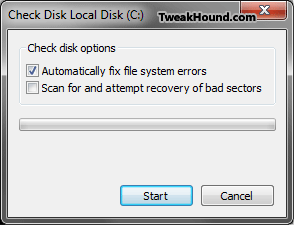
In the Resulting screen ensure the Automatically fix file system errors box is checked, then click start.
If this is your Windows partition you’ll need to reboot for the scan to take place.
To find info on the previous scan go to Administrative Tools > Event Viewer > Windows Logs > Application > in the Source column find a line with 1-Wininit for drives scanned on reboot or 2-Chkdsk for drives scanned while running Windows.
System File Checker
The second tool is System File Checker (a.k.a. – SFC)
This checks for and replaces corrupt system files. This of course is only for your Windows drive or partition.
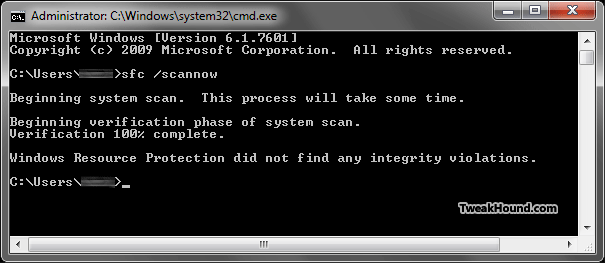
To run it open a Command Windows as admin (in the Search box type cmd > in the results right-click on cmd.exe and choose Run as administrator).
In the resulting window type sfc /scannow (if you are like me and want to see whats up before fixing any issues then use sfc /VERIFYONLY).
To view the results of this scan go to C:\Windows\Logs\CBS\CBS.log.
Time To Run Windows Update
 Updates for XP, 2K3, Vista, 2K8, Seven. Microsoft Security Bulletin Summary for July 2011
Firefox 5.0.1 Released
 Please read the release notes (below) before updating. Looks like there is nothing here for Windows and Linux users.
Download, Release notes.
The latest version of Firefox has the following changes:
Worked around an issue in Mac OS X 10.7 that could cause Firefox to crash
Worked around an issue caused by Apple’s “Java for Mac OS X 10.6 Update 5” where the Java plugin would not be loaded
openSUSE 11.4 Tips and Tricks Updated
 openSUSE 11.4 Tips and Tricks Updated.
Added Sections:
External USB Issues
How To Install RPM’s Without Kpackagekit
CCleaner v3.08
Windows Gadgets
Just a quick note. 2 of the Windows Gadgets I use have been updated.
Network Monitor Gadget – Updated to version 4.0
SysInfo – Was updated back in February to version 2.4 (I just found out)
For a screenshot of them on my computer click the pic below (I’ve modified the look of the gadgets to my liking):

Winamp 5.62
Winamp 5.62 released. Mostly bugfixes. See here for download links and release notes.
Thunderbird 5.0
Thunderbird 5.0 released.
The latest version of Thunderbird has the following changes:
More responsive and faster to start up and use
Thunderbird is based on the new Mozilla Gecko 5 engine
New Add-ons Manager
Revised account creation wizard to improve email setup
New Troubleshooting Information page
Tabs can now be reordered and dragged to different windows
Attachment sizes now displayed along with attachments
Plugins can now be loaded in RSS feeds by default
There are several theme fixes for Windows Vista and Windows 7
Support for Mac 32/64 bit Universal builds (Thunderbird no longer supports PowerPC on Mac)
Over 390 platform fixes that improve speed, performance, stability and security