
I’ve been asked several times about an alternative to Macrium Reflect Free since it is no longer free. I’ll be using it until it no longer works on my hardware.
The alternative I’ve always kept it my toolkit is Clonezilla, in fact I made a short video of Clonezilla in action over 6 years ago: Clonezilla Ain’t Hard.
Clonezilla runs off a “Live” cd or usb drive. There are 2 versions of that, alternative (dased on Debian) or alternative stable (based on Ubuntu). I recommend the alternative stable version, it probably has better hardware support.
There is also a GUI and enhanced version of Clonezilla called Rescuezilla.
Clonezilla was just updated (version 3.1.1-27/20231102).
Download
Clonezilla Live on USB flash drive or USB hard drive
How to Install Clonezilla on USB with YUMI
Software
BleachBit 4.6.0

Junk remover and file shredder.
Many additions, changes, and fixes for both Windows and Linux.
Download (I use portable) | Release Info
Wise Disk Cleaner 11.0.3
A few fixes/improvements, support for Thunderbird, AndroidStudioCache, VMware Horizon Client, Corel PaintShop Pro, Google Drive, GoodSync, and BoxDrive.
Download (I use portable) | Release Info
Wise Disk Cleaner 11.0.1
Freeware system cleaner.
1. Appearance upgraded: light mode and dark mode.
2. Optimize the engine for scanning files, faster and safer.
3. Skips UAC when Wise Disk Cleaner starts.
4. Improved the rule of cleaning the Font cache, Log files, Explorer MRU list, and Recent Documents.
5. Supported cleaning TikTok, Facebook Messenger, GitHub Desktop, IObitAdvancedSystemCare, IObitDriverBooster, AVG TuneUp, SkypeAlyzer, and Xmind.
Download (I use portable) | Release Info
Wise Disk Cleaner 10.9.8
Support for cleaning only prefetched files created more than 7 days ago.
Improved the rules for cleaning temporary files, icon cache, delivery optimization files, and system error logs.
Added support for cleaning AnyDesk, AVS Audio Converter, and AVS Audio Editor.
Fixed minor bugs in the previous version.
Download (I use portable) | Release Notes
Macrium Reflect Free Edition Ending

***EDIT 2024*** The last free version is 8.0.7783. You can still get it here: https://www.majorgeeks.com/files/details/macrium_reflect_free_edition.html
Went to update Macrium Reflect Free this morning and saw this:
Macrium Reflect Free – Service Announcement
This is to notify that Macrium Reflect Free Edition is being retired. Security patches will be provided until 1st January 2024, but there are no planned feature changes or non security related updates following this update.
Note: This notice only applies to Macrium Reflect Free.
Please see the section ‘Macrium Reflect Free Product – End Of Life (EOL)‘ in our support policy for more information.
This just plain sucks.
Also, Macrium Reflect Free was updated:
Bug fixes and Improvements v8.0.7279 – 10th January 2023
viBoot – VirtualBox VMs sometime would not show in viBoot GUI. This has been resolved.
Imaging – When reading some Bitlocker volumes, Reflect could attempt to allocate an erroneously large block of memory. This has been resolved.
System Restore – Staging a system restore from Windows would sometimes fail to automatically reboot after the restore completed within the rescue environment. This has been resolved.
General – Lower than actual write speed values were shown in Disk Write Performance tool. This has been resolved.
Download
*EDIT – 1600hrs
Just to clear things up. While unfortunate, this isn’t an immediate emergency/issue. Macrium Reflect Free will continue to work for years and should at least work through the demise of Windows 11, at least and especially for how I use it. I make a bootable USB drive that uses WinRE, This insures that the appropriate drivers for my computer are included. I also occasionally create another USB drive that uses Windows PE, with this I include a host of drivers good across many computers. This USB drive is the only way I create and restore images.
See:
The Macrium Rescue Environment
What are the differences between WinRE and WinPE? And which one should I use?
Sysinternals Freeware Updated
ZoomIt v6.0, BgInfo v4.30, PsExec v2.40, ProcMon v3.90 and Sigcheck v2.90 all updated.
Download & Info
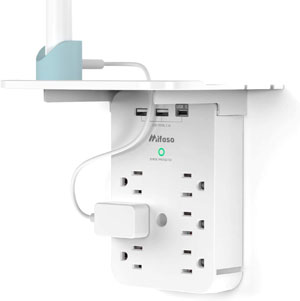
Wall Outlet Extender:
6 Outlet + 3 USB Ports
$11.86 with coupon code SNXCMKSJ (Enter code in cart)
Macrium Reflect Updated
Macrium Reflect 8.0.6560
A lot of small fixes.
Download | Release Notes
Autoruns 14.04

Autoruns 14.04
Bunch of fixes.
Download | Release Info
***WARNING – v14.05 just came out as a bugfix. I’m seeing posts that it is crashing on startup. DO NOT DOWNLOAD
Software I Use – 2021 Edition

A while back someone asked me to do a freeware guide for Windows 10 like I have for other Windows operating systems. My heart wasn’t in it. While there is excellent free software out there, in many cases you get what you pay for. I’m tired of talking about second best software I don’t use. So below is a list of the software I have installed on at least one of the 8 PC’s I have scattered across my house.
[Read more…] about Software I Use – 2021 Edition