• Skip to primary navigation
  • Skip to main content
  • Skip to primary sidebar

TweakHound

Computer stuff...

  • Home
  • Windows XP
  • Windows Vista
  • Windows 7
  • Windows 8
  • Windows 10
  • Windows 11
  • Linux
  • Tweak Guides
  • Site Info
    • About
    • About Me
    • TweakHound’s World
    • Contact
    • My Computers
    • Old Articles
    • Privacy Policy
    • Old Index
    • Advanced Search

Software

O&O ShutUp10 Updated

June 2, 2021, 06:15(EDT) By Eric (a.k.a. TweakHound)

Version 1.8.1421
NEW: Support Windows 10 Version 21H1
New: Disable “Meet now” in the task bar on this device
NEW: Disable “Meet now” in the task bar for current user
NEW: Disable news and interests in the task bar on this device
NEW: Disable news and interests in the task bar for current user
Startup of application optimized
Download | Changelog

Tagged With: Cool Tools

Google Chrome 91

May 25, 2021, 16:37(EDT) By Eric (a.k.a. TweakHound)

“This update includes 32 security fixes.” Also supposedly fixes the crashing issue some folks had.
Download | Release Info

Tagged With: Software

Autoruns v13.100

April 24, 2021, 11:24(EDT) By Eric (a.k.a. TweakHound)

“This update to Autoruns fixes a crash reported in v13.99.”
Download

Tagged With: Cool Tools

O&O ShutUp10 1.8.1420

March 30, 2021, 08:29(EDT) By Eric (a.k.a. TweakHound)

***edit 1150hrs
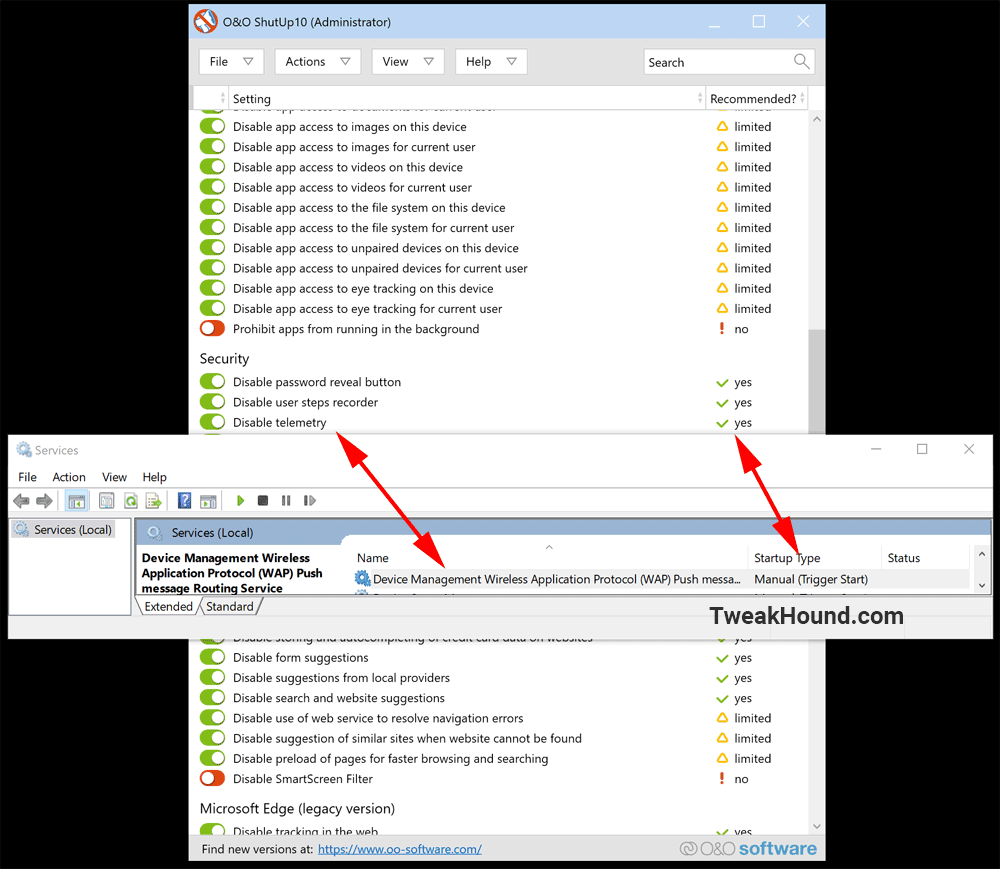
Despite the changelog saying this issue is fixed it is in fact not. See pic below.

1.8.1420 – released March 30, 2021
FIX: Disable telemetry
FIX: Disable automatic driver updates through Windows Update
Available in German, English, French, Italian, Spanish, Russian and Chinese (simplified)
Download | Changelog | Home Page

*edit 0915hrs
Here are the registry changes O&O Shutup10 version 1.8.1420 made when turning on “Disable Telemetry”

Changed from 0x00000001 = Enabled/Normal to 0x00000000 = Disabled/Ignore
[HKEY_LOCAL_MACHINE\SYSTEM\ControlSet001\Control\WMI\Autologger\AutoLogger-Diagtrack-Listener]
“Start”=dword:00000000

Changed from 0x00000002 = Automatic to 0x00000004 = Disabled
[HKEY_LOCAL_MACHINE\SYSTEM\ControlSet001\Services\DiagTrack]
“Start”=dword:00000004

Changed from 0x00000003 = Manual to 0x00000004 = Disabled
[HKEY_LOCAL_MACHINE\SYSTEM\ControlSet001\Services\dmwappushservice]
“Start”=dword:00000004

***edit 1150hrs
See: https://www.tweakhound.com/2021/03/18/oo-shutup10-issue/
Just like before the the dmwappushservice gets rest a while after reboot.
Tagged With: Cool Tools

WACUP, Winamp Lives On

February 22, 2021, 10:27(EST) By Eric (a.k.a. TweakHound)

Winamp
I’ve always loved Winamp and it’s pretty much been my main Windows music player since the late 90’s.
[Read more…] about WACUP, Winamp Lives On

Tagged With: Freeware, Software

WACUP Dual-Screen with Visualizations

February 9, 2021, 14:34(EST) By Eric (a.k.a. TweakHound)

An article on the Winamp reviving WACUP will be out at some point.
Until then, check out my workout/game room setup:
[Read more…] about WACUP Dual-Screen with Visualizations

Tagged With: Freeware, This Site

Google Chrome Updated

February 4, 2021, 17:07(EST) By Eric (a.k.a. TweakHound)

“The Stable channel has been updated to 88.0.4324.150 for Windows, Mac and Linux”
2 days ago Chrome was updated to 88.0.4324.146. Between the 2 updates it covers 7 security issues.
Download | Info
Chrome for Android was updated to 88.0.4324.141 on the 1st.
“This release includes stability and performance improvements.”

Tagged With: Security, Software

Google Chrome Updated

April 22, 2020, 16:28(EDT) By Eric (a.k.a. TweakHound)

google chrome

v81.0.4044.122 “This update includes 8 security fixes”
Download | Release Info
Chrome for Android updated too. The Chrome Android team can’t be bothered with release notes or info so we get, “You can see a full list of the changes in the Git log.“.
Check it out, it’s a real page turner that is full of such enlightening info as,
“Flush the output file after writing if it was mapped into memory.
This avoids an interesting bug in Windows as per the code comment.
”
or
“Move unmapping of large pages out of the spin-lock in PartitionAlloc
Instead of unmapping directly, Free() returns DeferredUnmap that needs
to be run after releasing the lock.
”
Keep working that nerd stereotype boys, I’m sure those Silicon Valley chicks dig it.

Tagged With: Software

Browser Updates

January 8, 2020, 07:22(EST) By Eric (a.k.a. TweakHound)

Google Chrome Updated
“The stable channel has been updated to 79.0.3945.117 for Windows, Mac, and Linux…This update includes 3 security fixes.”
Download | Release Notes
Chrome for Android updated too.
“This release includes stability and performance improvements.”
Download | Release Notes not available yet

Firefox 72.0.1
Download | Release notes not available yet
This is an update for version 72.0 that was released yesterday.

Tagged With: Software

O&O ShutUp10 Updated

December 3, 2019, 09:36(EST) By Eric (a.k.a. TweakHound)

1.7.1404 – released December 03, 2019
NEW: Category “Activity History and Clipboard” added
NEW: Disable user activity recordings
NEW: Disable saving the activity history of users on this device
NEW: Disable transfer of user activity to Microsoft
NEW: Deactivate storage of the history of the clipboard
NEW: Disable transfer of the clipboard to other devices via the cloud
FIX: Display of menus on touchscreen corrected
FIX: Adjustments to the HighContrast modes
Available in English, German, French, Italian, Spanish, Russian and Chinese (simplified)

Download & Info

Tagged With: Cool Tools

« Previous Page
Next Page »

Primary Sidebar

Popular Articles

Windows 10

Tweaking Windows 10

My Windows 10 Tweaks

Windows 10 Privacy Settings

Win10 Diagnostics Tracking Service Gone?

Windows 10 Advanced Disk Cleanup

Win10 Customize Installation Options

Windows 10 Dark Theme

Win10 Wallpapers, Graphics, etc.

All Windows 10 Articles

Windows 8

Tweaking Windows 8.1

Advice On Installing Windows 8.1

Clean Install Windows 8.1

Cleanup After Windows 8.1 Upgrade

Create Shutdown, Restart, Logoff Tiles For Windows 8

Tweaking Windows 8

Install Windows 8 – Clean Install With Upgrade Media

Install Windows 8 – Upgrade

Windows 8 – Cleaning Up After You’ve Upgraded

Windows 8 Freeware Machine

Windows 8 SSD Settings, Etc.

How To Resize Your Windows 8 Partition

Create Windows 8 Recovery Media

Windows 8 – Elevated Command Prompt

How To Fix The Windows Bootloader

Windows 7

Installing Windows 7

Tweaking Windows 7

Windows 7 Diagnostics Tracking Service

The Windows 7 Freeware Machine

The Windows 7 Pagefile And Running Without One

Bad Tweaks

SSD Tweak Guide (sort of)

The noguiboot (no GUI Boot) Tweak

NtfsMemoryUsage=2 Tweak

More Windows 7 articles here.

Windows Vista

Installing Windows Vista

Tweaking Windows Vista

More Windows Vista articles here.

Windows XP

eXPired - The Last Windows XP Guide You'll Ever Need

The Right Way To Install Windows XP

Super XP Tweaking Guide

The Freeware XP Machine

Bad Tweaks

More XP Articles here and here.

Backup

Backup Article Greatest Hits – Vol. 1

Other

Cataloging Your Music Collection

Finding Good Album Art

Converting Vinyl Records To Digital Music – A Non-Audiophiles Guide

Windows All-In-One Recovery Flash Drive

SSD Tweak Guide (sort of)

Raidmax Blackstorm Case Review

Disk Partitioning

Ditch Those CD's! A Guide To Using USB Flash Drives

Checking Your Disks For Problems

Bad Tweaks

More articles here

Tags

Android Backup Beer Computer Hardware Computer News Cool Tools Freeware How-To's Linux Off Topic openSUSE Playlists Privacy Security Software This Site vacation Veterans Windows 7 Windows 8 Windows 10 Windows 11 Windows Vista Windows XP

TweakHound - Optimize Your Computing Experience! TweakHound - Optimize Your Computing Experience!

Copyright 2002-2025 by Eric Vaughan All material contain here is the property of the materials owner. Windows, Windows XP, Windows Vista, Windows Seven, Windows 8, Windows 10, Windows 11, Microsoft, and all associated logos are trademarks/property of Microsoft. You may not use or copy any material from tweakhound.com without expressed written permission. Hotlinking to any material within this site is forbidden. Privacy Policy