
IMHO the Win10 Fall Creators Update was/is a giant waste of time and effort. It delivered nothing useful for the end user and caused headaches for many. FCU could have been delivered as a standard roll-up instead of a full system reset. There will be no changes to the Tweaking Windows 10. There is only one change to Windows 10 Privacy Settings and that is the screenshot to my O&O Shutup10 settings:
(click on image for full size.)
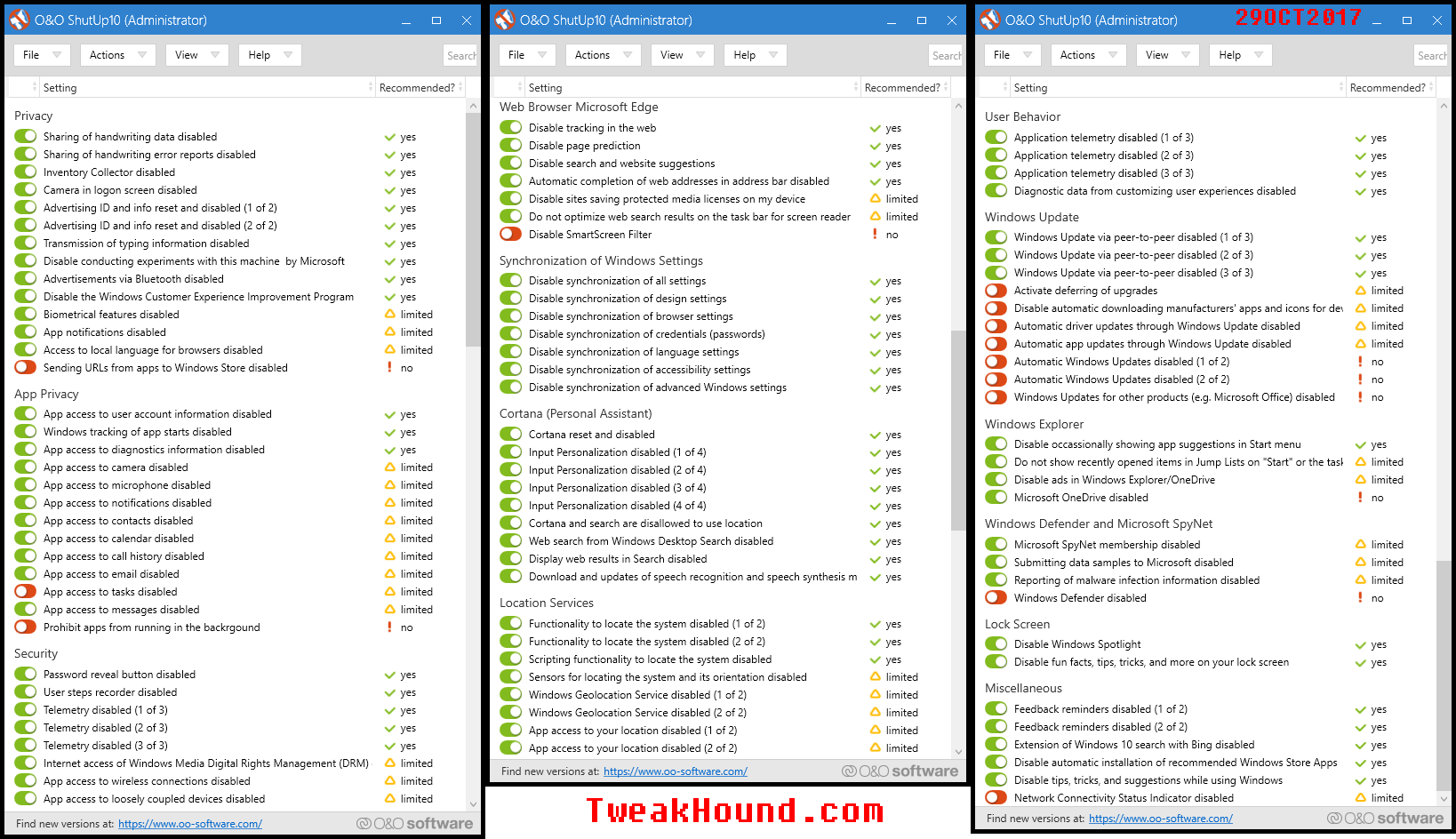
Windows
No Update For The Win10 Tweak Guide
Unless I have missed something I see no need to update the Tweak Guide for the Fall Creators Update.
However, the Windows 10 Privacy Settings companion for the Tweak Guide is another story. I hope to have it done by the end of next week.
What To Do After Installing Windows 10 Fall Creators Update
1 – Run Windows Update (Yes, there are updates already.)
reboot
2 – Run O&O ShutUp10 (There are a few new sections.)
See this page of Windows 10 Privacy Settings for more info.
reboot
3 – Run Windows 10 Advanced Disk Cleanup
reboot
4 – Run other disk cleanup utilities. I use CCleaner portable & Wise Disk Cleaner portable.
See this page of the Win10 Tweak Guide for more info.
reboot
5 – Make a system image.
Done!
Windows 10 Fall Creators Update Installation Media

I’ve downloaded and confirmed this is the FCU version, 10.0.16299.15.
Same procedure as it has been in the past. (full post for TH2, method unchanged)
Go to the Download Windows 10 page.
Download the Media Creation Tool and run it.
Choose the option to create a USB flash drive, DVD, or ISO file.
Windows 10 Fall Creators Update Is Live
My PC is downloading now.
Unlike some sites I do not feel the need to rewrite what is posted at the Windows Blog to act like I’m some sort of Super-Duper Windows Guru. Here are the official Microsoft links to all the Windows 10 Fall Creators Update you need.
All posts: https://blogs.windows.com/blog/tag/windows-10-fall-creators-update/
What’s new in the Windows 10 Fall Creators Update
IMHO this is a completely lame update. As far as new features, there is nothing there I care about.
How to get the Windows 10 Fall Creators Update
Settings > Update & security > Windows Update > Check for updates
or
The recommended method is to utilize the Update Assistant. To do so, click the Update Now button on the Software Download Site.
Weekend Random Stuff…

Windows 10 Fall Creators Update
This will be released next week. Of course I will install it, it’s what I do. IMHO you should not install this next week. If you want to take the risk, please back sure you have a disk image backup.
Block Windows 10 Fall Creators Update
You can easily stop this update.
Go to:
Action Center > All Settings > Update & security > Windows Update > Advanced options > In the section Choose when updates are installed, defer feature updates for as many days as you like (up to 365)
or
Go to:
Action Center > All Settings > Update & security > Windows Update > Advanced options > Pause Updates, turn On.
You can also switch Branches to Current Branch for Business.
Wednesday Random Stuff…

Win10 Update BSOD
Neowin is reporting that yesterday’s Win10 update is crashing systems with “USB Type-C Connector System Software Interface (UCSI)“.
I have heard unconfirmed reports from unnamed sources that are quoting a friend of a friend who knows someone in Redmond that said he heard someone in a Starbucks line say, “Oops.”
Kapersky, “Oy vey”
Israel hacked the Russians who hacked Kaspersky.
“The Russian operation, described by multiple people who have been briefed on the matter, is known to have stolen classified documents from a National Security Agency employee who had improperly stored them on his home computer, on which Kaspersky’s antivirus software was installed. What additional American secrets the Russian hackers may have gleaned from multiple agencies, by turning the Kaspersky software into a sort of Google search for sensitive information, is not yet publicly known.”
I don’t see how Kaspersky Labs survives this.
It Keeps Getting Worse
Equifax Breach Fallout: Your Salary History
“In May, KrebsOnSecurity broke a story about lax security at a payroll division of big-three credit bureau Equifax that let identity thieves access personal and financial data on an unknown number of Americans. Incredibly, this same division makes it simple to access detailed salary and employment history on a large portion of Americans using little more than someone’s Social Security number and date of birth — both data elements that were stolen in the recent breach at Equifax.”
There are a number of people involved in this who should have all their assets seized and spend a long time in jail. We all know they won’t.
– – – OFF TOPIC – – –
Smokeless Fire Pit
There is a Kiskstarter project called BioLite FirePit. The BioLite FirePit is “a smokeless wood-burning device that cooks your meals and gives you a front-row seat to everything going on inside your fire.”
Looks pretty cool. What do y’all think?
I Want It
Outta my price range but hey, a man can dream!

Delicious Whiskey
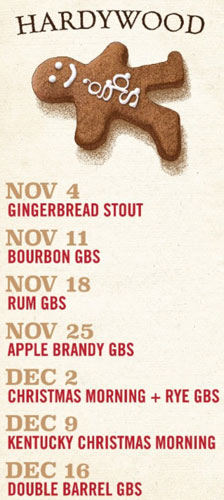
I was at Repeal Bourbon & Burgers in Virginia Beach this weekend. I managed to get the last pour of A. Smith Bowman Limited Edition Gingerbread Cocoa Finished Bourbon. It is the spawn of two Virginia products, Bowman Bourbon obviously and 2 beers from Hardywood Brewery. The two beers are Gingerbread Stout and Foolery Imperial Milk Stout. Both these beers are fantastic. Hardywood’s Gingerbread has been called “Christmas in a bottle.” It held a 100% rating at Ratebeer for several years (99 now). It is one of my favorite beers (Foolery is up there too). The Hardywood Bourbon Barrel GBS variant is outstanding. Anyway, back to the aforementioned bourbon. I was excited and tried to find it. AFAIK the only bottles left are in private hands and they are going for well north of $100 for a 375ml bottle.. It is a shame because it was one of the most unique and tasty bourbons I have ever had.
Hardywood GBS variants and release dates 2017:
Patch Tuesday

Time To Run Windows Update
Updates for all currently supported Windows versions, IE, Edge, Office, Flash, .NET Framework…
As usual see the complete Breakdown at the end of this post.
Win10 update info: September 12, 2017—KB4038788 (OS Build 15063.608)
“This update includes quality improvements. No new operating system features are being introduced in this update.”
Flash Updated
APSB17-28 Security updates available for Adobe Flash Player
Download for IE
Download for Firefox, Opera
CCleaner Too
Download
[Read more…] about Patch Tuesday
Profound Post

I don’t post in forums much. I don’t comment in posts much either. I may scan through comments on non-political type posts. There are a few places where most comments are level headed. Askwoody.com Forums is one such place. Once in a while a comment truly impresses me.
A comment by user Canadian Tech is an example. I’ve no idea who he is. I don’t necessarily agree with everything he said but his argument is solid, well reasoned, and well written. If he isn’t a tech writer he should be.
Thursday Random Stuff…

Win10 KB4032188
This update has been rolling out the last few days.
“This update includes quality improvements. No new operating system features are being introduced in this update.”
Google Chrome Updated
Chrome 60.0.3112.90 released. Looks to be bugfixes.
Download: Google Chrome Web 32-bit Google Chrome 64-bit
Etc.
Google’s new program to track shoppers sparks a federal privacy complaint
“Google said it had obtained access to the credit and debit card records of 70 percent of U.S. consumers”
Off Topic
Moderate, Heavy Drinkers More Likely To Reach Age 85 Without Dementia, Study Says

