Today is patch Tuesday. My advice from last Patch Tuesday holds,
“Unless you are a masochist you shouldn’t be updating any Windows machine today.“
I’ll post more info this afternoon.
oops, I was a week early.
Computer stuff...
Today is patch Tuesday. My advice from last Patch Tuesday holds,
“Unless you are a masochist you shouldn’t be updating any Windows machine today.“
I’ll post more info this afternoon.
oops, I was a week early.
Microsoft exec Terry Myerson lays out what he expects the performance impact of the Meltdown/Spectre patches.
– With Windows 10 on newer silicon (2016-era PCs with Skylake, Kabylake or newer CPU), benchmarks show single-digit slowdowns, but we don’t expect most users to notice a change because these percentages are reflected in milliseconds.
TH – Skylake released 2015. Kaby Lake 2016.
– With Windows 10 on older silicon (2015-era PCs with Haswell or older CPU), some benchmarks show more significant slowdowns, and we expect that some users will notice a decrease in system performance.
TH – Haswell released 2013.
– With Windows 8 and Windows 7 on older silicon (2015-era PCs with Haswell or older CPU), we expect most users to notice a decrease in system performance.
TH – Haswell released 2013
– Windows Server on any silicon, especially in any IO-intensive application, shows a more significant performance impact when you enable the mitigations to isolate untrusted code within a Windows Server instance. This is why you want to be careful to evaluate the risk of untrusted code for each Windows Server instance, and balance the security versus performance tradeoff for your environment.
TH – You’re attached to another object by an incline plane wrapped helically around an axis.
Conveniently left out is any reference to Microsoft bricking AMD machines.
I will repeat my advice to not update Windows machines right now. Certainly you need to have a full image backup before you do.
I recommend Macrium Reflect 7 Free Edition.
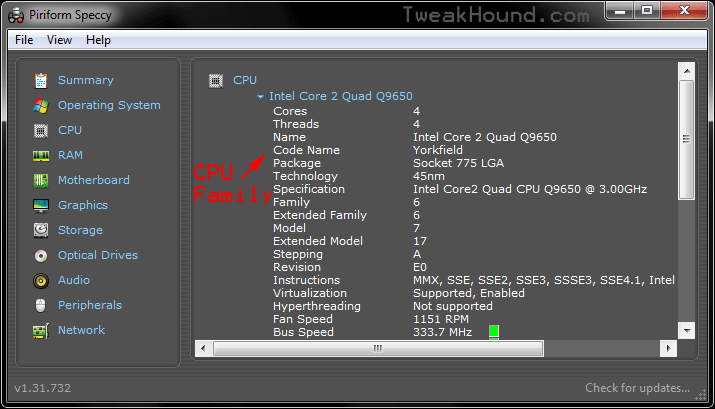
To find your CPU family.
Those odd names are CPU Family or CPU Code Names (Haswell, Skylake, Kabylake…).
Download Speccy PORTABLE and run it.
Click the CPU tab. Find the line Code Name, that is your CPU family.
Google it or, see: https://en.wikipedia.org/wiki/List_of_Intel_microprocessors
The Windows 10 free upgrade was due to expire on Dec. 31st of last year. It has been extended to January 16th, 2018.
Patches will be rolling out today for the Intel CPU Fiasco.
(See below for the email I woke up to this morning.)
I highly recommend you pause, disable, stop, do not run Windows Update.
Full details have not been released as of this writing. These updates will at the kernel level. For the non-Geek that means at the core of Windows. I am not trying to play chicken little (henny penny for my U.K. friends). IMHO these updates are being rushed out and will be altered over time. They could slow down or even hose your PC. Let someone else beta test this stuff.
[Read more…] about WARNING – Do Not Run Windows Update
Here is my current setup. I will be attempting to switch over to a Linux server setup in the near future (just because).
This machine was my secondary workstation and has been repurposed for my home server.
This is a quickie article. No hand holding. If you do not know your way around Windows this article is not for you.
[Read more…] about My Home Server – Windows 7
Today is the last day to get your free Windows 10 upgrade.
After my latest computer build, parts swapping in/out old computers, and making a new/old home server I noticed network browsing was FUBAR. I double-checked everything I could think of. Everything worked last time I checked. I did some Googling and finally came up with the answer.
Fall Creators Update broke network browsing. Surprise, surprise:
[Read more…] about Fix Windows 10 Network Browsing
Time To Run Windows Update
Patches available for all things Microsoft. Full breakdown at the end of this post.
Windows 10 – December 12, 2017—KB4053580 (OS Build 15063.786)
“This update includes quality improvements. No new operating system features are being introduced in this update.”
Flash Updated
APSB17-42 Security updates available for Adobe Flash Player
Download for Firefox and Opera: Adobe Flash Player 28.0.0.126
Download for Internet Explorer: Adobe Flash Player 28.0.0.126
CCleaner 5.38 Released
***WARNING*** As of this writing only the standard build available. No portable or slim.
I am not downloading this until a portable version is available.
CCleaner Forums post about this:
“The devs have decided to delay the portable version until the slim release. it is unclear if this is just for this version or going forward but this is a test trial of this policy.”
I am considering switching to Privacy Eraser. If anyone is/has used this please chime in.
Windows 10 Fall Creators Update has been updated.
November 30, 2017—KB4051963 (OS Build 16299.98)
“This update includes quality improvements. No new operating system features are being introduced in this update.“
I have seen 2 posts about Win10 FCU messing with peoples power plans. One of them even intimated Win10 was somehow covertly throttling CPUs. A dastardly deed if there ever was one.
There is in fact a super-duper-top-secret way to disable CPU throttling in Windows 10. I’m going to show you but you must promise to keep this very covert and dangerous information away from… well, somebody. In fact this message may self-destruct any moment.
[Read more…] about Windows 10 Disable Power Throttling