• Skip to primary navigation
  • Skip to main content
  • Skip to primary sidebar

TweakHound

Computer stuff...

  • Home
  • Windows XP
  • Windows Vista
  • Windows 7
  • Windows 8
  • Windows 10
  • Windows 11
  • Linux
  • Tweak Guides
  • Site Info
    • About
    • About Me
    • TweakHound’s World
    • Contact
    • My Computers
    • Old Articles
    • Privacy Policy
    • Old Index
    • Advanced Search

Windows

Tweaking Windows 10, Creators Update Version

June 13, 2017, 09:07(EDT) By Eric (a.k.a. TweakHound)

th

After far too long the Creators Updated version of the Win10 Tweak Guide is here.
For a variety of reasons this version was a royal PITA to write and publish.
Last week Windows 10 Privacy Settings version 3.0 was released.
As always I would appreciate you spreading the word via email, social media, news postings, or whatever.

Important changes to purchasing.
Many of you noticed that the original Win10 tweak guide purchase page left out the “Once you purchase the guide you get updates of following versions for free” statement that was present in other guides.
This is because Windows 10 is supposedly the “Last version of Windows” and I’ve no intention of providing free books in perpetuity.
Windows 10 is now scheduled to receive 2 major updates per year. That means a whole lot of work for me.
There are now 3 options:
1 – $5 (U.S.) One time purchase
2 – $10 (U.S.) One year of updates (this should get you through 2 or three editions)
3 – $20 (U.S.) Lifetime updates

I will be giving out free updates to the following people (please forward your original email to me):
– Bought a guide in the last 6 months
– Used an option of more than $5 previously
– Donated to my Bike MS ride

Thank you,
Eric

Tagged With: Windows 10

Updated – Windows 10 Privacy Settings

June 7, 2017, 06:36(EDT) By Eric (a.k.a. TweakHound)

th

Now that I have moved to a new web host and I can finally upload stuff…

Introducing Windows 10 Privacy Settings version 3.0

Tagged With: How-To's, This Site, Windows 10

Win10 Updated

May 25, 2017, 16:37(EDT) By Eric (a.k.a. TweakHound)

win10_logo

Windows 10 has been updated
May 25, 2017—KB4020102 (OS Build 15063.332)
“This update includes quality improvements. No new operating system features are being introduced in this update.“

Tagged With: Windows 10

Get Rid Of SMB1 In Windows 7

May 22, 2017, 07:33(EDT) By Eric (a.k.a. TweakHound)

win7orb

A reader was confused by all the steps in Microsoft’s How to enable and disable SMBv1, SMBv2, and SMBv3 in Windows and Windows Server.
Should he use PowerShell, Registry Editor, Group Policy? Should he disable it on Client or Server or both?
Because it is a security risk, it is important to ditch SMB1 on all platforms.
You should get rid of both the client and server.
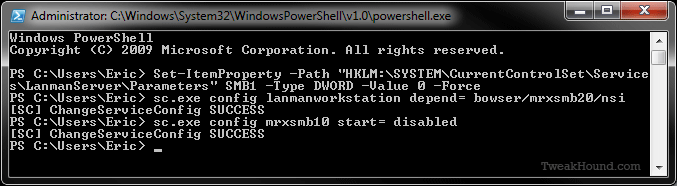
In Windows 7 I do this via PowerShell. It is fast and easy.
You must run PowerShell as Admin.

Press the Windows + R keys > type powershell (press the Enter key)
> copy and paste the following command:
Set-ItemProperty -Path “HKLM:\SYSTEM\CurrentControlSet\Services\LanmanServer\Parameters” SMB1 -Type DWORD -Value 0 -Force
> now press the Enter key
> copy and paste the following command: sc.exe config lanmanworkstation depend= bowser/mrxsmb20/nsi
> now press the Enter key
> copy and paste the following command: sc.exe config mrxsmb10 start= disabled
> now press the Enter key > Reboot

———-
Windows PowerShell
Copyright (C) 2009 Microsoft Corporation. All rights reserved.

PS C:\Users\Eric> Set-ItemProperty -Path “HKLM:\SYSTEM\CurrentControlSet\Service
s\LanmanServer\Parameters” SMB1 -Type DWORD -Value 0 -Force
PS C:\Users\Eric> sc.exe config lanmanworkstation depend= bowser/mrxsmb20/nsi
[SC] ChangeServiceConfig SUCCESS
PS C:\Users\Eric> sc.exe config mrxsmb10 start= disabled
[SC] ChangeServiceConfig SUCCESS
PS C:\Users\Eric>
———-

Tagged With: How-To's, Security, Windows 7

Win10 Troubleshooters

May 14, 2017, 08:31(EDT) By Eric (a.k.a. TweakHound)

thpinpostlogo

I took yesterday off to do the Cap2Cap bike ride. I’ve completed the following section for the tweak guide. So, I am getting closer at least. [Read more…] about Win10 Troubleshooters

Tagged With: How-To's, Windows 10

More Win10 Tweak Guide Snippets

May 11, 2017, 13:55(EDT) By Eric (a.k.a. TweakHound)

thpinpostlogo

More Win10 Tweak Guide snippets.
[Read more…] about More Win10 Tweak Guide Snippets

Tagged With: This Site, Windows 10

Patch Tuesday

May 9, 2017, 17:01(EDT) By Eric (a.k.a. TweakHound)

windows security

Lots of Windows Updates available. As always watch AskWoody for WU install advice. He is at MS-DEFCON 2 as of this writing.
For Win10 see May 9, 2017—KB4016871 (OS Build 15063.296 and 15063.297).
Since MS stopped the Security Bulletins I’m going to pass along the emails I get from them:
[Read more…] about Patch Tuesday

Tagged With: Security

Tuesday Random Stuff…

April 25, 2017, 15:36(EDT) By Eric (a.k.a. TweakHound)

www_news

New Win10 Update
April 25, 2017—KB4016240 (OS Build 15063.250)
“This non-security update includes quality improvements. No new operating system features are being introduced in this update.”
As always keep an eye on AskWoody for advice on the latest Windows Updates.

I Have No Words
Speed Up Windows by Disabling and Removing HomeGroup

Tweak Guide Worthy?
I experimented with this new feature: Lock your Windows 10 PC automatically when you step away from it
Kinda neat. Would be better if it worked like a USB key (can’t login without it).
Not sure if this is worth putting in the Tweak Guide. What do y’all think?

Does This Make Me Look Fat?
Rafael Rivera says “Yes”. Windows is Bloated, Thanks to Adobe’s Extensible Metadata Platform
Basically Windows images contain a lot of useless data that can be stripped away.
“Windows Explorer, for example, is a critical Shell component in the startup hot path. But despite its importance, it’s comprised of ~20% pure garbage. ApplicationFrame.dll, responsible for Windows app title bars and frame gizmos, is ~41% garbage. Twinui, imageres, and other related components scored with much lower numbers but couldn’t fully escape Adobe XMP.”

Cool Story Bro!
Video at YouTube: https://www.youtube.com/watch?v=iBG03A49-0Y
“Tom Sitter won The Moth in Madison StorySLAM at the High Noon Saloon February 13, 2017. Tom scored our first ever 10 with his winning story tonight. The memory of the girls he carefully selected to give his five valentines to in 1933 was strong enough that 84 years later he still knew their names.”

Tagged With: Computer News

Win10 CU Tweak Guide Status

April 24, 2017, 13:49(EDT) By Eric (a.k.a. TweakHound)

Several readers emailing about a Tweak Guide for Creators Update.
[Read more…] about Win10 CU Tweak Guide Status

Tagged With: Windows 10

Win10 CU – Get Your Control Panel Icons Back

April 23, 2017, 08:42(EDT) By Eric (a.k.a. TweakHound)

thpinpostlogo

With the Windows 10 Creators Update some genius at Microsoft thought it would be fun to remove your Control Panel icons. I have seen several articles showing unnecessarily complicated steps to get them back. Use this program, edit the registry, etc.
It is very easy to get these icons back:
[Read more…] about Win10 CU – Get Your Control Panel Icons Back

Tagged With: How-To's, This Site, Windows 10

« Previous Page
Next Page »

Primary Sidebar

Popular Articles

Windows 10

Tweaking Windows 10

My Windows 10 Tweaks

Windows 10 Privacy Settings

Win10 Diagnostics Tracking Service Gone?

Windows 10 Advanced Disk Cleanup

Win10 Customize Installation Options

Windows 10 Dark Theme

Win10 Wallpapers, Graphics, etc.

All Windows 10 Articles

Windows 8

Tweaking Windows 8.1

Advice On Installing Windows 8.1

Clean Install Windows 8.1

Cleanup After Windows 8.1 Upgrade

Create Shutdown, Restart, Logoff Tiles For Windows 8

Tweaking Windows 8

Install Windows 8 – Clean Install With Upgrade Media

Install Windows 8 – Upgrade

Windows 8 – Cleaning Up After You’ve Upgraded

Windows 8 Freeware Machine

Windows 8 SSD Settings, Etc.

How To Resize Your Windows 8 Partition

Create Windows 8 Recovery Media

Windows 8 – Elevated Command Prompt

How To Fix The Windows Bootloader

Windows 7

Installing Windows 7

Tweaking Windows 7

Windows 7 Diagnostics Tracking Service

The Windows 7 Freeware Machine

The Windows 7 Pagefile And Running Without One

Bad Tweaks

SSD Tweak Guide (sort of)

The noguiboot (no GUI Boot) Tweak

NtfsMemoryUsage=2 Tweak

More Windows 7 articles here.

Windows Vista

Installing Windows Vista

Tweaking Windows Vista

More Windows Vista articles here.

Windows XP

eXPired - The Last Windows XP Guide You'll Ever Need

The Right Way To Install Windows XP

Super XP Tweaking Guide

The Freeware XP Machine

Bad Tweaks

More XP Articles here and here.

Backup

Backup Article Greatest Hits – Vol. 1

Other

Cataloging Your Music Collection

Finding Good Album Art

Converting Vinyl Records To Digital Music – A Non-Audiophiles Guide

Windows All-In-One Recovery Flash Drive

SSD Tweak Guide (sort of)

Raidmax Blackstorm Case Review

Disk Partitioning

Ditch Those CD's! A Guide To Using USB Flash Drives

Checking Your Disks For Problems

Bad Tweaks

More articles here

Tags

Android Backup Beer Computer Hardware Computer News Cool Tools Freeware How-To's Linux Off Topic openSUSE Playlists Privacy Security Software This Site vacation Veterans Windows 7 Windows 8 Windows 10 Windows 11 Windows Vista Windows XP

TweakHound - Optimize Your Computing Experience! TweakHound - Optimize Your Computing Experience!

Copyright 2002-2025 by Eric Vaughan All material contain here is the property of the materials owner. Windows, Windows XP, Windows Vista, Windows Seven, Windows 8, Windows 10, Windows 11, Microsoft, and all associated logos are trademarks/property of Microsoft. You may not use or copy any material from tweakhound.com without expressed written permission. Hotlinking to any material within this site is forbidden. Privacy Policy