• Skip to primary navigation
  • Skip to main content
  • Skip to primary sidebar

TweakHound

Computer stuff...

  • Home
  • Windows XP
  • Windows Vista
  • Windows 7
  • Windows 8
  • Windows 10
  • Windows 11
  • Linux
  • Tweak Guides
  • Site Info
    • About
    • About Me
    • TweakHound’s World
    • Contact
    • My Computers
    • Old Articles
    • Privacy Policy
    • Old Index
    • Advanced Search

Security

My System Repair Flash Drive

March 8, 2016, 13:46(EST) By Eric (a.k.a. TweakHound)

yumi_logoA reader wanted to know if I had changed what was on my System Repair Flash Drive from previous articles here, and here.
Those were from 2011, 2012. So, yes it has changed.
[Read more…] about My System Repair Flash Drive

Tagged With: Backup, How-To's, Security, This Site

Tuesday News

March 1, 2016, 16:52(EST) By Eric (a.k.a. TweakHound)

windows security

windows securityUpdate For Win10
Cumulative Update for Windows 10 Version 1511 for x64-based Systems (KB3140743)
Release Notes

There Is An Optional Update For Windows 7 and 8.1 Too
They are KB3138612 and KB3138615.
This is a update for the Windows Update Client. Although I am not seeing anything suspicious, some updates like this in the past have been GWX related. I’m gonna hold off on this one for a while.

Nvidia Drivers
Nvidia Geforce Game Ready 362.00 WHQL Drivers
Support for: Gears of War: Ultimate Edition, Far Cry Primal, and the latest update for Dying Light
Release Notes

Tagged With: Computer Hardware, Security

Patch Tuesday

February 9, 2016, 14:19(EST) By Eric (a.k.a. TweakHound)

windows security

windows securityTime To Run Windows Update
Updates available for all supported operating systems and MS Office versions.
Microsoft Security Bulletin Summary for February 2016

Flash Updated
APSB16-04 Security updates available for Adobe Flash Player
“These updates address critical vulnerabilities that could potentially allow an attacker to take control of the affected system.”
Main Download Page
Flash for IE
Flash for Firefox
Windows 8/8.1/10 users check Windows Update. Microsoft will get around to updating it…eventually.
Google Chrome users, ditto.

*update 14:58hrs

Google Chrome Updated
“The stable channel has been updated to 48.0.2564.109 for Windows, Mac, and Linux.”
Download or update from within the program.

Tagged With: Security

Patch Tuesday

December 8, 2015, 16:13(EST) By Eric (a.k.a. TweakHound)

windows security

windows securityJust a quickie post. I’m spending what little free time I have on formatting the Win10 tweak guide.

Lots of Windows Updates: Microsoft Security Bulletin Summary for December 2015
Fortunately, I am not seeing any GWX stuff this go-round.

Adobe Flash
APSB15-32 Security Updates Available for Adobe Flash Player
Flash for IE
Flash for other browsers
Main download page
Windows 8/8.1/10 users check Windows Update. Microsoft will get around to updating it…eventually.
Google Chrome users, Flash was updated with today’s’ Chrome release.

Google Chrome
“The stable channel has been updated to 47.0.2526.80 for Windows, Mac, and Linux.
This release contains an update to Adobe Flash Player (20.0.0.228) and security fixes.
”
Download or update from within the program.

VMware Player Updated
“VMware Workstation 12 Player version 12.1 is a maintenance release that resolves some known issues.”
Download
Release Notes

Tagged With: Security

Windows 10 Privacy Settings

November 19, 2015, 13:43(EST) By Eric (a.k.a. TweakHound)

th

************ This version is now expired. Updated version here: https://www.tweakhound.com/2020/12/30/tweaking-windows-10-version-20h2/


Windows 10 Privacy Settings

A companion guide for:

TweakHound’s


Tweaking Windows 10

Version 4.0, last edited 17 May, 2018

Windows 10 Privacy Settings
Page 1 – Intro, Windows Insider Program, Use A Local Account
Page 2 – Windows 10 Built-In Privacy Settings
Page 3 – Telemetry, Cortana
Page 4 – Update & Security, Windows Defender
Page 5 – Services, Microsoft Browsers
Page 6 – Remove Ads And Annoyances
Page 7 – Apps To Tweak Privacy Settings

Windows 10 does a lot of communicating with Microsoft servers. Many people find this to be somewhere between an annoyance to an outright invasion of privacy. Some folks suspect it’s even worse than that. For its part, Microsoft steadfastly insists that they do not invade your privacy, that any information sent back to Microsoft is “anonymous”, and that it is for your own good. I will leave it up to you to decide.

This section will show you your privacy options, the settings I use, and 3rd party apps that can help you configure your settings.

It should be noted that turning off some settings can hamper the ability of some built-in and Microsoft Store apps to function properly. Since I don’t use these things I haven’t run into a single issue.

Windows Insider Program

This is a neat program for those that want updates before everyone else or Geeks that live on the bleeding edge. It also sends the maximum amount of data back to Microsoft. If privacy is a concern, then don’t use this.

More info: https://insider.windows.com/

Use A Local Account

If you are using a Microsoft Account and privacy is a concern you should switch to a Local Account. Be warned you will lose syncing. If this is important to you then skip this.

More info: http://windows.microsoft.com/en-us/windows-10/getstarted-microsoft-account

Let switch to a Local account:

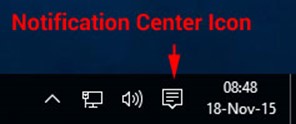
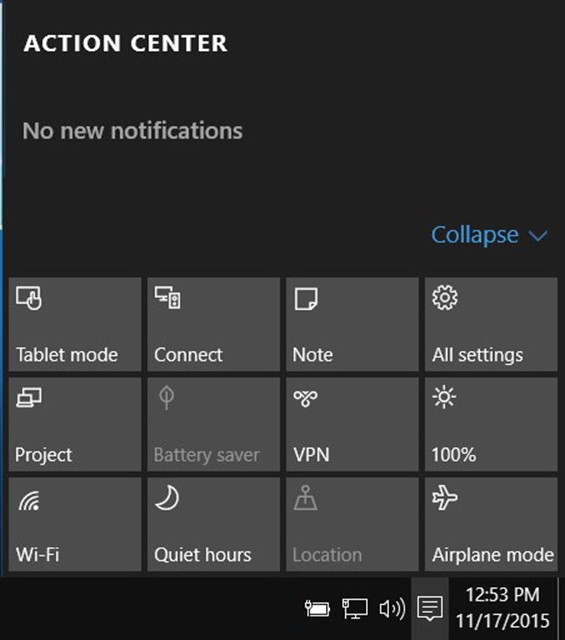
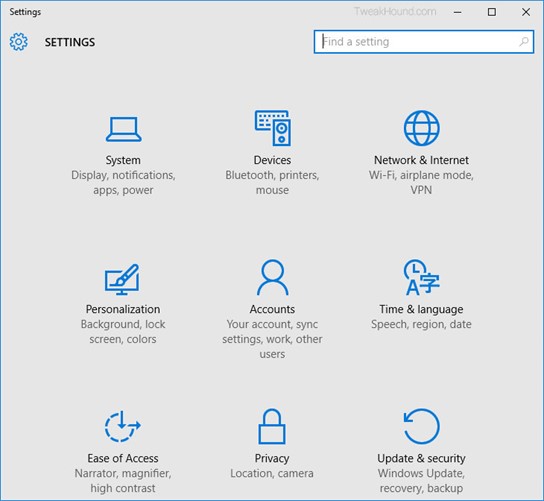
Choose All settings

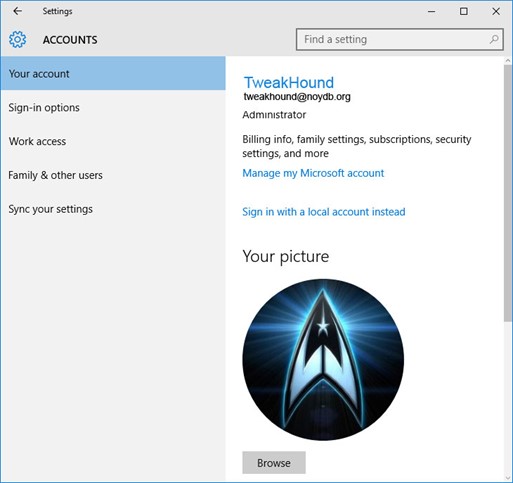
Choose Accounts

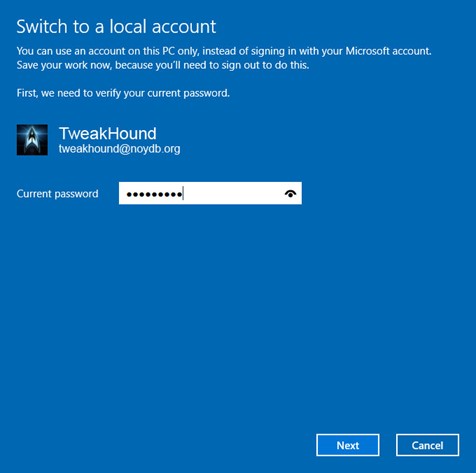
Choose Sign in with a local account instead

Enter current user password

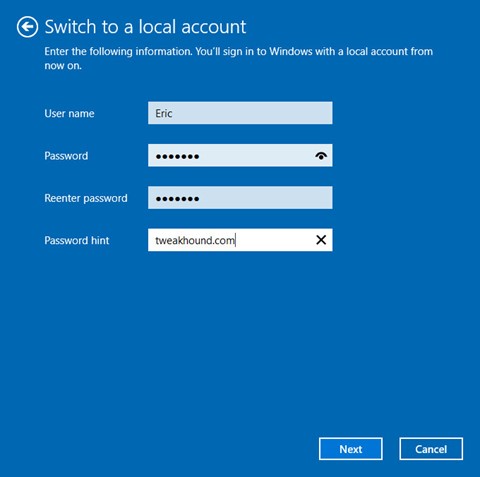
Enter the new User name, Password, and Password hint.

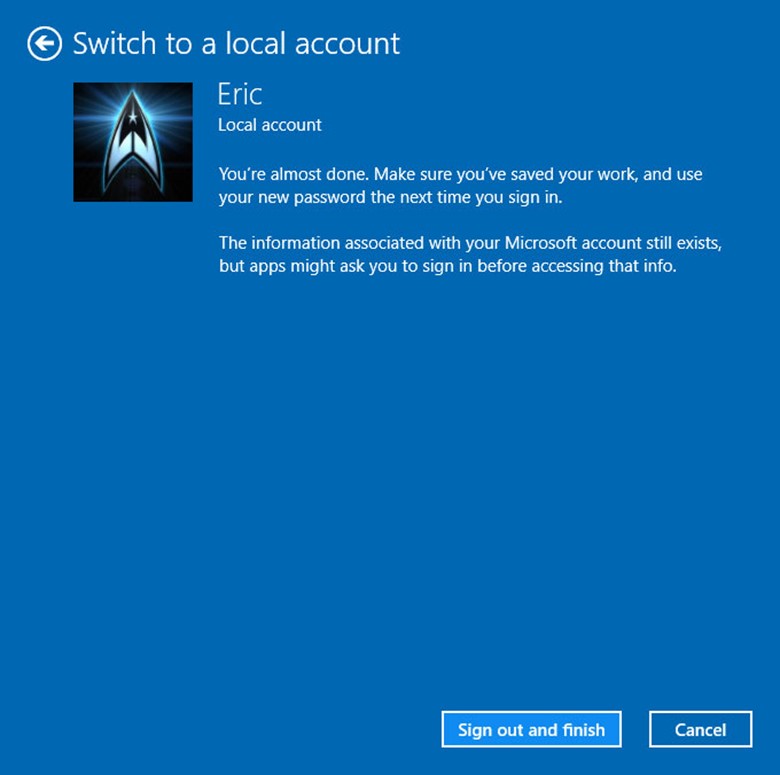
Sign out and finish.

Pages: Page 1 Page 2 Page 3 Page 4 Page 5 Page 6 Page 7

Tagged With: How-To's, Security, This Site, Windows 10

Patch Tuesday

October 13, 2015, 16:25(EDT) By Eric (a.k.a. TweakHound)

windows security

windows security
[Read more…] about Patch Tuesday

Tagged With: Security

Time To Run Windows Update

September 8, 2015, 16:31(EDT) By Eric (a.k.a. TweakHound)

microsoft_Knight_shield

microsoft_Knight_shieldUpdates available for all currently supported versions of Windows, IE and Edge too.
Microsoft Security Bulletin Summary for September 2015

Tagged With: Security

Microsoft Security Bulletin MS15-093 – Critical

August 19, 2015, 09:12(EDT) By Eric (a.k.a. TweakHound)

windows security

windows securityMicrosoft has issued an out-of-band update for Internet Explorer versions 7-11. When they do this it means you need to update NOW.
Microsoft Security Bulletin MS15-093 – Critical

Tagged With: Security

Patch Tuesday

August 11, 2015, 16:16(EDT) By Eric (a.k.a. TweakHound)

win10_up_icon_sTime To Run Windows Update
Updates available for all supported Windows versions as well as Office 2007-13 and Flash for IE in Win 8/8.1/10.
Microsoft Security Bulletin Summary for August 2015

Flash
“Adobe has released security updates for Adobe Flash Player.
These updates address critical vulnerabilities that could potentially allow an attacker to take control of the affected syste
m.”
Flash vulnerable? Nooooooooooooowaaaaaaay 🙄
APSB15-19 Security updates available for Adobe Flash Player
Download Flash
Flash for IE in Win 8/8.1/10 via Windows Update.
Latest version of Chrome has it too (see below)

Google Chrome
“The stable channel has been updated to 44.0.2403.155 for Windows, Mac, and Linux.”
Includes above Flash update.
Download or update from within the program.

VeraCrypt Updated
Version 1.13 released. Missed this one, got update on Sunday (Thanks Mike!).
This is a TrueCrypt replacement.
Download

Tagged With: Security

Patch Tuesday

July 14, 2015, 15:34(EDT) By Eric (a.k.a. TweakHound)

windows security

windows securityTime to run Windows update. I had 18 updates in Windows 7 and 29 in Windows 8.1.
Microsoft Security Bulletin Summary for July 2015
[Read more…] about Patch Tuesday

Tagged With: Security

« Previous Page
Next Page »

Primary Sidebar

Popular Posts

Tweaking Windows 10

Software I Use – 2021 Edition

Timer Tweaks Benchmarked

Win10 – Get Auto-Login Back

Recent Posts

  • Patch Tuesday
  • Weekend News
  • Weekend News
  • Patch Tuesday
  • Friday News
  • Patch Tuesday
  • Using Wise Disk Cleaner
  • Using Cleanmgr+
  • O&O ShutUp10++ 2.2.1024
  • Friday News
buywin10th2

Tags

  • Android
  • Backup
  • Beer
  • Computer Hardware
  • Computer News
  • Cool Tools
  • Freeware
  • How-To's
  • Linux
  • Off Topic
  • openSUSE
  • Playlists
  • Privacy
  • Security
  • Software
  • This Site
  • vacation
  • Veterans
  • Windows 10
  • Windows 11
  • Windows 7
  • Windows 8
  • Windows Vista
  • Windows XP

Catagories

  • Android
  • Backup
  • Beer
  • Computer Hardware
  • Computer News
  • Cool Tools
  • Freeware
  • Freeware Machines
  • How-To's
  • Linux
  • News From The Web
  • Off Topic
  • openSUSE
  • Privacy
  • Security
  • Software
  • Tweak Guides
  • Veterans
  • Windows
  • Windows 10
  • Windows 11
  • Windows 7
  • Windows 8
  • Windows Vista
  • Windows XP

TweakHound - Optimize Your Computing Experience! TweakHound - Optimize Your Computing Experience!

Copyright 2002-2025 by Eric Vaughan All material contain here is the property of the materials owner. Windows, Windows XP, Windows Vista, Windows Seven, Windows 8, Windows 10, Windows 11, Microsoft, and all associated logos are trademarks/property of Microsoft. You may not use or copy any material from tweakhound.com without expressed written permission. Hotlinking to any material within this site is forbidden. Privacy Policy