• Skip to primary navigation
  • Skip to main content
  • Skip to primary sidebar

TweakHound

Computer stuff...

  • Home
  • Windows XP
  • Windows Vista
  • Windows 7
  • Windows 8
  • Windows 10
  • Windows 11
  • Linux
  • Tweak Guides
  • Site Info
    • About
    • About Me
    • TweakHound’s World
    • Contact
    • My Computers
    • Old Articles
    • Privacy Policy
    • Old Index
    • Advanced Search

Eric (a.k.a. TweakHound)

Patch Tuesday

April 10, 2018, 13:30(EDT) By Eric (a.k.a. TweakHound)

windows security

*This post will be updated as info comes in.
Microsoft Security Update Summary at bottom of post.

Windows 7 SP1 – April 10, 2018—KB4093118 (Monthly Rollup)

Win10 1709 – April 10, 2018—KB4093112 (OS Build 16299.371)
“This update includes quality improvements. No new operating system features are being introduced in this update.”
Win10 1703 – April 10, 2018—KB4093107 (OS Build 15063.1029)
“This update includes quality improvements. No new operating system features are being introduced in this update.”
Win10 1607 – April 10, 2018—KB4093119 (OS Build 14393.2189)
“Windows 10 version 1607 will reach end of service on April 10, 2018. Devices running Windows 10 Home or Pro editions will no longer receive monthly security and quality updates that contain protection from the latest security threats. To continue receiving security and quality updates, Microsoft recommends updating to the latest version of Windows 10.”

Insider builds also get the above updates (KB4100375).
[Read more…] about Patch Tuesday

Tagged With: Security, Windows 10, Windows 7

Win10 SCU Delayed?

April 10, 2018, 11:16(EDT) By Eric (a.k.a. TweakHound)

***ATM this is interesting, high school gossipy speculation. But, what’s a day without a little drama! Follow the links in the post below and watch it unfold.

AskWoody reports both Paul Thurrott (thurrott.com) and Zac Bowden (windowscentral.com) are hearing SCU/RS4 is delayed.

*update 1243hrs
Don’t know if this is related but BuildFeed has the updated the latest build to 10.0.17133.1009, dated today.

Tagged With: Windows 10

Mozilla – Internet Health Report

April 10, 2018, 09:26(EDT) By Eric (a.k.a. TweakHound)

www_news

Mozilla has a new… I don’t know what to call it: Information, research, opinion, propaganda.
Anyway, they are going to cover a variety of topics from their perspective. IMHO worth reading and keeping track of.
“The Internet Health Report is about the human experience of the Internet. It is an independent, open source compilation of data, research and stories that show how the Internet is evolving across five issues…Privacy and security, Openness, Digital inclusion, Web literacy and Decentralization…We also cast a spotlight on three of the biggest Internet health issues of the past year: Securing the Internet of Things, Understanding ‘fake news’, and Too big tech?”
The Internet Health Report v.0.1
https://internethealthreport.org/2018/introduction/readme/
https://internethealthreport.org/2018/introduction/how-healthy-is-the-internet/

Tagged With: Computer News

Patch Tuesday Morning

April 10, 2018, 07:23(EDT) By Eric (a.k.a. TweakHound)

It’s Patch Tuesday. I thought I would post some stuff early to clear the board as this Patch Tuesday should be a big one. Windows 7 is said to have 10 critical patches and Win10 SCU comes out today.
If you want to install SCU today please backup.
If you do not want to upgrade to SCU today, please follow my instructions here.

Wise Disk Cleaner 9.7.3
Improved Mozilla Firefox cleaning – Minor GUI improvements – Updated various translations.
Download (I use the portable version)

HandBrake 1.1.0
Multi-platform video converter.
“This major release includes new features, as well as bug fixes and improvements for issues affecting previous HandBrake releases.”
Download

Flash Updated
Version 29.0.0.140 is out.
for Firefox, Opera
for Internet Explorer
Flash for Edge, IE 11, and Chrome update automatically with the browser.

Stuff I’ve Bookmarked Lately
How to keep your ISP’s nose out of your browser history with encrypted DNS
Richest 1% on target to own two-thirds of all wealth by 2030
Demolition of silo in Denmark goes wrong.

Tagged With: Computer News

Friday Random Stuff…

April 6, 2018, 15:07(EDT) By Eric (a.k.a. TweakHound)

Not much going on out there today. Hope y’all have a great weekend!
[Read more…] about Friday Random Stuff…

Tagged With: Computer News

Thursday Random Stuff…

April 5, 2018, 15:15(EDT) By Eric (a.k.a. TweakHound)

≥ EVO?
Western Digital has a new SSD that reviewers are raving over. Anandtech says the “EVO Meets Its Match“.
“The MSRPs for the WD Black roughly match current street prices for the Samsung 960 EVO, which is exactly what the WD Black should be competing against. Neither drive has a clear overall performance advantage in the 1TB capacity we’ve analyzed with this review, though the WD Black has a modest power efficiency advantage (our idle power problems notwithstanding).”
Good to see competition but with no clear advantage and similar price points, why should I switch?

Cellphone Spying
Someone is intercepting cellphone communications around DC. Homeland Security “said it had not determined the type of devices in use or who might have been operating them. Nor did it say how many it detected or where…DHS official Christopher Krebs noted that DHS had observed “anomalous activity” consistent with Stingrays in the Washington area.”

That Thing I Said I Wasn’t Gonna Talk About
Kinda hard to keep my yap shut. So much news, and the CEO is gonna get grilled by Congress. Well, unless he threatens to show their IMs to their significant others.

Harry Potter: Hogwarts Mystery
RPG for your phone coming April 25th.
Harry Potter: Hogwarts Mystery

Tagged With: Computer News

Win10 SCU Is Out Next Week

April 5, 2018, 11:39(EDT) By Eric (a.k.a. TweakHound)

Windows 10 Spring Creators Update is going to be released next week.
In My Humble Opinion:
– There is no reason to upgrade within 30 days of release. (Or at least until the following Patch Tuesday.)
– There are no new features worth upgrading for.

You can stick with the current release you are on and still get updates for at least 18 months:
1709 (Fall Creators Update) Expires April 9, 2109
1703 (Creators Update) Expires October 9, 2018
1607 (Anniversary Update) Expires April 10, 2018

I recommend blocking/delaying feature updates:
– You need to be running Win10 Pro, Enterprise, or Education.
There is no way to stop a feature update in Win10 Home without stopping security updates. You can officially upgrade from Home to Pro for $99 but there are MUCH, MUCH cheaper legit keys to be had out there. If you can’t find them, email me.
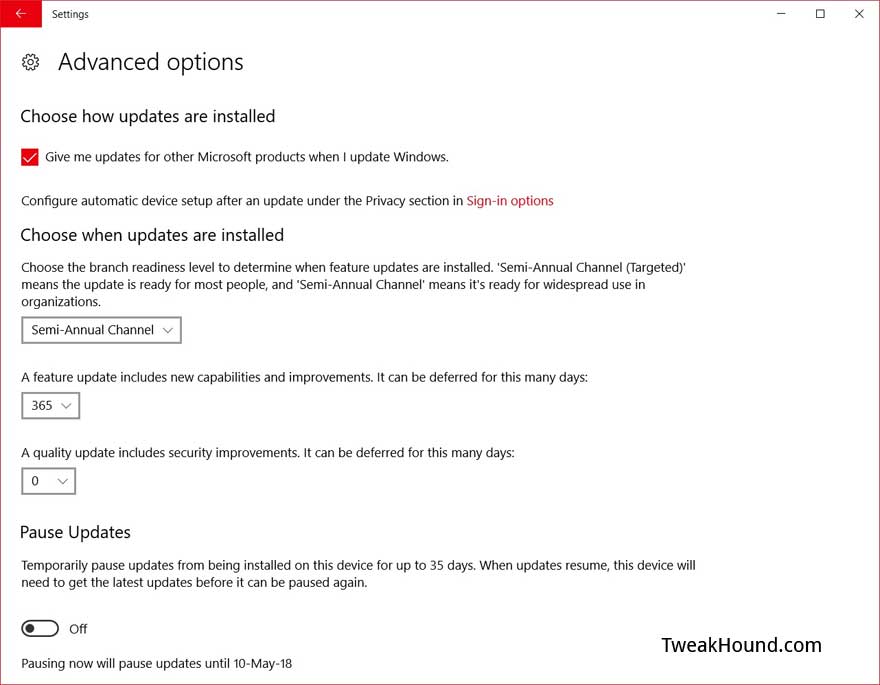
Go to Settings > Update & Security > Advanced options
Optional – Use the  > Semi-Annual Channel ( NOT Semi-Annual Channel (Targeted) )
This channel used to be Current Branch for Business. This delays feature updates until they are ready for business, i.e. all the bugs are worked out. This was about 3 months for FCU (approx. Oct 17 – Jan. 11).
Go to Settings > Update & Security > Advanced options >
In the box under A feature update includes new capabilities and improvements. It can be deferred for this many days:
Change days to desired amount. I recommend at least 31 but since SCU offers me nothing then up to 365 will not hurt. You can re-evaluate when the next feature update comes out and it looks to be a big one.

Tagged With: Windows 10

Intel Isn’t Going To Patch Your Old CPU

April 4, 2018, 10:40(EDT) By Eric (a.k.a. TweakHound)

intellogo

Intel has microcode patches available for newer CPUs.
They are not going to patch: Bloomfield, Clarksfield, Gulftown, Penryn, Wolfdale, Yorkfield…
AFAICS this is basically Intel Core 2 through the early i5/7 and the Xeons from those eras.
Intel – Microcode Revision Guidance, April 2, 2018 (PDF)

Tagged With: Computer Hardware, Security

Windows Defender Vulnerability

April 4, 2018, 08:18(EDT) By Eric (a.k.a. TweakHound)

windows security

I’m in front of the boob tube last night and I get this email entitled “Microsoft Security Update Releases” (full email posted below).
CVE-2018-0986 | Microsoft Malware Protection Engine Remote Code Execution Vulnerability
The gist of the alert is that all versions of Windows Defender have a vulnerability.
If Windows Defender scans an infected file then a hacker could own your system.
Rephrased…
If the product that is supposed to protect your system just SCANS a bad file you could be OWNED.
Fortunately this has been patched. Windows Defender should update automatically but you can force an update.
Press the Windows + R keys > copy paste the following: “%ProgramFiles%\Windows Defender\MSASCui.exe” -Update
[Read more…] about Windows Defender Vulnerability

Tagged With: Security

Richard Stallman On Privacy

April 3, 2018, 12:14(EDT) By Eric (a.k.a. TweakHound)

Legendary Geek Richard Stallman has A radical proposal to keep your personal data safe.
His proposal is that collection of personal data by entities both public and private needs to stop. I agree wholeheartedly.

Tagged With: Privacy

« Previous Page
Next Page »

Primary Sidebar

Popular Articles

Windows 10

Tweaking Windows 10

My Windows 10 Tweaks

Windows 10 Privacy Settings

Win10 Diagnostics Tracking Service Gone?

Windows 10 Advanced Disk Cleanup

Win10 Customize Installation Options

Windows 10 Dark Theme

Win10 Wallpapers, Graphics, etc.

All Windows 10 Articles

Windows 8

Tweaking Windows 8.1

Advice On Installing Windows 8.1

Clean Install Windows 8.1

Cleanup After Windows 8.1 Upgrade

Create Shutdown, Restart, Logoff Tiles For Windows 8

Tweaking Windows 8

Install Windows 8 – Clean Install With Upgrade Media

Install Windows 8 – Upgrade

Windows 8 – Cleaning Up After You’ve Upgraded

Windows 8 Freeware Machine

Windows 8 SSD Settings, Etc.

How To Resize Your Windows 8 Partition

Create Windows 8 Recovery Media

Windows 8 – Elevated Command Prompt

How To Fix The Windows Bootloader

Windows 7

Installing Windows 7

Tweaking Windows 7

Windows 7 Diagnostics Tracking Service

The Windows 7 Freeware Machine

The Windows 7 Pagefile And Running Without One

Bad Tweaks

SSD Tweak Guide (sort of)

The noguiboot (no GUI Boot) Tweak

NtfsMemoryUsage=2 Tweak

More Windows 7 articles here.

Windows Vista

Installing Windows Vista

Tweaking Windows Vista

More Windows Vista articles here.

Windows XP

eXPired - The Last Windows XP Guide You'll Ever Need

The Right Way To Install Windows XP

Super XP Tweaking Guide

The Freeware XP Machine

Bad Tweaks

More XP Articles here and here.

Backup

Backup Article Greatest Hits – Vol. 1

Other

Cataloging Your Music Collection

Finding Good Album Art

Converting Vinyl Records To Digital Music – A Non-Audiophiles Guide

Windows All-In-One Recovery Flash Drive

SSD Tweak Guide (sort of)

Raidmax Blackstorm Case Review

Disk Partitioning

Ditch Those CD's! A Guide To Using USB Flash Drives

Checking Your Disks For Problems

Bad Tweaks

More articles here

Tags

Android Backup Beer Computer Hardware Computer News Cool Tools Freeware How-To's Linux Off Topic openSUSE Playlists Privacy Security Software This Site vacation Veterans Windows 7 Windows 8 Windows 10 Windows 11 Windows Vista Windows XP

TweakHound - Optimize Your Computing Experience! TweakHound - Optimize Your Computing Experience!

Copyright 2002-2025 by Eric Vaughan All material contain here is the property of the materials owner. Windows, Windows XP, Windows Vista, Windows Seven, Windows 8, Windows 10, Windows 11, Microsoft, and all associated logos are trademarks/property of Microsoft. You may not use or copy any material from tweakhound.com without expressed written permission. Hotlinking to any material within this site is forbidden. Privacy Policy