
• Skip to primary navigation
  • Skip to main content
  • Skip to primary sidebar

TweakHound

Computer stuff...

  • Home
  • Windows XP
  • Windows Vista
  • Windows 7
  • Windows 8
  • Windows 10
  • Windows 11
  • Linux
  • Tweak Guides
  • Site Info
    • About
    • About Me
    • TweakHound’s World
    • Contact
    • My Computers
    • Old Articles
    • Privacy Policy
    • Old Index
    • Advanced Search

Eric (a.k.a. TweakHound)

Classic Shell 4.0

October 5, 2013, 14:44(EDT) By Eric (a.k.a. TweakHound)

classicshell_new

classicshell_newClassic Shell version 4.0.0 is out.
“Improved compatibility with Windows 8.1”
Download
Classic Shell has been around for nearly 4 years.
It has recently attracted attention from a wider audience because of its Start Menu addon/replacement called Classic Start Menu.
IMHO it is the best freeware Windows 8 start menu program.

Tagged With: Cool Tools, Freeware

iTunes 11.1.1

October 4, 2013, 06:49(EDT) By Eric (a.k.a. TweakHound)

itunes10logo

itunes10logo“This update resolves an issue that may cause iTunes Extras to display incorrectly, fixes a problem with deleted podcasts, and improves stability.”
Download
Download 64-bit
Be sure to see:
Ed Bott – The unofficial guide to installing iTunes 10 without bloatware

Google Chrome Updated, Again

October 4, 2013, 06:37(EDT) By Eric (a.k.a. TweakHound)

google chrome

google chrome“The Stable Channel has been updated to 30.0.1599.69 for Windows, Mac and Chrome Frame.”
Download or update from within the program.
Source: Google Chrome Blog

This update fixes the top two user issues with the latest stable build:
-Tabs freeze up (Issue: 303293)
-Lag in some games/GPU issues with certain monitors (Issue: 262437)

Chrome for Android updated too:
Chrome 30.0.1599.82 has several new features.

Tagged With: Cool Tools, Freeware

Google Chrome Updated

October 1, 2013, 13:56(EDT) By Eric (a.k.a. TweakHound)

google chrome

google chromeChrome 30.0.1599.66 has been released for Windows, Linux, and Mac. [Read more…] about Google Chrome Updated

Tagged With: Cool Tools, Freeware

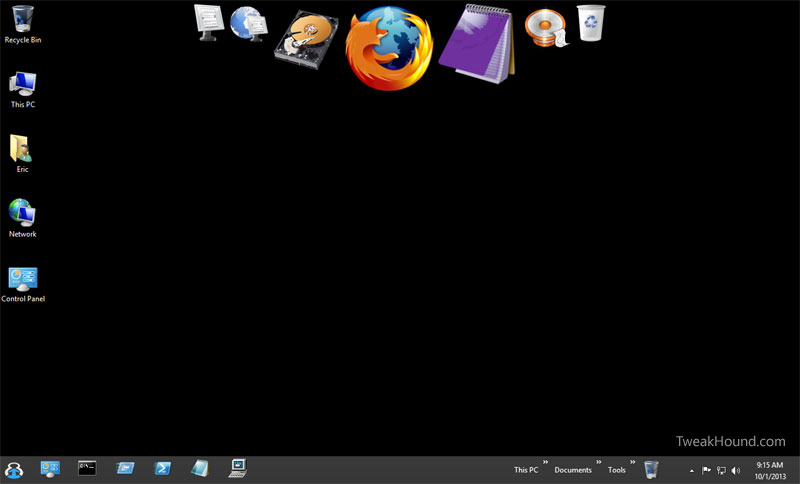
Windows 8 Custom Menus & Stuff

October 1, 2013, 09:06(EDT) By Eric (a.k.a. TweakHound)

th

thThere are many ways to create custom menus and more in Windows 8. Below are my guides to some of those options:
Using Start8
Using RocketDock
Creating Desktop Icons
Creating Toolbars In Windows 8
Pin Items To The Taskbar In Windows 8
win8menusandstuff

Tagged With: How-To's, This Site, Windows 8

Pin Items To The Taskbar In Windows 8

October 1, 2013, 08:54(EDT) By Eric (a.k.a. TweakHound)

thpinpostlogo

thpinpostlogoPinning apps to the desktop taskbar in Windows is not new but Windows 8 with its goofy Metro screen introduced some complexity into it. [Read more…] about Pin Items To The Taskbar In Windows 8

Tagged With: How-To's, This Site, Windows 8

Creating Toolbars In Windows 8

October 1, 2013, 08:51(EDT) By Eric (a.k.a. TweakHound)

thpinpostlogo

thpinpostlogoYou can create multiple menus on your taskbar in Windows 8.
In fact you could create enough so that you would not miss the old Windows 7 start menu.
[Read more…] about Creating Toolbars In Windows 8

Tagged With: How-To's, This Site, Windows 8

Using RocketDock

October 1, 2013, 08:47(EDT) By Eric (a.k.a. TweakHound)

thpinpostlogo

thpinpostlogoRocketDock is a free OS X style launcher for Windows. It is highly customizable. [Read more…] about Using RocketDock

Tagged With: Cool Tools, Freeware, How-To's, This Site, Windows 7, Windows 8, Windows Vista, Windows XP

Using Start8

October 1, 2013, 08:41(EDT) By Eric (a.k.a. TweakHound)

thpinpostlogo

thpinpostlogoStart8 is a popular Start Menu program for Windows 8. This article is intended to show you its configuration options. [Read more…] about Using Start8

Tagged With: Cool Tools, How-To's, This Site, Windows 8

Creating Desktop Icons

October 1, 2013, 08:37(EDT) By Eric (a.k.a. TweakHound)

thpinpostlogo

thpinpostlogo>A quick guide on creating desktop icons for Windows 7 and Windows 8.
[Read more…] about Creating Desktop Icons

Tagged With: How-To's, This Site, Windows 7, Windows 8

« Previous Page
Next Page »

Primary Sidebar

Popular Articles

Windows 10

Tweaking Windows 10

My Windows 10 Tweaks

Windows 10 Privacy Settings

Win10 Diagnostics Tracking Service Gone?

Windows 10 Advanced Disk Cleanup

Win10 Customize Installation Options

Windows 10 Dark Theme

Win10 Wallpapers, Graphics, etc.

All Windows 10 Articles

Windows 8

Tweaking Windows 8.1

Advice On Installing Windows 8.1

Clean Install Windows 8.1

Cleanup After Windows 8.1 Upgrade

Create Shutdown, Restart, Logoff Tiles For Windows 8

Tweaking Windows 8

Install Windows 8 – Clean Install With Upgrade Media

Install Windows 8 – Upgrade

Windows 8 – Cleaning Up After You’ve Upgraded

Windows 8 Freeware Machine

Windows 8 SSD Settings, Etc.

How To Resize Your Windows 8 Partition

Create Windows 8 Recovery Media

Windows 8 – Elevated Command Prompt

How To Fix The Windows Bootloader

Windows 7

Installing Windows 7

Tweaking Windows 7

Windows 7 Diagnostics Tracking Service

The Windows 7 Freeware Machine

The Windows 7 Pagefile And Running Without One

Bad Tweaks

SSD Tweak Guide (sort of)

The noguiboot (no GUI Boot) Tweak

NtfsMemoryUsage=2 Tweak

More Windows 7 articles here.

Windows Vista

Installing Windows Vista

Tweaking Windows Vista

More Windows Vista articles here.

Windows XP

eXPired - The Last Windows XP Guide You'll Ever Need

The Right Way To Install Windows XP

Super XP Tweaking Guide

The Freeware XP Machine

Bad Tweaks

More XP Articles here and here.

Backup

Backup Article Greatest Hits – Vol. 1

Other

Cataloging Your Music Collection

Finding Good Album Art

Converting Vinyl Records To Digital Music – A Non-Audiophiles Guide

Windows All-In-One Recovery Flash Drive

SSD Tweak Guide (sort of)

Raidmax Blackstorm Case Review

Disk Partitioning

Ditch Those CD's! A Guide To Using USB Flash Drives

Checking Your Disks For Problems

Bad Tweaks

More articles here

Tags

Android Backup Beer Computer Hardware Computer News Cool Tools Freeware How-To's Linux Off Topic openSUSE Playlists Privacy Security Software This Site vacation Veterans Windows 7 Windows 8 Windows 10 Windows 11 Windows Vista Windows XP

TweakHound - Optimize Your Computing Experience! TweakHound - Optimize Your Computing Experience!

Copyright 2002-2025 by Eric Vaughan All material contain here is the property of the materials owner. Windows, Windows XP, Windows Vista, Windows Seven, Windows 8, Windows 10, Windows 11, Microsoft, and all associated logos are trademarks/property of Microsoft. You may not use or copy any material from tweakhound.com without expressed written permission. Hotlinking to any material within this site is forbidden. Privacy Policy