 As they say around here, “I ain’t got a dawg in this fight“.
My prediction Carolina Panthers 38 – Denver Broncos 20.
What say you?
Computer News
Slashdot and SourceForge Sold
 In many peoples opinion Slashdot and SourceForge have been going down hill for quite a while. Slashdotters often lampoon the site. SourceForge has gotten so bad that it regularly appears on malware site block lists.
I hope this move will bring these sites to their former glory.
Articles:
SourceForge and Slashdot Have Been Sold (Foss Force)
Slashdot and SourceForge Sold, Now Under New Management (Slashdot)
Thursday Random Stuff…
 New Nvidia Drivers
Nvidia Game Ready 361.75 WHQL Drivers
Windows 7 Diagnostics Tracking Service
I had to update my article on this topic because Microsoft keeps playing games with us.
Google Wants The Web To Be HTTPS Too
It is my belief that everything on the web should be as secure as we can make it. To that end I have done my part by making this site all HTTPS.
Website operators, it is time to get your act together because Google Will Soon Shame All Websites That Are Unencrypted.
Back To The Future
DeLoreans are coming back. “Flux Capacitors for everyone!” exclaimed one fan.
Not the original company, and it will set you back at least $100,000.
Def Leppard – Dangerous
 One my all time favorite bands has released a new video.
It follows the Let’s Go video. I’ll embed both. [Read more…] about Def Leppard – Dangerous
Tuesday Random Stuff…
 Firefox 44
Download 32-bit (en-US)
Download 64-bit (en-US)
Download other systems and languages
Release Notes
CCleaner 5.14
The monthly update for CCleaner has been released.
Download
Release Notes
***Pay attention during install. May attempt to install unwanted programs.
Etc…
Most of your Facebook friends couldn’t care less about you
Reminder, Disney sux:
Ex-Disney IT workers sue after being asked to train their own H-1B replacements
Lawsuits Claim Disney Colluded to Replace U.S. Workers With Immigrants
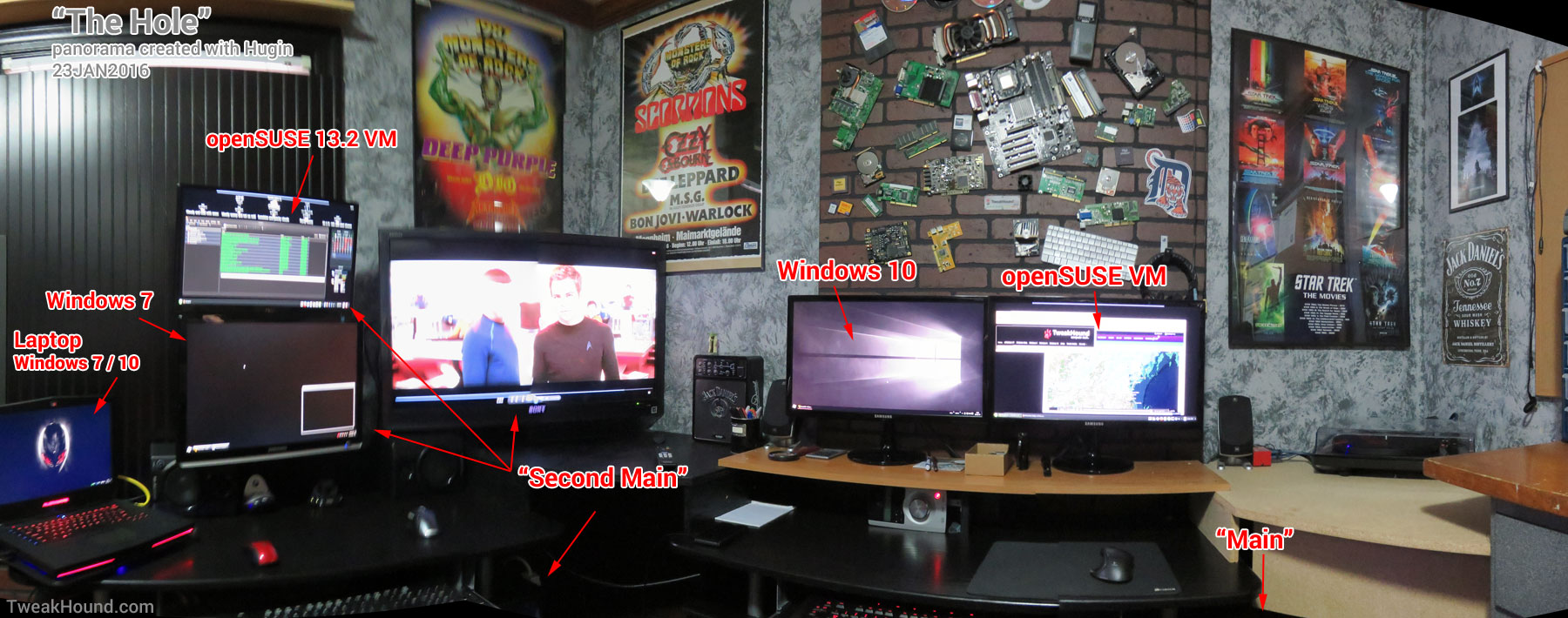
The Hole (updated)
 My computer setup has changed a little since the last time I published it.
Below is an updated pic. I used a free program called Hugin to create the panorama (click it for a larger image):
Snow Storm
 This weekends snow storm is in it’s second day here.
[Read more…] about Snow Storm
Wednesday Wild, Wonderful, Wacky News
 Well, it is Wednesday and there is some news. No guarantees after that…
Linux Malware
Well frack. There is a Linux Trojan that takes screenshots every 30 seconds and apparently Android 2-factor authentication has been pwned.
Et tu, Intel?
Intel’s Driver Update Utility has a security flaw. It has been fixed. Download it here.
Software Updates
Audacity 2.1.2 (download)
VirtualBox 5.0.14
Planet Nine
The stargazers at Caltech say they found a ninth planet. I’m still pissed they took Pluto away. That’s just wrong. Once you have a Disney character named after you there should be no take-backs.
Etc…
Star Wars: Episode VIII delayed until December 2017
How to seal a bag of chips without a clip
Sunday Random Stuff…
More Privacy News
Pew research has a rather lengthy discussion on privacy. The topic and discussion are very interesting and worth the read. I question the results of the survey as it was an online survey of “461 U.S. adults and nine online focus groups of 80 people”. Very small group of people and I don’t particularly trust online surveys. For instance, does anyone think the polls on this TweakHound.com are an accurate representation of anything other than the way readers of this site feel? I certainly don’t. I put them up because it’s fun and it gives me some insight to my readership.
Speaking Of Online Surveys
Lots of sites copied info from a Computerworld article quoting a survey that nobody can read. Well, you can read it but it’ll cost you $500.00.
The survey “Fielded online through Survata in late September 2015, the survey asked 1,009 U.S. adults about their attitudes toward Microsoft’s latest operating system:“.
The gist of the Computerworld article is that 60% of Win10 users had a favorable opinion of the OS. Interestingly, 37% of those were Windows Insiders.
Personally I question the usefulness of an online survey of only 1009 people that is over 3 months old.
No Old Windows On New Hardware
ARSTechnica – Skylake users given 18 months to upgrade to Windows 10
Neowin – Microsoft will not support older Windows versions on upcoming PC hardware
Paul Thurrott – Microsoft Finds Another Way to Force Windows 10 Upgrade on Businesses
The above posts are based on Terry Myerson’s Windows 10 Embracing Silicon Innovation blog post. He said in part,
“Going forward, as new silicon generations are introduced, they will require the latest Windows platform at that time for support. This enables us to focus on deep integration between Windows and the silicon, while maintaining maximum reliability and compatibility with previous generations of platform and silicon. For example, Windows 10 will be the only supported Windows platform on Intel’s upcoming “Kaby Lake” silicon, Qualcomm’s upcoming “8996” silicon, and AMD’s upcoming “Bristol Ridge” silicon.”
In a nutshell, new hardware will need new Windows. Some folks are pissed about it. I understand their feelings but I’m not sure how much care about this issue. I’ll run the OS I desire and virtualize the rest.
Site News
Thank you all for hanging in with me this last week and coming back here. I’m still trying to tweak the best settings for the speed of this site.
Move Complete
Sorry for the downtime. I had to get the hell off of Godaddy.
Now hosted at DreamHost.
I’m not a big fan of caching plugins but I am trying out W3 Total Cache.
Please let me know if you have any issues.
Thanks for hanging in there!