• Skip to primary navigation
  • Skip to main content
  • Skip to primary sidebar

TweakHound

Computer stuff...

  • Home
  • Windows XP
  • Windows Vista
  • Windows 7
  • Windows 8
  • Windows 10
  • Windows 11
  • Linux
  • Tweak Guides
  • Site Info
    • About
    • About Me
    • TweakHound’s World
    • Contact
    • My Computers
    • Old Articles
    • Privacy Policy
    • Old Index
    • Advanced Search

Windows 7

Patch Tuesday

June 12, 2018, 15:19(EDT) By Eric (a.k.a. TweakHound)

windows security

Got Windows? You got updates. MS Office too. See the end of this post for full breakdown. Among many other things these Windows Updates contain more Spectre fixes.
Win10 1803 – June 12, 2018—KB4284835 (OS Build 17134.112)
Win10 1709 – June 12, 2018—KB4284819 (OS Build 16299.492)
Win10 1703 – June 12, 2018—KB4284874 (OS Build 15063.1155)
Win10 1607 – June 12, 2018—KB4284880 (OS Build 14393.2312)

All flash plugins were patched last week. I’m not gonna track this security nightmare anymore. Do yourself a favor and uninstall it. I have it installed on like one of 7 computers and I don’t even remember why it is installed on that.

Chrome Updated
“The stable channel has been updated to 67.0.3396.87 for Windows, Mac, and Linux…This update includes 1 security fix”
Download
Download standalone(full)
Download standalone 64-bit Windows version(full)


[Read more…] about Patch Tuesday

Tagged With: Computer News

My Home Server – Windows 7

January 1, 2018, 09:32(EST) By Eric (a.k.a. TweakHound)

thpinpostlogo

Here is my current setup. I will be attempting to switch over to a Linux server setup in the near future (just because).
This machine was my secondary workstation and has been repurposed for my home server.
This is a quickie article. No hand holding. If you do not know your way around Windows this article is not for you.
[Read more…] about My Home Server – Windows 7

Tagged With: Backup, Computer Hardware, How-To's, This Site, Windows 7

Profound Post

September 7, 2017, 10:46(EDT) By Eric (a.k.a. TweakHound)

win8user

I don’t post in forums much. I don’t comment in posts much either. I may scan through comments on non-political type posts. There are a few places where most comments are level headed. Askwoody.com Forums is one such place. Once in a while a comment truly impresses me.
A comment by user Canadian Tech is an example. I’ve no idea who he is. I don’t necessarily agree with everything he said but his argument is solid, well reasoned, and well written. If he isn’t a tech writer he should be.

Tagged With: Windows 7

Get Rid Of SMB1 In Windows 7

May 22, 2017, 07:33(EDT) By Eric (a.k.a. TweakHound)

win7orb

A reader was confused by all the steps in Microsoft’s How to enable and disable SMBv1, SMBv2, and SMBv3 in Windows and Windows Server.
Should he use PowerShell, Registry Editor, Group Policy? Should he disable it on Client or Server or both?
Because it is a security risk, it is important to ditch SMB1 on all platforms.
You should get rid of both the client and server.
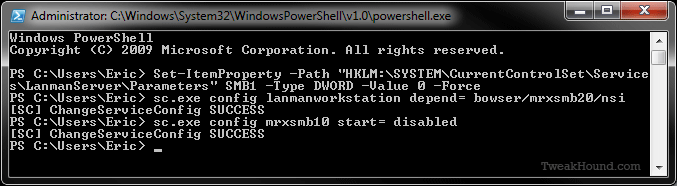
In Windows 7 I do this via PowerShell. It is fast and easy.
You must run PowerShell as Admin.

Press the Windows + R keys > type powershell (press the Enter key)
> copy and paste the following command:
Set-ItemProperty -Path “HKLM:\SYSTEM\CurrentControlSet\Services\LanmanServer\Parameters” SMB1 -Type DWORD -Value 0 -Force
> now press the Enter key
> copy and paste the following command: sc.exe config lanmanworkstation depend= bowser/mrxsmb20/nsi
> now press the Enter key
> copy and paste the following command: sc.exe config mrxsmb10 start= disabled
> now press the Enter key > Reboot

———-
Windows PowerShell
Copyright (C) 2009 Microsoft Corporation. All rights reserved.

PS C:\Users\Eric> Set-ItemProperty -Path “HKLM:\SYSTEM\CurrentControlSet\Service
s\LanmanServer\Parameters” SMB1 -Type DWORD -Value 0 -Force
PS C:\Users\Eric> sc.exe config lanmanworkstation depend= bowser/mrxsmb20/nsi
[SC] ChangeServiceConfig SUCCESS
PS C:\Users\Eric> sc.exe config mrxsmb10 start= disabled
[SC] ChangeServiceConfig SUCCESS
PS C:\Users\Eric>
———-

Tagged With: How-To's, Security, Windows 7

Cleaning Up The Script

February 13, 2017, 10:19(EST) By Eric (a.k.a. TweakHound)

th

In my post Blocking Windows 7 Telemetry I provided a script to remove Windows 7 telemetry updates. This was done in haste from an older script and I have now cleaned it up.
One poster in the AskWoody lounge stated certain updates were no longer there. I asked him to provide some documentation so I could verify his statement and he did not.
So, I had to dig in and find the answer myself. I checked a few of the KB articles for the updates and there weren’t any notices about updates being removed or superseded. That is par for the course for Microsoft.
[Read more…] about Cleaning Up The Script

Tagged With: Windows 7

Blocking Windows 7 Telemetry

February 11, 2017, 14:19(EST) By Eric (a.k.a. TweakHound)

th

In the last few days I’ve seen posts at AskWoody and Ghacks discussing blocking Windows 7 telemetry.
Since this seems to still be an issue I’ve decided to revive my Remove And Block GWX In Windows 7 script.
[Read more…] about Blocking Windows 7 Telemetry

Tagged With: Windows 7

Windows 7 DiagTrack. It’s Ba-ack!

October 24, 2016, 12:52(EDT) By Eric (a.k.a. TweakHound)

The Windows 7 Diagnostics Tracking Service is back and uninstallable if you want to keep your system patched.
I’ve updated my post on this: Windows 7 Diagnostics Tracking Service

Tagged With: Windows 7

Bad Tweak – Disable Receive Window Auto-Tuning

October 8, 2016, 11:11(EDT) By Eric (a.k.a. TweakHound)

thpinpostlogo

A reader just commented on this so this is a quickie article to debunk this “tweak”.
[Read more…] about Bad Tweak – Disable Receive Window Auto-Tuning

Tagged With: Windows 10, Windows 7, Windows 8

Fix – Windows 7 Update Not Working

September 29, 2016, 09:12(EDT) By Eric (a.k.a. TweakHound)

win7orb

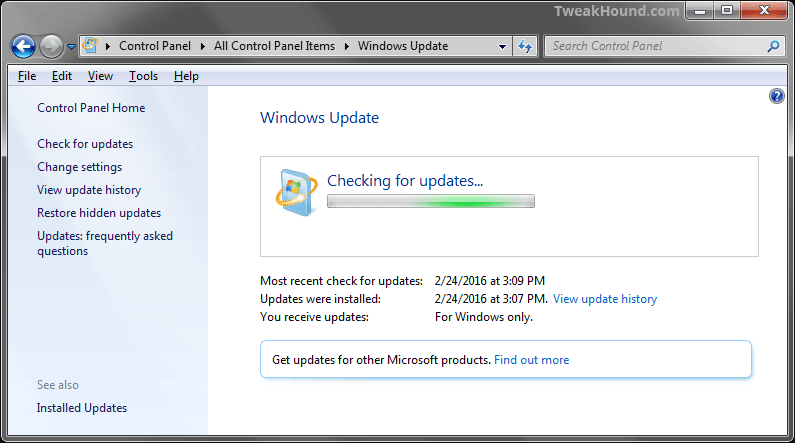
Microsoft broke Windows 7 update. Whether or not it was intentional…
Purported solutions to this problem abound.
I keep getting asked about it so here is my solution.
I have used this exact method on dozens of Windows 7 installs and it has worked.
I cannot guarantee it will work for you.
winup23456
[Read more…] about Fix – Windows 7 Update Not Working

Tagged With: How-To's, This Site, Windows 7

Remove software related to the Windows 10 free upgrade offer

September 21, 2016, 06:38(EDT) By Eric (a.k.a. TweakHound)

Microsoft has a new Windows update that removes most GWX stuff from Windows 7 and 8.1.
“This update removes the Get Windows 10 app and other software related to the Windows 10 free upgrade offer that expired on July 29, 2016. ”
KB3184143 – Remove software related to the Windows 10 free upgrade offer

This update replaces the following previously-released software:
KB 3035583 — Update installs Get Windows 10 app in Windows 8.1 and Windows 7 SP1
KB 3064683 — Windows 8.1 OOBE modifications to reserve Windows 10
KB 3072318 — Update for Windows 8.1 OOBE to upgrade to Windows 10
KB 3090045 — Windows Update for reserved devices in Windows 8.1 or Windows 7 SP1
KB 3123862 — Updated capabilities to upgrade Windows 8.1 and Windows 7
KB 3173040 — Windows 8.1 and Windows 7 SP1 end of free upgrade offer notification
KB 3146449 — Updated Internet Explorer 11 capabilities to upgrade Windows 8.1 and Windows 7

Like everything else Microsoft does these days this is incomplete. Geeks have done their own research and come up with there own list to uninstall.
I did this via a Batch file, Remove And Block GWX In Windows 7. I included the updates I thought were important to remove. I’m going to revise it one more time this evening.
See this MDL forum thread for a bigger list: MDL – Remove Telemetry and Windows 10 Related Updates from Windows 7

Tagged With: Windows 7

« Previous Page
Next Page »

Primary Sidebar

Popular Articles

Windows 10

Tweaking Windows 10

My Windows 10 Tweaks

Windows 10 Privacy Settings

Win10 Diagnostics Tracking Service Gone?

Windows 10 Advanced Disk Cleanup

Win10 Customize Installation Options

Windows 10 Dark Theme

Win10 Wallpapers, Graphics, etc.

All Windows 10 Articles

Windows 8

Tweaking Windows 8.1

Advice On Installing Windows 8.1

Clean Install Windows 8.1

Cleanup After Windows 8.1 Upgrade

Create Shutdown, Restart, Logoff Tiles For Windows 8

Tweaking Windows 8

Install Windows 8 – Clean Install With Upgrade Media

Install Windows 8 – Upgrade

Windows 8 – Cleaning Up After You’ve Upgraded

Windows 8 Freeware Machine

Windows 8 SSD Settings, Etc.

How To Resize Your Windows 8 Partition

Create Windows 8 Recovery Media

Windows 8 – Elevated Command Prompt

How To Fix The Windows Bootloader

Windows 7

Installing Windows 7

Tweaking Windows 7

Windows 7 Diagnostics Tracking Service

The Windows 7 Freeware Machine

The Windows 7 Pagefile And Running Without One

Bad Tweaks

SSD Tweak Guide (sort of)

The noguiboot (no GUI Boot) Tweak

NtfsMemoryUsage=2 Tweak

More Windows 7 articles here.

Windows Vista

Installing Windows Vista

Tweaking Windows Vista

More Windows Vista articles here.

Windows XP

eXPired - The Last Windows XP Guide You'll Ever Need

The Right Way To Install Windows XP

Super XP Tweaking Guide

The Freeware XP Machine

Bad Tweaks

More XP Articles here and here.

Backup

Backup Article Greatest Hits – Vol. 1

Other

Cataloging Your Music Collection

Finding Good Album Art

Converting Vinyl Records To Digital Music – A Non-Audiophiles Guide

Windows All-In-One Recovery Flash Drive

SSD Tweak Guide (sort of)

Raidmax Blackstorm Case Review

Disk Partitioning

Ditch Those CD's! A Guide To Using USB Flash Drives

Checking Your Disks For Problems

Bad Tweaks

More articles here

Tags

Android Backup Beer Computer Hardware Computer News Cool Tools Freeware How-To's Linux Off Topic openSUSE Playlists Privacy Security Software This Site vacation Veterans Windows 7 Windows 8 Windows 10 Windows 11 Windows Vista Windows XP

TweakHound - Optimize Your Computing Experience! TweakHound - Optimize Your Computing Experience!

Copyright 2002-2025 by Eric Vaughan All material contain here is the property of the materials owner. Windows, Windows XP, Windows Vista, Windows Seven, Windows 8, Windows 10, Windows 11, Microsoft, and all associated logos are trademarks/property of Microsoft. You may not use or copy any material from tweakhound.com without expressed written permission. Hotlinking to any material within this site is forbidden. Privacy Policy