
Here is my current setup. I will be attempting to switch over to a Linux server setup in the near future (just because).
This machine was my secondary workstation and has been repurposed for my home server.
This is a quickie article. No hand holding. If you do not know your way around Windows this article is not for you.
[Read more…] about My Home Server – Windows 7
How-To's
Fix Windows 10 Network Browsing

After my latest computer build, parts swapping in/out old computers, and making a new/old home server I noticed network browsing was FUBAR. I double-checked everything I could think of. Everything worked last time I checked. I did some Googling and finally came up with the answer.
Fall Creators Update broke network browsing. Surprise, surprise:
[Read more…] about Fix Windows 10 Network Browsing
My Rescue Flash Drive

Creating a multi-scenario rescue USB flash drive. (Updated and expanded version of previous articles.)
*Edit – Tired of YouTube telling me I can’t embed videos on my own site because of background music.
PLEASE let me know if the embedded video at the bottom of this post is working.
[Read more…] about My Rescue Flash Drive
Clonezilla Ain’t Hard
I made a video of Clonezilla in action. My goal was to show Clonezilla is pretty easy to use.
I’ve made a handful of videos ever so please cut me some slack.
Video – Clonezilla Ain’t Hard
Software I Use
How To Delete Google History
Asked about it so here is a quickie.
[Read more…] about How To Delete Google History
Updated – Windows 10 Privacy Settings
Now that I have moved to a new web host and I can finally upload stuff…
Introducing Windows 10 Privacy Settings version 3.0
Get Rid Of SMB1 In Windows 7

A reader was confused by all the steps in Microsoft’s How to enable and disable SMBv1, SMBv2, and SMBv3 in Windows and Windows Server.
Should he use PowerShell, Registry Editor, Group Policy? Should he disable it on Client or Server or both?
Because it is a security risk, it is important to ditch SMB1 on all platforms.
You should get rid of both the client and server.
In Windows 7 I do this via PowerShell. It is fast and easy.
You must run PowerShell as Admin.
Press the Windows + R keys > type powershell (press the Enter key)
> copy and paste the following command:
Set-ItemProperty -Path “HKLM:\SYSTEM\CurrentControlSet\Services\LanmanServer\Parameters” SMB1 -Type DWORD -Value 0 -Force
> now press the Enter key
> copy and paste the following command: sc.exe config lanmanworkstation depend= bowser/mrxsmb20/nsi
> now press the Enter key
> copy and paste the following command: sc.exe config mrxsmb10 start= disabled
> now press the Enter key > Reboot
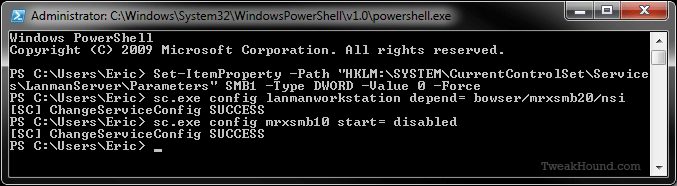
———-
Windows PowerShell
Copyright (C) 2009 Microsoft Corporation. All rights reserved.
PS C:\Users\Eric> Set-ItemProperty -Path “HKLM:\SYSTEM\CurrentControlSet\Service
s\LanmanServer\Parameters” SMB1 -Type DWORD -Value 0 -Force
PS C:\Users\Eric> sc.exe config lanmanworkstation depend= bowser/mrxsmb20/nsi
[SC] ChangeServiceConfig SUCCESS
PS C:\Users\Eric> sc.exe config mrxsmb10 start= disabled
[SC] ChangeServiceConfig SUCCESS
PS C:\Users\Eric>
———-
Win10 Troubleshooters
I took yesterday off to do the Cap2Cap bike ride. I’ve completed the following section for the tweak guide. So, I am getting closer at least. [Read more…] about Win10 Troubleshooters
Win10 CU – Get Your Control Panel Icons Back
With the Windows 10 Creators Update some genius at Microsoft thought it would be fun to remove your Control Panel icons. I have seen several articles showing unnecessarily complicated steps to get them back. Use this program, edit the registry, etc.
It is very easy to get these icons back:
[Read more…] about Win10 CU – Get Your Control Panel Icons Back