I’ve said from the beginning of Win10 that the “stable releases” of Win10 are beta quality software and that Windows Insiders are actually alpha testers.
This past weeks updates prove me right yet again. With printers causing blue screens, Microsoft has posted a “workaround” until they fix the issue.
If you have this issue, do yourself a favor and just uninstall the update. Microsoft’s workarounds tend not to be completely effective and sometimes cause other issues.
To uninstall KB5000802:
Elevated Command Prompt: wusa /uninstall /kb:5000802
or
Press the Windows + S keys > type Control Panel > click on Programs and Features > click on View installed updates >
find Security Update for Microsoft Windows (KB5000802) and double-click to uninstall.
Windows
Stupid Office New Item Menu

MS Office 2019 introduced a new item menu; right-click and empty space in a drive/file/folder and you get this twaddle:
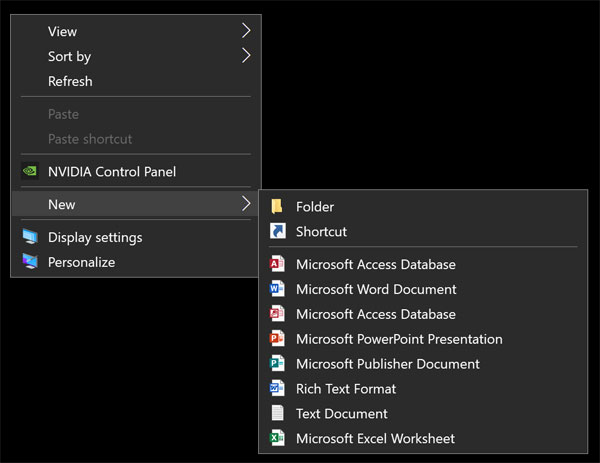
There are registry entries to eliminate these but one or all will come back after Office is updated, especially Access it seems.
[Read more…] about Stupid Office New Item Menu
Patch Tuesday

Windows Updated
One Cumulative Update and a 1 or 2 .NET updates depending on which version you’ve installed.
20H2 & 2004: February 9, 2021—KB4601319 (OS Builds 19041.804 and 19042.804)
1909: February 9, 2021—KB4601315 (OS Build 18363.1377)
Firefox 85.0.2
“Fixed a deadlock during startup”
Download | Release Notes
O&O ShutUp10 Updated
“FIX: Determining registry key permissions has resulted in fewer displayed settings on some NT domain systems.”
If you aren’t on a corporate network (domain) then don’t bother with this update.
Download | Changelog
Security update available for Adobe Reader
Download | Security Bulletin
Google Chrome will no longer support dusty old computers from the mid-2000s
“Though admittedly small, the user base for Chrome users on devices dating back to the early to mid-2000s still exists. A new policy document published by the Chromium development team states that they will be dropping support for processors that lack something called SSE3, or Streaming SIMD Extensions 3, in x86 Chrome builds.”
SSE3 from Wikipedia:
“Intel introduced SSE3 in early 2004 with the Prescott revision of their Pentium 4 CPU. In April 2005, AMD introduced a subset of SSE3 in revision E (Venice and San Diego) of their Athlon 64 CPUs.”
From Intel: Products formerly Prescott
Patch Tuesday
Win10 Updated
2004 & 20H2 – January 12, 2021—KB4598242 (OS Builds 19041.746 and 19042.746)
– Updates to improve security when using external devices, such as game controllers, printers, and web cameras.
– Updates to improve security when Windows performs basic operations.
1909 – January 12, 2021—KB4598229 (OS Build 18363.1316)
– Updates to improve security when using external devices, such as game controllers, printers, and web cameras.
– Updates to improve security when using Microsoft Office products.
– Updates to improve security when Windows performs basic operations.
Latest Tweak Guide

UAC – Quick notes on why I disable it.

Original article: Windows 7 UAC – Quick notes on why I disable it. circa 2009
***31 December, 2020
As of today my original article is over eleven years old. Links to sources have disappeared. I updated the links today, mostly to the Internet Wayback Machine archive. I’ve also backed up these sources to PDF and have linked to those where appropriate.
Microsoft introduced User Account Control (UAC) with Windows Vista. Windows 7 has an “improved” version of UAC. The purpose of this short note is to explain why I do not like or use UAC on my own machines (because I get asked so much), it is not to start an argument or to try to convince others to disable UAC.
[Read more…] about UAC – Quick notes on why I disable it.
Tweaking Windows 10 – Version 20H2
TweakHound’s

Tweaking Windows 10
Windows 10 October 2020 Update
A guide to tweak and optimize Windows 10.
Updated as of Windows 10 20H2. Lasted edited as of 30 December, 2020
I would like to thank Ken Rosenstein, Sentwali Lewis, and others for their invaluable help in editing this guide.

tweak – to change slightly, esp. in order to make something more effective or correct.
optimize – get the most out of, make optimal – modify to achieve maximum efficiency in storage capacity or time or cost
“TweakHound.com – Home Of The Original Tweak Guides”
Windows 10 Default Services v20H2

Windows 10 Default Services (version 20H2, build 19042.685, 23DEC2020) by TweakHound.com.
Default install, all options accepted during install.
This is a sortable list of default Windows 10 Services.
[Read more…] about Windows 10 Default Services v20H2
The Windows 10 Pagefile And Running Without One
In 2011 I wrote The Windows 7 Pagefile And Running Without One. It’s been sourced, quoted, and held up as an example these several years. In reviewing possible changes to the upcoming Win10 Tweak Guide revision I decided to revisit this.
[Read more…] about The Windows 10 Pagefile And Running Without One
Win10 – Uninstall Apps Via PowerShell
Ongoing work on the next Win10 tweak guide.
I’m considering removing this method from the guide and linking to a separate how-to.
I very much need your input…
[Read more…] about Win10 – Uninstall Apps Via PowerShell