
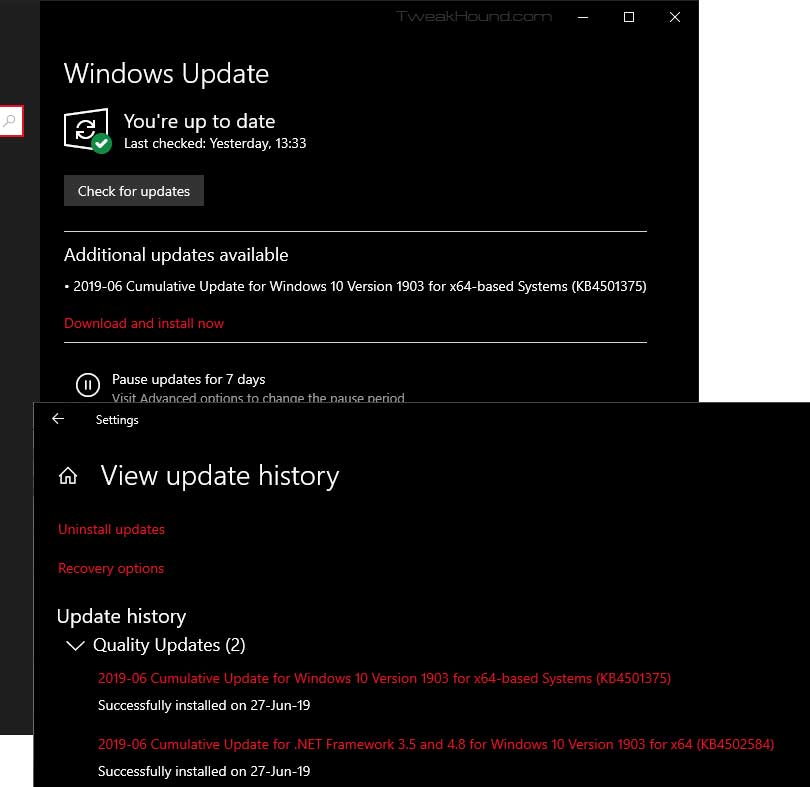
KB4501375 is installed. Win10 doesn’t seem to know and wants to do it again. This isn’t the first time it has happened.
Hey Microsoft, Your Windows 10 model isn’t working. Fix it.
Windows 10
Win10 1903 Stuff

Win10 1903 Stuff
I rarely re-post Windows changes and known issues. Microsoft posts this and we’re all most of us are literate adults. As such you don’t need me or anyone else regurgitating this for you.
Windows 10 release information: has “Known issues and notifications” and “Resolved issues” of every Win10 version.
Features removed or planned for replacement starting with Windows 10, version 1903
How to get the Windows 10 May 2019 Update
Get the Windows 10 May 2019 Update
What’s new in Windows 10, version 1903 IT Pro content
Windows 10 and Windows Server 2019 update history
What’s new in recent Windows 10 updates
Windows lifecycle fact sheet – “The lifecycle begins when a product is released and ends when it’s no longer supported.”
Windows 10 and reserved storage
“Starting with the next major update we’re making a few changes to how Windows 10 manages disk space. Through reserved storage, some disk space will be set aside to be used by updates, apps, temporary files, and system caches. Our goal is to improve the day-to-day function of your PC by ensuring critical OS functions always have access to disk space. Without reserved storage, if a user almost fills up her or his storage, several Windows and application scenarios become unreliable.”
Improving the Windows 10 update experience with control, quality and transparency
Win10 1903 Available Now
Well…kinda sorta…
Saw over at Neowin that some people have 1903 showing up via “check for update”. Not for me. All I had was May 21, 2019—KB4497934 (OS Build OS 17763.529). 1903 is available for download:
https://www.microsoft.com/en-us/software-download/windows10
I’ll wait and see if it shows up tomorrow.
Win10 1903, Are You Ready?
Windows 10 May 2019 Update
Win10 1903 brings several changes, most of which the average user won’t care about. Two changes of note are supposed increased performance and improved control of Windows Update. The best breakdown I’ve seen to date is:
Neowin – The Windows 10 May 2019 Update is coming – here’s what’s new
Release Date
– “Official” date unknown at this time. “End of May” often quoted. Expect it somewhere between tomorrow and hell freezing over.
– ISOs are floating around now
Blocking 1903
– Easy way: Use O&O ShutUp10
See also: Windows Update section of the Tweak Guide.
(1903 will bring major changes to this.)
Preparing for 1903
– Update all your apps and drivers.
– Backup everything. Make a system image. I use the free Macrium Reflect. This is also a good time to backup everything else.
See also: Windows 10 Backup And Recovery Options
My Recommendation
– Put off installing 1903 at least one month.
– Better safe than sorry. Microsoft will, at some point, state that 1903 is “safe for business”. The October 2018 Update was declared safe on March 28th, 2019.
Tweaking Windows 10
It will be at least a month after release before the Win10 Tweak Guide is updated.
Bad Tweak – Optimize USB Storage

I don’t know why but a setting introduced in Win10 1809 is just recently making the rounds as a performance tweak.
[Read more…] about Bad Tweak – Optimize USB Storage
Win10 1809 Updated
The latest version of Win10 did not get updated with other versions a few weeks ago. Yesterday that changed. It’s a whole bunch of “Addresses an issue” stuff. With Win10 version 1903 imminent IMHO I wouldn’t go out of my way to install this.
April 2, 2019—KB4490481 (OS Build 17763.404)
Changing Your DNS Server
This guide will show you how to change your DNS Server. In addition it covers benchmarking DNS servers and if you should change your DNS server.
[Read more…] about Changing Your DNS Server
Using Macrium Reflect Boot Media

First and foremost, I do not backup from within Windows. I only use the boot CD.
Why? After many years of backup and restoring Windows and Linux I have seen just about every method fail at one time or another.
It is my belief that the only way to do an Operating System backup and restore is:
1 – Only use system images.
2 – Not to be using that OS. This is referred to as being offline.
[Read more…] about Using Macrium Reflect Boot Media
Post Of The Year

Out Of Band Update

CVE-2018-8653 | Scripting Engine Memory Corruption Vulnerability
A remote code execution vulnerability exists in the way that the scripting engine handles objects in memory in Internet Explorer…
Updates for all currently supported Windows versions.
Windows 10
Build 1809 – December 19, 2018—KB4483235 (OS Build 17763.195)
Build 1803 – December 19, 2018—KB4483234 (OS Build 17134.472)
Build 1709 – December 19, 2018—KB4483232 (OS Build 16299.847)
Windows 7 and Windows 8.1 update history pages not updated as of this writing.