• Skip to primary navigation
  • Skip to main content
  • Skip to primary sidebar

TweakHound

Computer stuff...

  • Home
  • Windows XP
  • Windows Vista
  • Windows 7
  • Windows 8
  • Windows 10
  • Windows 11
  • Linux
  • Tweak Guides
  • Site Info
    • About
    • About Me
    • TweakHound’s World
    • Contact
    • My Computers
    • Old Articles
    • Privacy Policy
    • Old Index
    • Advanced Search

Tweaking Windows 10 – Version 21H2

May 19, 2021, 12:53(EDT) By Eric (a.k.a. TweakHound)

Miscellaneous Tweaks

Get The Old System Properties Shortcut Back
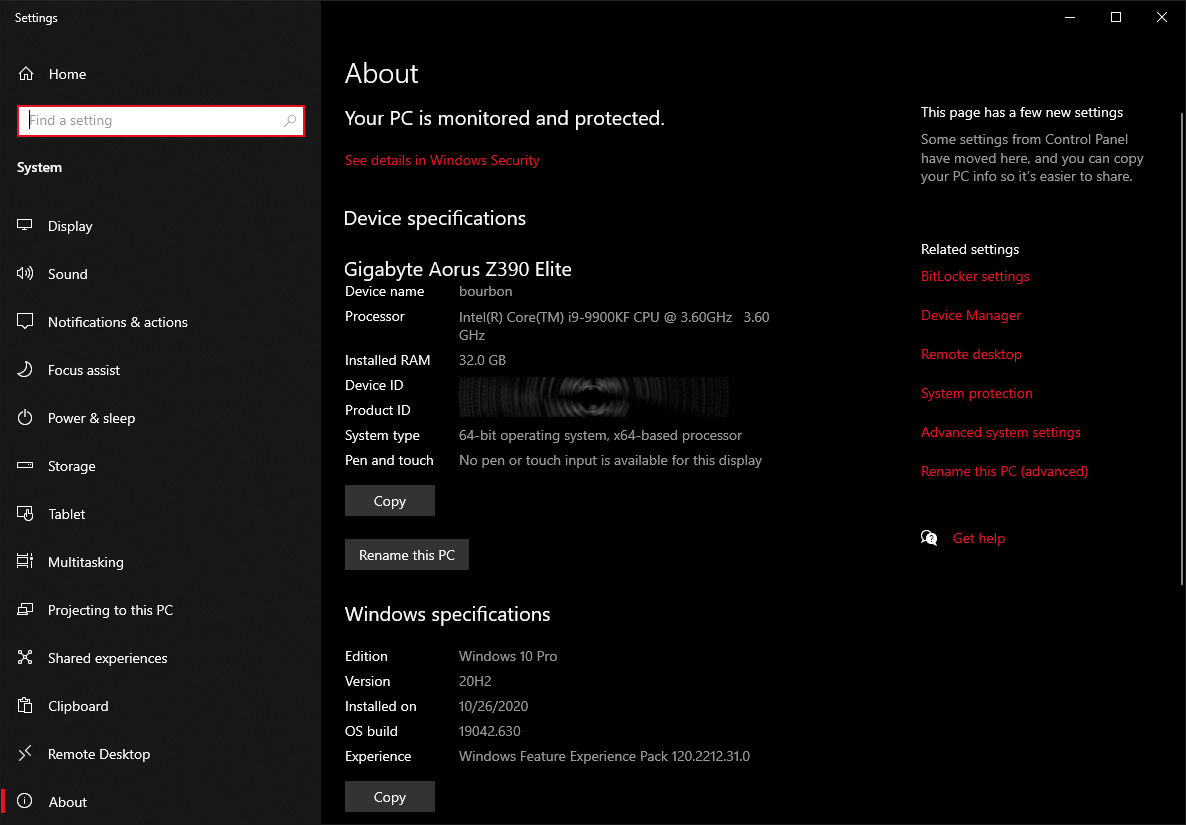
Win10 20H2 has removed the standard System Properties from Windows shortcuts. For instance, pressing the Windows + Pause Break keys now brings up the new System Properties window.
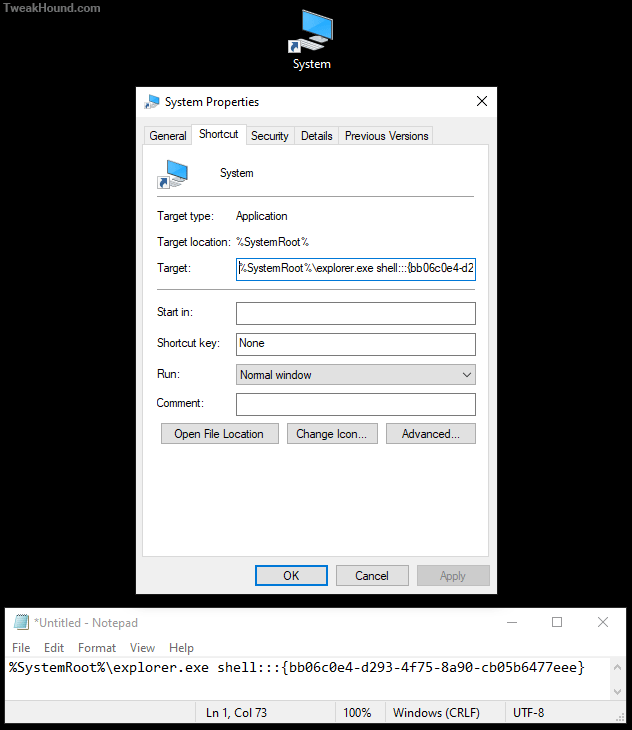
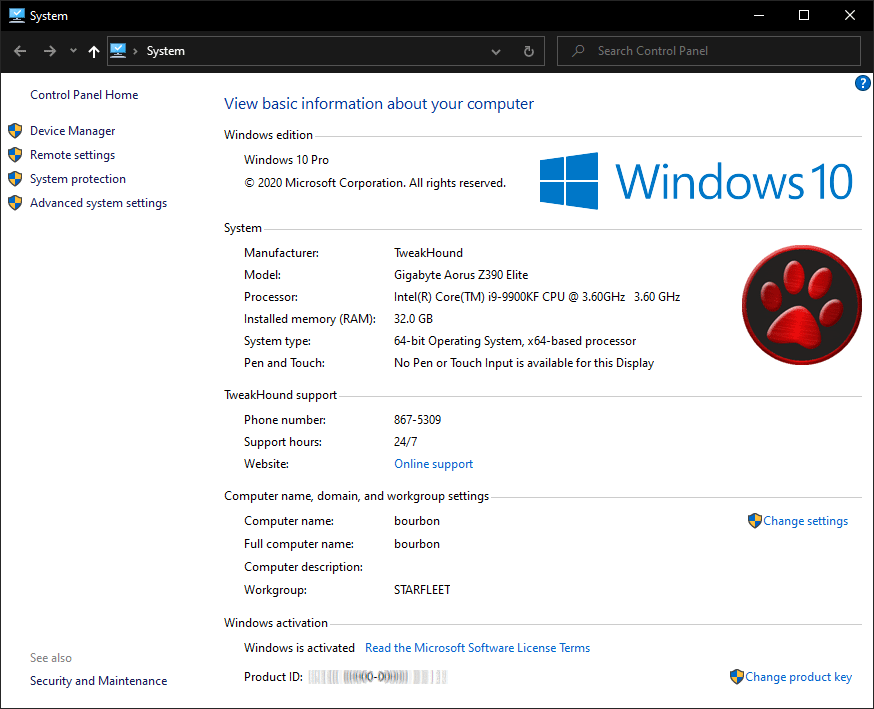
If, like me, you want the old System Properties windows back, you can just create an icon and place it wherever you want.
We will do this in the Desktop window.
Right click in an empty area > choose New > Shortcut >
In the resulting Target window, copy and paste: %SystemRoot%\explorer.exe shell:::{bb06c0e4-d293-4f75-8a90-cb05b6477eee}
> click Next > choose a name (System, System Properties) >
If you want to change the icon simply click the Change Icon… button >
Now you can copy this shortcut anywhere. I’ve also uploaded this as a zip file: https://www.tweakhound.com/win10/OldSystemPropertiesIcon.zip
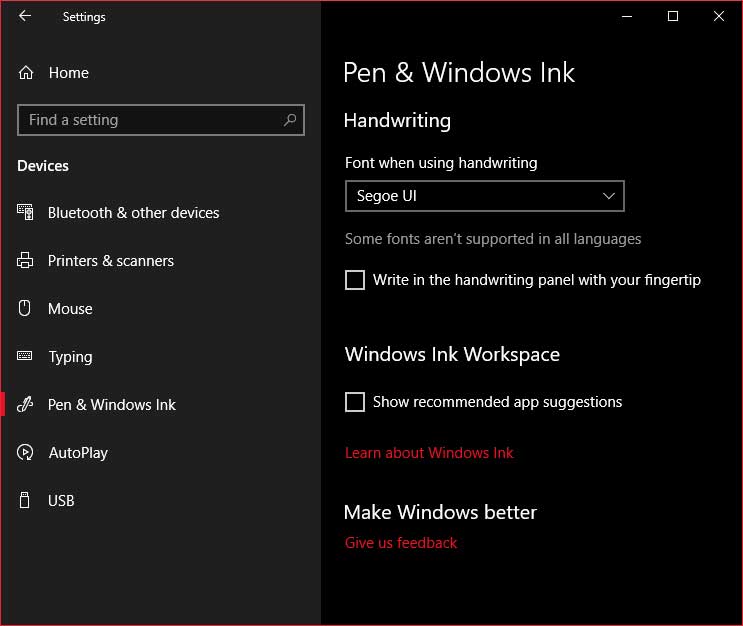
Turn Off App Recommendations
Settings
 > Devices > Pen & Windows Ink
Turn OFF Show recommended app suggestions
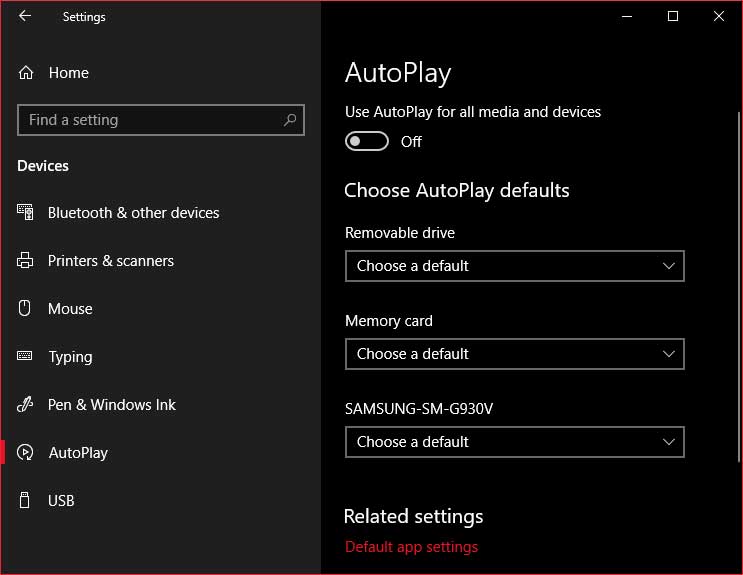
Turn Off Autoplay
Autoplay is a security risk. I do not use it.
Settings > Devices > Pen & Windows Ink
Turn OFF Use AutoPlay for all media and devices
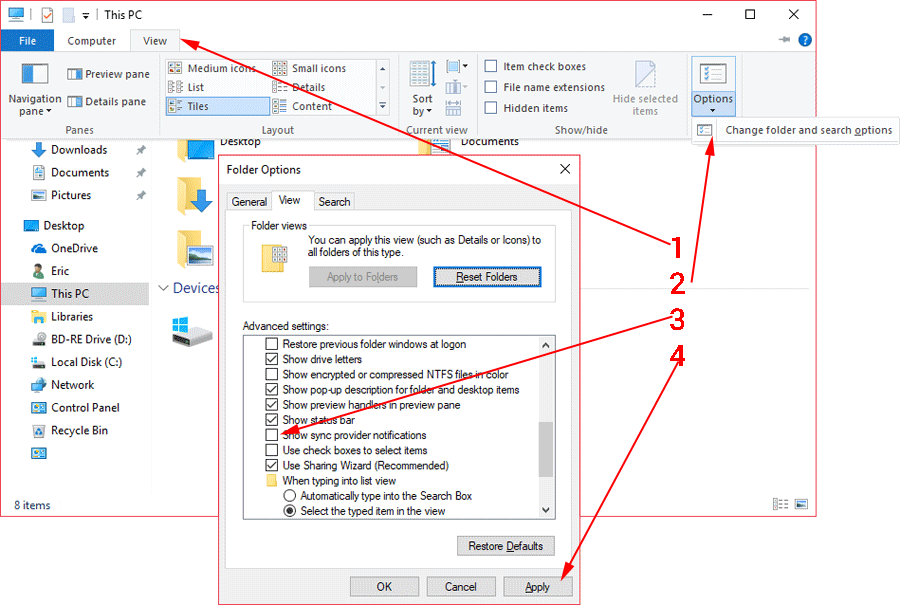
Remove Ads From Windows Explorer
Open Explorer (Windows + E keys).
Go to View > click Options, Change folder and search options >
Uncheck the box Show sync provider notifications > click Apply
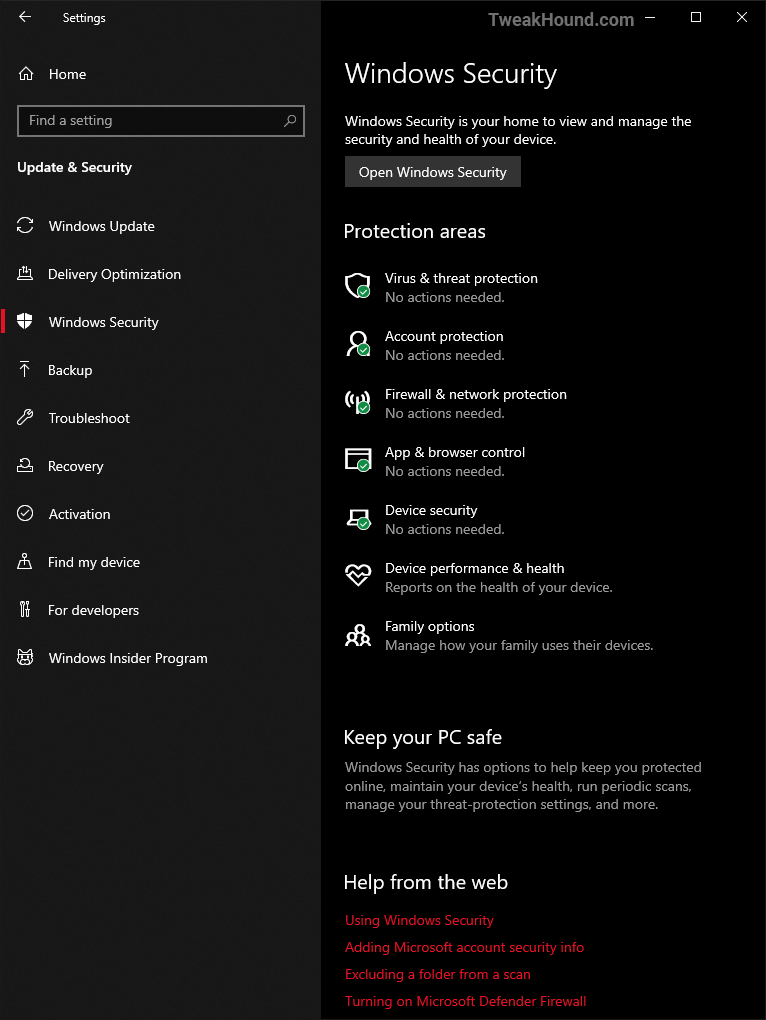
Windows Security

Windows Security Center

I’m not going to get into this too much. Microsoft has provided good information here:

Stay protected with Windows Security

Virus & threat protection – Info on either Windows Defender or your 3rd party antivirus. For Windows Defender you can: do manual scans, adjust protection settings, and update protection definitions.

Account Protection – Sign-in options.

Firewall & network protection – Exactly what it says.

Device performance & health – “View status info about your device’s performance health, and keep your device clean and up to date with the latest version of Windows 10.”

Device security – Built-in hardware protections

Firewall & network protection – Firewall and Network info. You can adjust Firewall settings here too.

App & browser control – This is where you can view and adjust SmartScreen settings. I see no need to mess with this.

Family options – Provides links to all your Family Options. Kinda lets you control what kids do and see on the computer. At least until they find a way around it. Because they will.

To open Windows Security Center, right-click on the taskbar icon and click Open.

See also: Blocking A Programs Internet Access Via The Windows Firewall


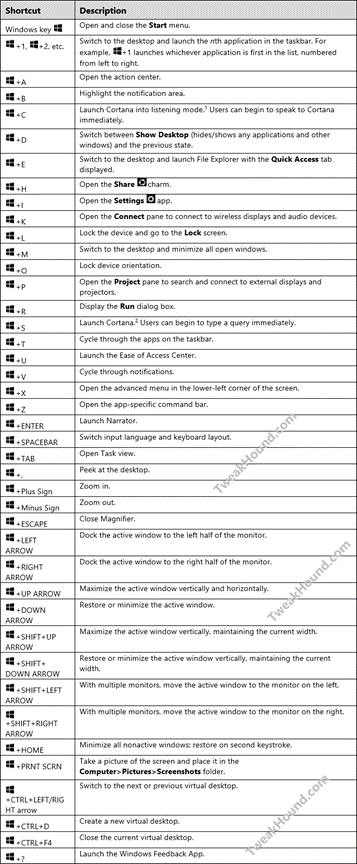
Shortcut Keys For Windows 10

Official Microsoft shortcut keys for Windows 10 document.
Download: Shortcut-Keys-For-Windows-10.docx
They disappeared the docx so I’ve uploaded my PDF: https://www.tweakhound.com/win10/Shortcut%20Keys%20For%20Windows%2010.pdf
NEXT >>>


Pages: Page 1 Page 2 Page 3 Page 4 Page 5 Page 6 Page 7 Page 8 Page 9 Page 10 Page 11 Page 12 Page 13 Page 14 Page 15 Page 16 Page 17 Page 18 Page 19 Page 20 Page 21 Page 22

Reader Interactions

Comments

  1. Nate says

    May 5, 2022, 10:50(EDT) at 10:50

    Just a quick question regarding the block Cortana registry tweak. Is this still the current working method? I had read that this has changed a few times over the last few releases of Windows, just confirming it still works.

    Thanks for your incredibly thorough guides over the years, it’s always been a great source of education.

    Nate

    • Eric (a.k.a. TweakHound) says

      May 5, 2022, 13:06(EDT) at 13:06

      AFAIK. I would advise using O&O Shutup10 to make sure.

Primary Sidebar

Popular Articles

Windows 10

Tweaking Windows 10

My Windows 10 Tweaks

Windows 10 Privacy Settings

Win10 Diagnostics Tracking Service Gone?

Windows 10 Advanced Disk Cleanup

Win10 Customize Installation Options

Windows 10 Dark Theme

Win10 Wallpapers, Graphics, etc.

All Windows 10 Articles

Windows 8

Tweaking Windows 8.1

Advice On Installing Windows 8.1

Clean Install Windows 8.1

Cleanup After Windows 8.1 Upgrade

Create Shutdown, Restart, Logoff Tiles For Windows 8

Tweaking Windows 8

Install Windows 8 – Clean Install With Upgrade Media

Install Windows 8 – Upgrade

Windows 8 – Cleaning Up After You’ve Upgraded

Windows 8 Freeware Machine

Windows 8 SSD Settings, Etc.

How To Resize Your Windows 8 Partition

Create Windows 8 Recovery Media

Windows 8 – Elevated Command Prompt

How To Fix The Windows Bootloader

Windows 7

Installing Windows 7

Tweaking Windows 7

Windows 7 Diagnostics Tracking Service

The Windows 7 Freeware Machine

The Windows 7 Pagefile And Running Without One

Bad Tweaks

SSD Tweak Guide (sort of)

The noguiboot (no GUI Boot) Tweak

NtfsMemoryUsage=2 Tweak

More Windows 7 articles here.

Windows Vista

Installing Windows Vista

Tweaking Windows Vista

More Windows Vista articles here.

Windows XP

eXPired - The Last Windows XP Guide You'll Ever Need

The Right Way To Install Windows XP

Super XP Tweaking Guide

The Freeware XP Machine

Bad Tweaks

More XP Articles here and here.

Backup

Backup Article Greatest Hits – Vol. 1

Other

Cataloging Your Music Collection

Finding Good Album Art

Converting Vinyl Records To Digital Music – A Non-Audiophiles Guide

Windows All-In-One Recovery Flash Drive

SSD Tweak Guide (sort of)

Raidmax Blackstorm Case Review

Disk Partitioning

Ditch Those CD's! A Guide To Using USB Flash Drives

Checking Your Disks For Problems

Bad Tweaks

More articles here

Tags

Android Backup Beer Computer Hardware Computer News Cool Tools Freeware How-To's Linux Off Topic openSUSE Playlists Privacy Security Software This Site vacation Veterans Windows 7 Windows 8 Windows 10 Windows 11 Windows Vista Windows XP

TweakHound - Optimize Your Computing Experience! TweakHound - Optimize Your Computing Experience!

Copyright 2002-2025 by Eric Vaughan All material contain here is the property of the materials owner. Windows, Windows XP, Windows Vista, Windows Seven, Windows 8, Windows 10, Windows 11, Microsoft, and all associated logos are trademarks/property of Microsoft. You may not use or copy any material from tweakhound.com without expressed written permission. Hotlinking to any material within this site is forbidden. Privacy Policy