 Microsoft has released OPTIONAL updates for Windows 7 & 8.1 that address upgrade issues to Win10.
Obviously, if you don’t want to upgrade to Win10 you don’t need them. Recommend you hide it too.
[Read more…] about More GWX Related Updates
Windows 10
Windows 10 & SSDs – FEEDBACK WANTED
 Need your help here y’all. Am I wrong about somethings? Do I need to add something? Please read and comment.
[Read more…] about Windows 10 & SSDs – FEEDBACK WANTED
Win10: Customize The Desktop
This is part of the upcoming Windows 10 Tweak Guide. Since this section is finished and you guys have been so patient I thought I would post it.
[Read more…] about Win10: Customize The Desktop
More Windows 10 News
 Why TH2 Was Pulled
Betanews reports TH2 was pulled because of a bug where “Some settings may not have been retained when applying the November update“. In the KB Microsoft mentions that “a few settings preferences may have inadvertently not been retained for advertising ID, Background apps, SmartScreen Filter, and Sync with devices.” It was and is way more settings than that but whatever.

TH2 ISOs Are Back
Official Threshold 2 ISOs are now back and downloadable via the Media Creation Tool.
Guide here.
Win10 Uninstalling Programs?
From Reddit / Reddit via Betanews via Ghacks. Some users report Win10 is uninstalling some programs with consent.
Win10 Clean Install On My Main PC
I had done a few clean installs on my main rig but was waiting for TH2 for my “final”. This PC had previously been a dual-boot Windows 8.1 / Window 7 PC. I had upgraded 8.1 to Win 10.
[Read more…] about Win10 Clean Install On My Main PC
Windows 10 TH2 ISOs Pulled
Microsoft has pulled the new Threshold 2 ISO’s. Ed Bott has the full story.
Note: They have not pulled TH2, just the ISOs. TH2 is still available via Windows Update.
Bottom line there is a bug or bugs in the ISOs. Rather than find it and fix it Microsoft wants you to install the first Win10 build ISO and then download and reinstall another 2-4 gigs of files and update. Is Win10 becoming a tragic comedy?
Where to get TH2 ISOs and ESDs:
1: WZOR
ESDs: https://cloud.mail.ru/public/2xE4/5k5wdRDSu
ISOs: https://cloud.mail.ru/public/AwAA/N9RXzm6eU
2: Torrents: http://umtorrent.com/usearch/windows%2010%2010586/?field=seeders&sorder=desc
Authors note: This story appeared all over the web overnight. As near as I can figure Ed Bott is the original source. “Journalists” often don’t source or barely source their information anymore. Many of them choose to just rewrite the original article without adding anything and post it as their own work. Disgusting.
Windows 10 Privacy Settings
************ This version is now expired. Updated version here: https://www.tweakhound.com/2020/12/30/tweaking-windows-10-version-20h2/
Windows 10 Privacy Settings
A companion guide for:
TweakHound’s

Tweaking Windows 10
Version 4.0, last edited 17 May, 2018
Windows 10 Privacy Settings
Page 1 – Intro, Windows Insider Program, Use A Local Account
Page 2 – Windows 10 Built-In Privacy Settings
Page 3 – Telemetry, Cortana
Page 4 – Update & Security, Windows Defender
Page 5 – Services, Microsoft Browsers
Page 6 – Remove Ads And Annoyances
Page 7 – Apps To Tweak Privacy Settings
Windows 10 does a lot of communicating with Microsoft servers. Many people find this to be somewhere between an annoyance to an outright invasion of privacy. Some folks suspect it’s even worse than that. For its part, Microsoft steadfastly insists that they do not invade your privacy, that any information sent back to Microsoft is “anonymous”, and that it is for your own good. I will leave it up to you to decide.
This section will show you your privacy options, the settings I use, and 3rd party apps that can help you configure your settings.
It should be noted that turning off some settings can hamper the ability of some built-in and Microsoft Store apps to function properly. Since I don’t use these things I haven’t run into a single issue.
Windows Insider Program
This is a neat program for those that want updates before everyone else or Geeks that live on the bleeding edge. It also sends the maximum amount of data back to Microsoft. If privacy is a concern, then don’t use this.
More info: https://insider.windows.com/
Use A Local Account
If you are using a Microsoft Account and privacy is a concern you should switch to a Local Account. Be warned you will lose syncing. If this is important to you then skip this.
More info: http://windows.microsoft.com/en-us/windows-10/getstarted-microsoft-account
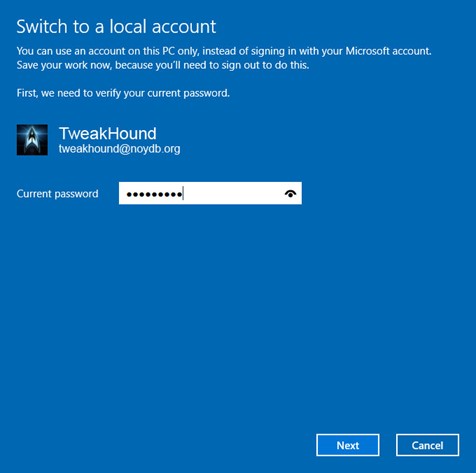
Let switch to a Local account:
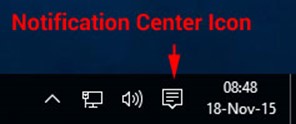
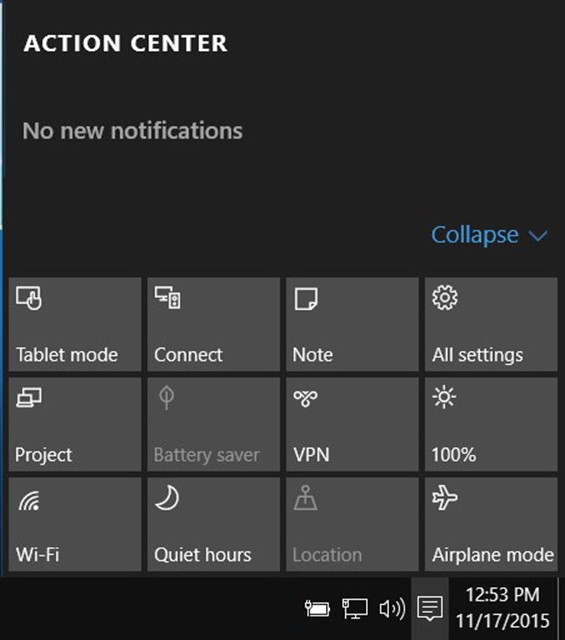
Choose All settings
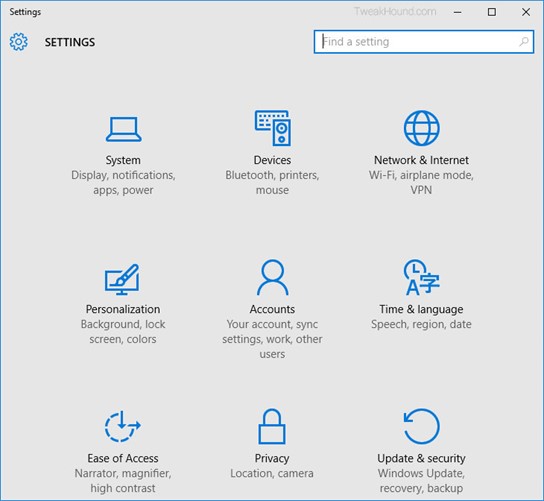
Choose Accounts
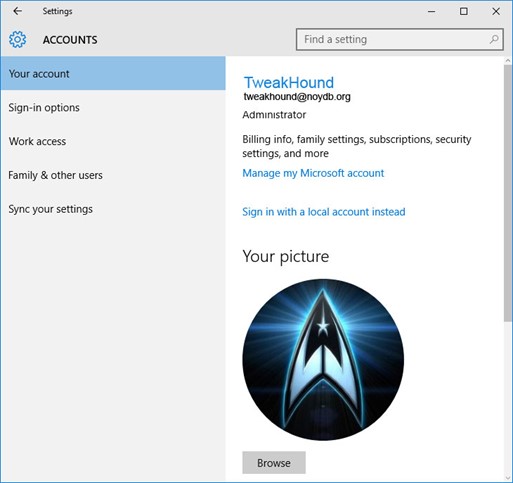
Choose Sign in with a local account instead
Enter current user password
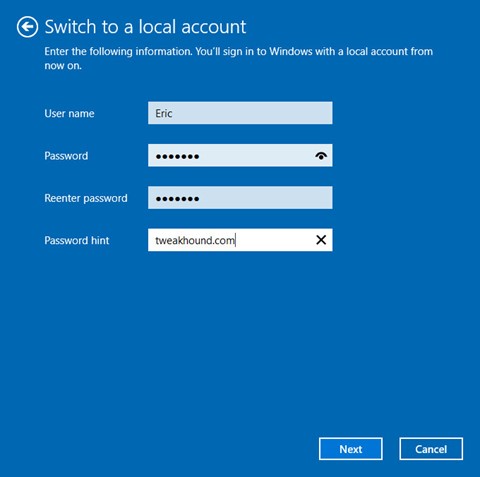
Enter the new User name, Password, and Password hint.
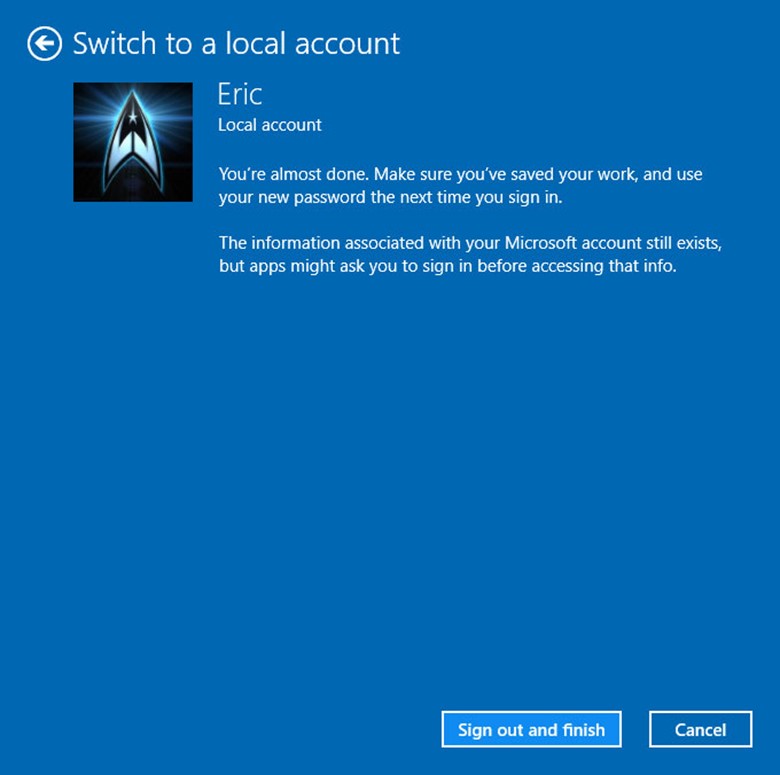
Sign out and finish.
Win10 Diagnostics Tracking Service Gone?
So I’m writing the Privacy section of the Win10 tweak guide. [Read more…] about Win10 Diagnostics Tracking Service Gone?
Cumulative Update for Windows 10 Version 1511 (KB3118754)
Just released.
*Edit 1811hrs* KB is up now: https://support.microsoft.com/en-us/kb/3118754
“This update includes improvements to enhance the functionality of Windows 10 Version 1511.”
Boy that is helpful.
Description from update:
“Install this update to resolve issues in Windows. For a complete listing of the issues that are included in this update, see the associated Microsoft Knowledge Base article for more information. After you install this item, you may have to restart your computer.“
Post Your Win10 Tips And Tweaks
Now that Threshold 2 is out I’m writing the Win10 tweak guide as time permits.
If you have any please post your tips and tweaks here. Be sure to include where you got it if you can.