 As many of you know, I consider moving libraries an essential part of my backup strategy.
I decided to post this article because through the years I’ve discovered some folks don’t get it and some folks don’t want to do it.
There is an alternative. [Read more…] about Alternative To Moving Libraries
Windows 8
Advice On Installing Windows 8.1
I am constantly asked installation/partitioning advice on installing Windows.
Below is my advice on installing Windows 8.1.
[Read more…] about Advice On Installing Windows 8.1
Windows 8.1 SSD Defrag
 An interesting blog post was brought to me attention by a reader. Many Geeks will recognize the blogger, Scott Hanselman:
The real and complete story – Does Windows defragment your SSD? (be cure to check out the comments too)
The gist of this post is to tell us we’ve all been wrong and Windows 8.1 does in fact defrag SSD’s.
However, we need to dig a little deeper. [Read more…] about Windows 8.1 SSD Defrag
Fix KB3000850 Will Not Install
I had a couple of Windows 8.1 computers that would not install KB3000850.
KB3000850 is also called “The November 2014 update rollup for Windows RT 8.1, Windows 8.1, and Windows Server 2012 R2.”
The specific error code was 80070002.
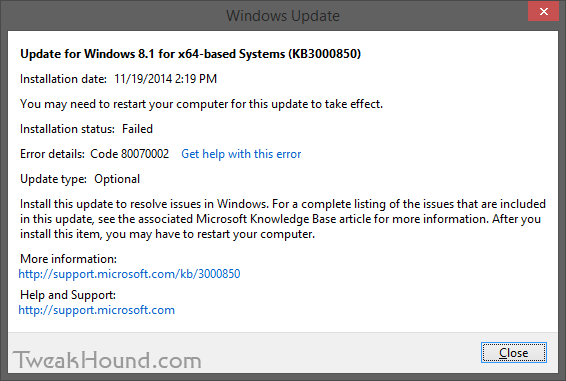
The Windows error logs directed me to C:\Windows\Logs\CBS\CBS.log. There I found complaints about system files.
The cure for that is:
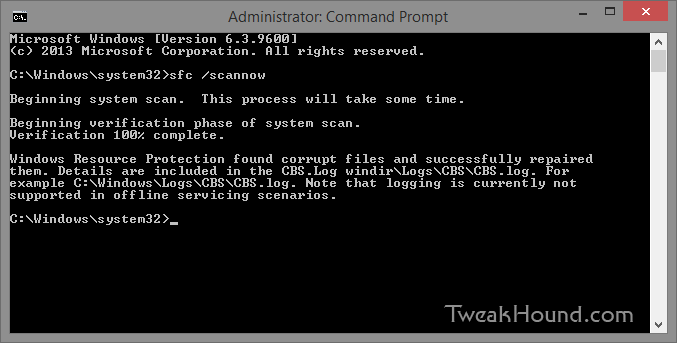
From an ELEVATED command prompt [Command Prompt (Admin) ] > type sfc /scannow and press the Enter key >
Let it do its thing > Reboot and install your update.
– END –
Updated Microsoft Explore Windows 8.1 Guides
 Microsoft has updated their Explore Windows 8.1 guides:
Explore Windows 8.1 Word Doc:
“This guide provides instructions for touch, mouse, and keyboard access to Windows 8.1 features.”
Explorer Windows 8.1 Quick Reference Guide:
“The Windows 8.1 operating system provides a robust array of features for touch-based, mouse-controlled, and keyboard-controlled devices. This Quick Reference Guide will get you started.“
Ultimate Windows Tweaker 3.1
Ultimate Windows Tweaker 3.1 is out. This is for Windows 8.1 update 1 only.
These guys have done a fantastic job with this program.
Highly recommended.
Tweaking Windows 8.1 Updated
Tweaking Windows 8.1 has been updated for Update 1.
Get it while it’s hot!
PLEASE help spread the word!
If you ordered the printable PDF in the past you’re due a free update! Contact me:
– Either reply to the original email, or
– Email me and provide the email address you ordered with or forward your receipt.
Haven’t ordered the printable PDF yet? Grab it here.
Installed – Windows 8.1 Update 1
As many of you know Windows 8.1 Update 1 was released to MSDN. Regular users will get it via Windows Update starting April 8th.
Hopefully some time after that ISO’s for regular users will become available, um, “officially”.
I decided to do a clean install via the x64 ISO using the following steps. [Read more…] about Installed – Windows 8.1 Update 1
All TweakHound.com Windows 8 Articles (so far)
Tweaking Windows 8.1
Tweaking Windows 8
The Windows 8 Freeware Machine
Install Windows 8 – Clean Install With Upgrade Media
Guide To Windows 8.1 System Image Backup
Windows 8 – Cleaning Up After You’ve Upgraded
Cleanup After Windows 8.1 Upgrade
Windows Update Cleanup For Windows 7 And Windows 8
Windows 8.1 SSD Settings, Etc.
Windows 8 SSD Settings, Etc.
How To Resize Your Windows 8 Partition
Windows 8 Custom Menus & Stuff
Windows 8.1 – View Libraries In Explorer
Creating Toolbars In Windows 8
Create Shutdown, Restart, Logoff Tiles For Windows 8
Create Windows 8 Recovery Media
Windows 8 – Elevated Command Prompt
How To Fix The Windows Bootloader
All Windows 8 Keyboard Shortcuts
Pin Items To The Taskbar In Windows 8
Gid Rid Of Windows 8.1 Help Stickers
Internet Explorer Pinned Sites
Ultimate Windows Tweaker 3.0.2 for Windows 8
Ultimate Windows Tweaker version 3.0.2 has been released. It’s for Windows 8 / 8.1 only.
Change log: Ultimate Windows Tweaker 3.0
v 3.0.2.0
Fixed: UWT 3 disables Windows script host service
Fixed: UWT 3 hangs when system file checker utility is run
v 3.0.1.0
Bug reporting system removed due to false positives been given out by some antivirus software.